


Description :
Displays a widget of current sponsors.
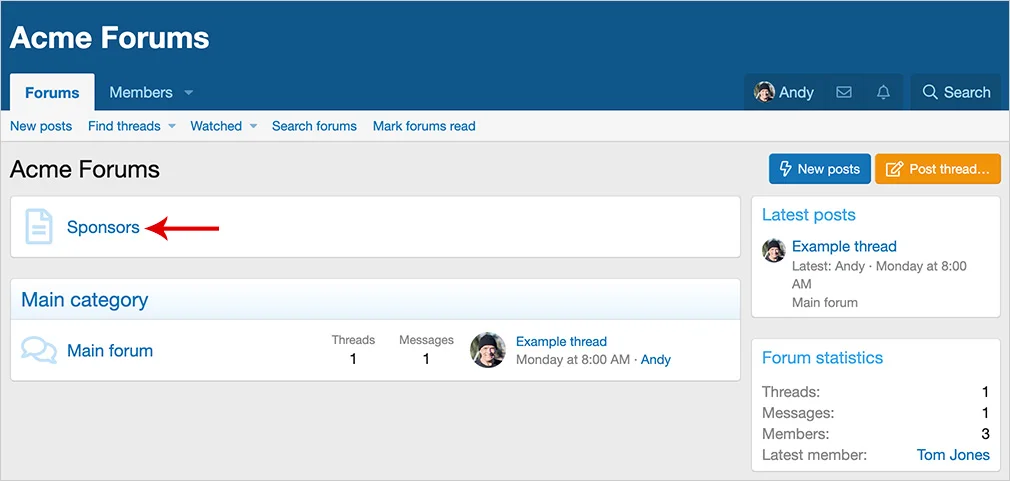
(Example of page node) :
(Example of Sponsors widget) :

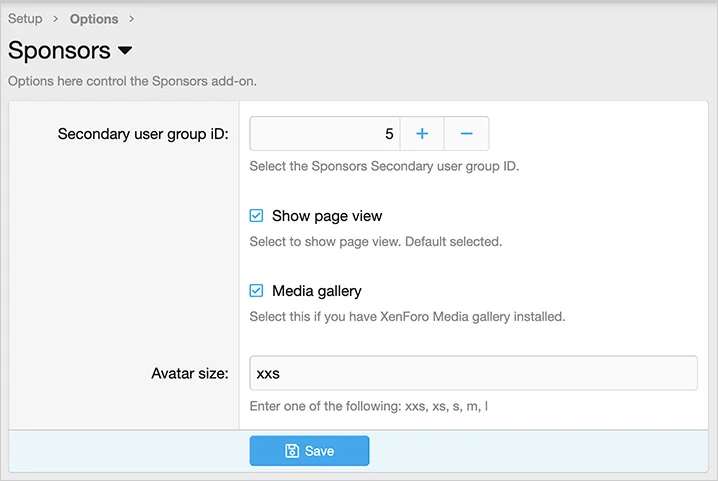
(Example of Options page) :
Features :
All phrases start with sponsors_ for your convenience.
Node setup :
Follow these steps if you want to create a page node.
Registered = View
Unregistered / Unconfirmed = View
Questions and answers :
Q: When does the widget get updated?
A: The widget is updated by cron entry at the top of the hour. You can run the cron entry manually if you don't want to wait.
Télécharger V1.0 :
Displays a widget of current sponsors.
(Example of page node) :
(Example of Sponsors widget) :
(Example of Options page) :
Features :
All phrases start with sponsors_ for your convenience.
Node setup :
Follow these steps if you want to create a page node.
- From the Admin Control Panel select Forums -> Nodes.
- Click the Add node button.
- Node type = Page.
- URL portion = sponsors.
- Title = Sponsors
- Template HTML =
<xf:widget key="sponsors" />
- From the Admin Control Panel select the Widgets under the Appearance tab.
- Click the Add widgets button.
- Select the Sponsors widget.
- Widget key = sponsors
- Title = (leave blank)
- Display in positions = Forum list: Above nodes
- Click Save.
Registered = View
Unregistered / Unconfirmed = View
Questions and answers :
Q: When does the widget get updated?
A: The widget is updated by cron entry at the top of the hour. You can run the cron entry manually if you don't want to wait.
Télécharger V1.0 :
Pour consulter le contenu, vous devez : Se connecter ou S'inscrire.
![[XenCustomize] Online Time Tracker: User Time Spent Statistics & Insights 2.2.2](https://www.societyfrenchmodding.net/data/attachments/12/12278-da3438ecf2e1cbdc59d3d56b443ab858.jpg?hash=9-kkw9F_M4)


