![[XenCustomize] Online Time Tracker: User Time Spent Statistics & Insights 2.2.2](https://www.societyfrenchmodding.net/data/attachments/12/12278-da3438ecf2e1cbdc59d3d56b443ab858.jpg?hash=9-kkw9F_M4)


Additional requirements :
- XenCustomize Core Library 1.0.1
Track, display, and understand member online time in a way that feels native to XenForo.
Want to highlight your most active users and encourage engagement? XenCustomize Online Time Tracker tracks and displays how much time users have spent on your XenForo forum—creating a fun, competitive, and interactive experience for your community!
This feature motivates engagement, encourages competition, and enhances community interaction effortlessly. With detailed statistics, interactive charts, and a real-time tracking system, admins can gain valuable insights into user activity.
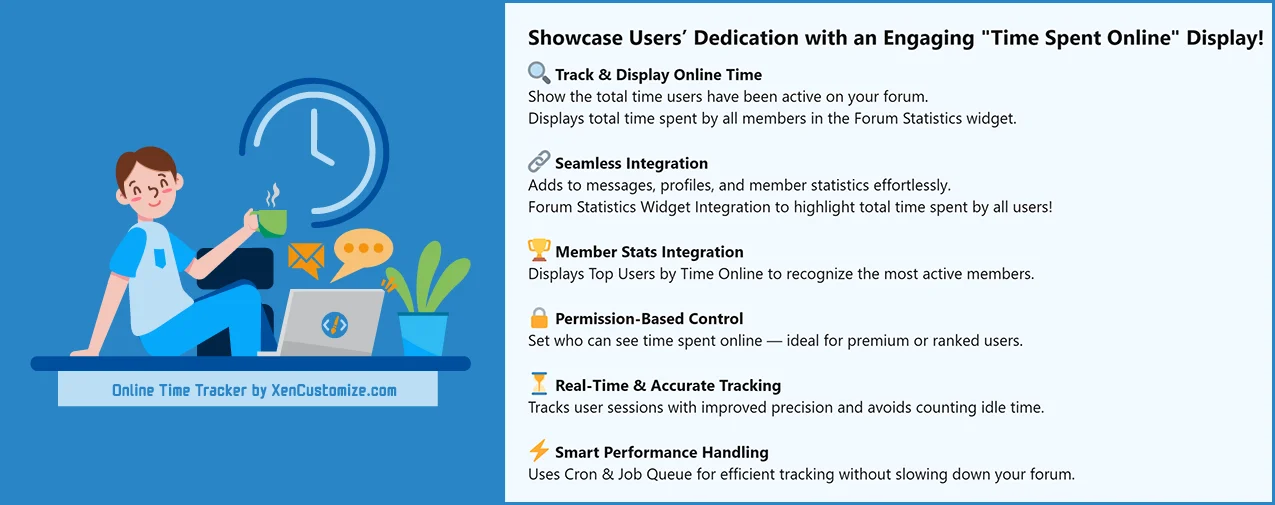
 Online time tracking for logged-in members
 Profile, tooltip, and message user info displays for individual online time
 Top users by online time through XenForo member statistics
 Online Time Statistics page with daily and community-wide engagement insights
 Country-based statistics using bundled MaxMind GeoIP2 data
 Age and gender breakdowns when the relevant profile data is available
 User group permissions plus member privacy control for individual online time visibility
 Admin options and style properties for dashboard sections and presentation
 XenForo-native integration using permissions, templates, cron, jobs, entities, and member stats
Track member online time
The addon tracks active logged-in member sessions and stores accumulated online time for each user. Guests, bots, and banned users are not counted.
Show online time where members naturally look
Individual online time can appear on member profiles, member tooltips, and message user info, depending on permissions, privacy settings, and style property choices.
Dedicated Online Time Statistics page
The statistics page gives members and permitted viewers a broader look at online activity, including daily averages, today's personal time, community totals, most engaged user today, and comparison-style summary content.
Recognize your most active members
Online Time Tracker integrates with XenForo's member statistics system so communities can highlight top users by time online.
Privacy-aware visibility
Members can control who may view their individual online time through XenForo's account privacy settings. Admins still keep control through the addon permissions.
Country, age, and gender insights
When enabled, the statistics page can show engagement breakdowns by age group, gender, and country. Country detection uses bundled MaxMind GeoIP2 data so the feature works immediately after installation.
After installation, go to the add-on options and open the License options tab to enter your license key. If you have a branding-free license key, you may enter it there as well to remove branding.
License verification may use XenCustomize.com with local caching. Normal installation and uninstallation do not depend on our server being available. An expired license does not disable normal use of the add-on, but an active valid license is required for official support and access to new downloads or updates released after the license expires.
Click on each documentation thread below for additional details and screenshots where available.
If you want to recognize active members, show meaningful online time displays, and add a simple engagement statistics page to your community, XenCustomize Online Time Tracker gives you that in a familiar XenForo-friendly package.
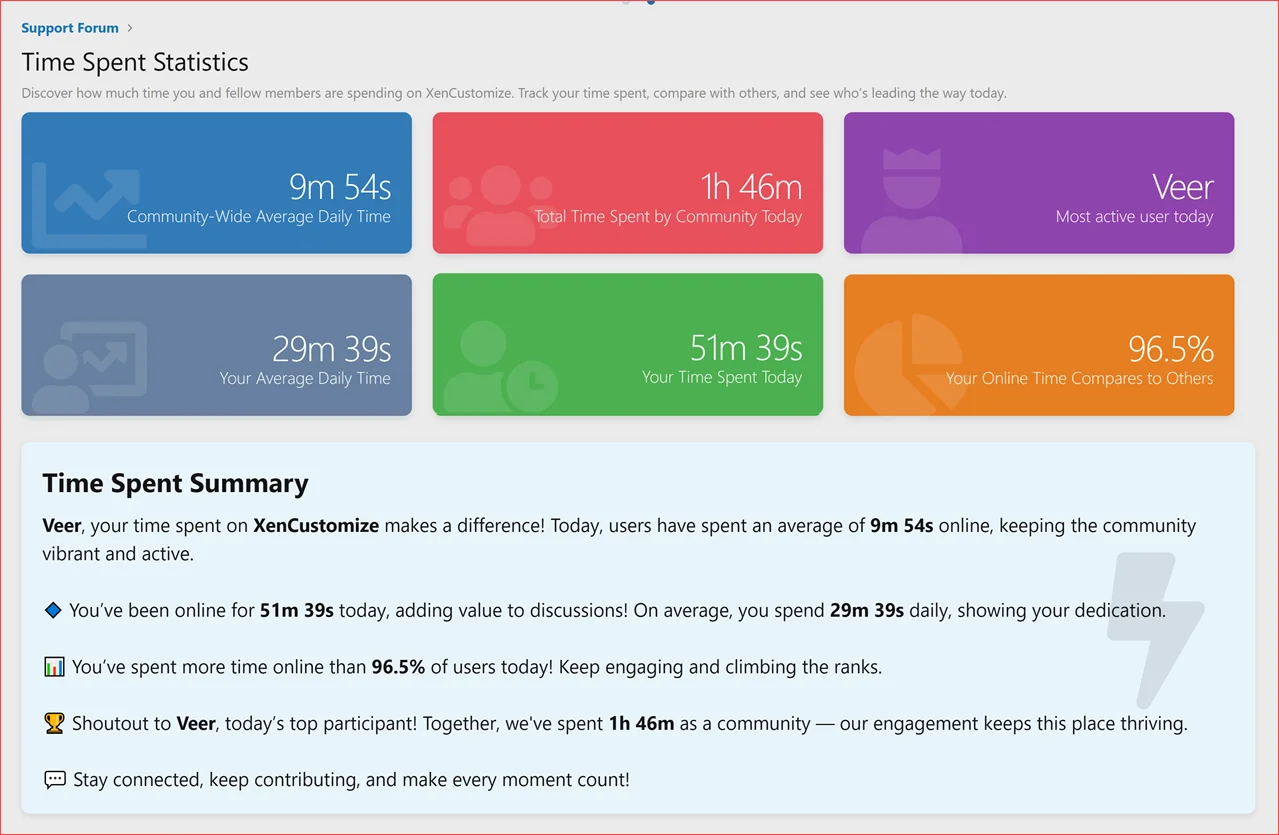
 Stats Cards and Stats Summary
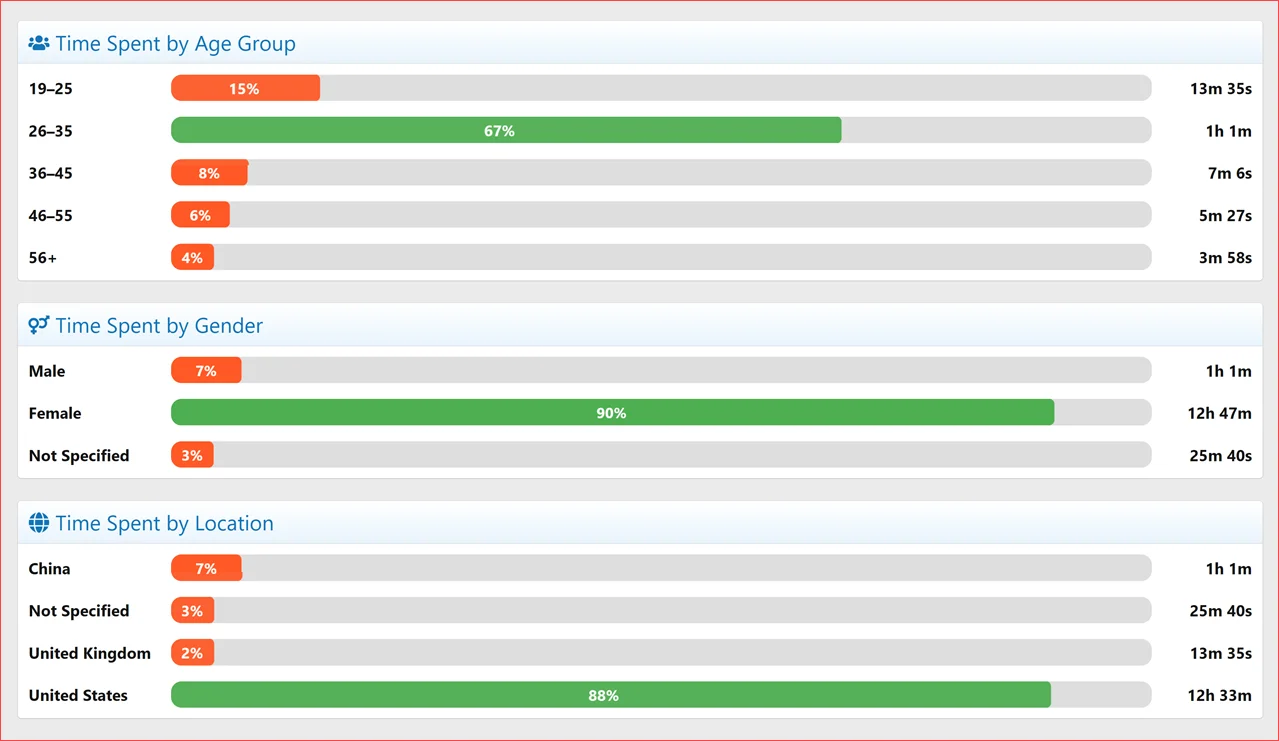
CSS Bar Charts
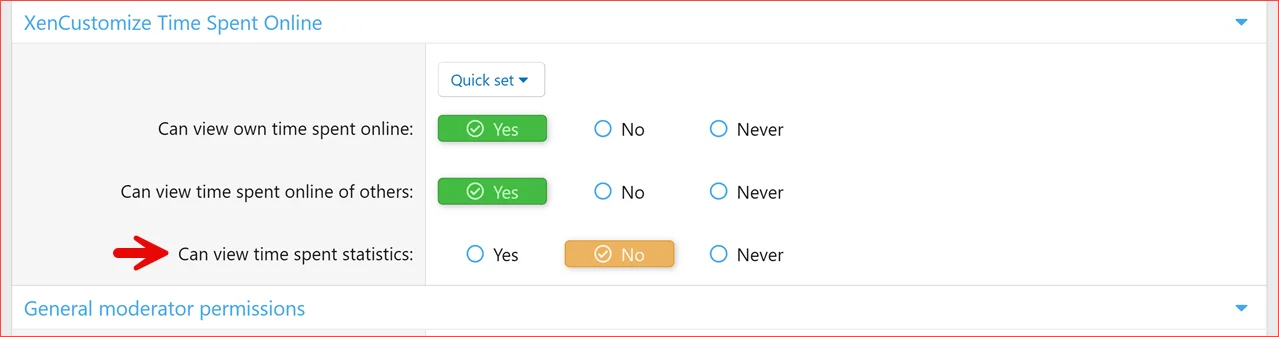
User Group Permissions
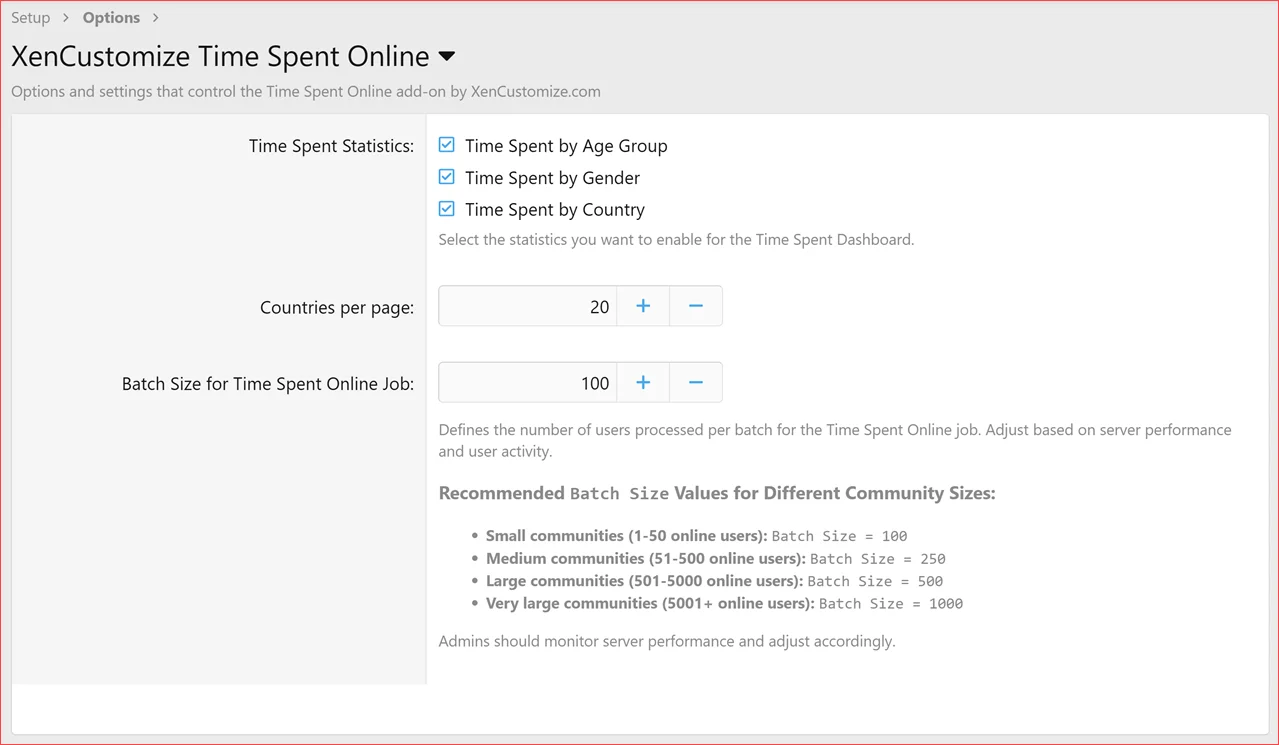
Admin Options
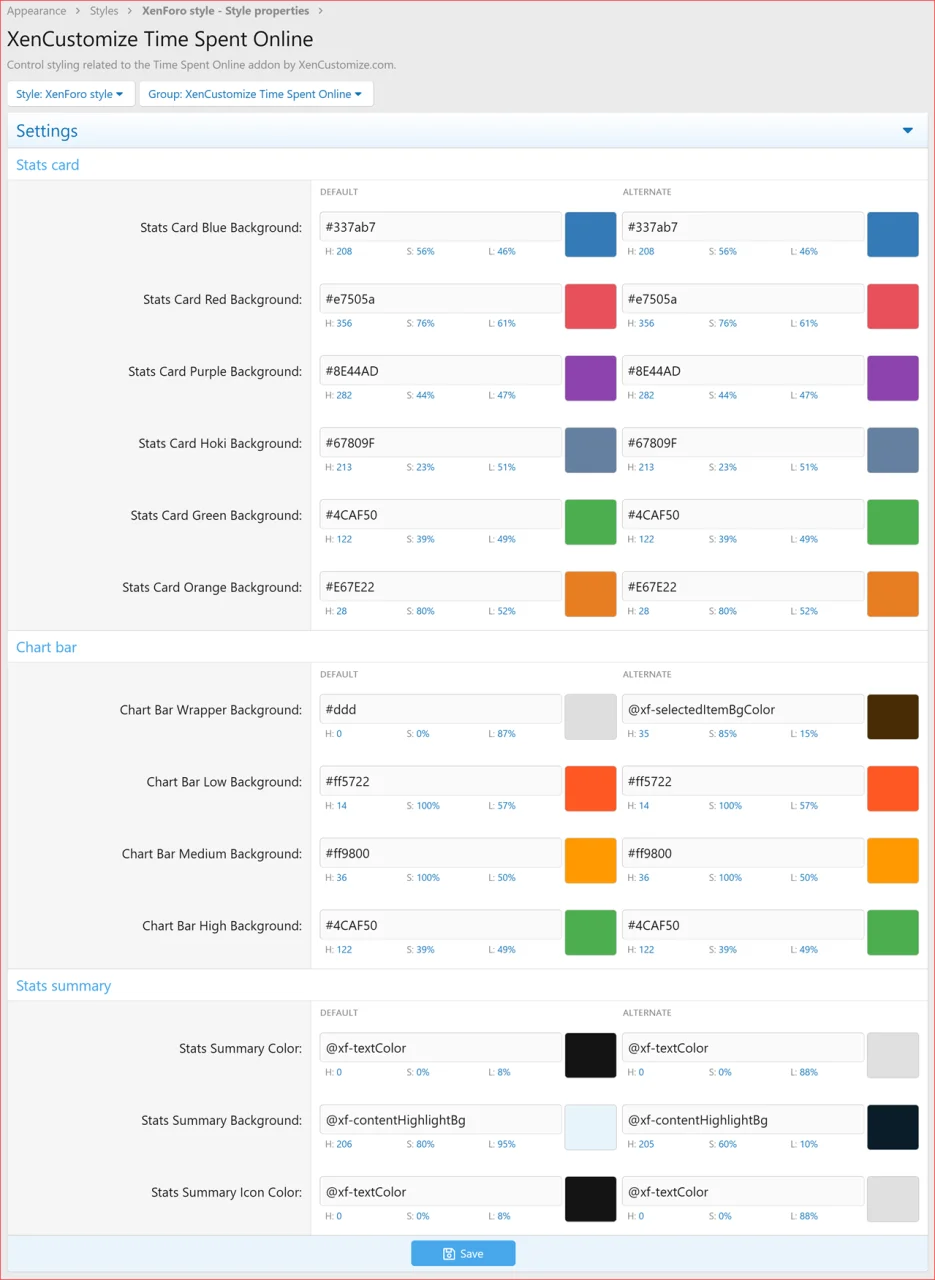
Style Properties
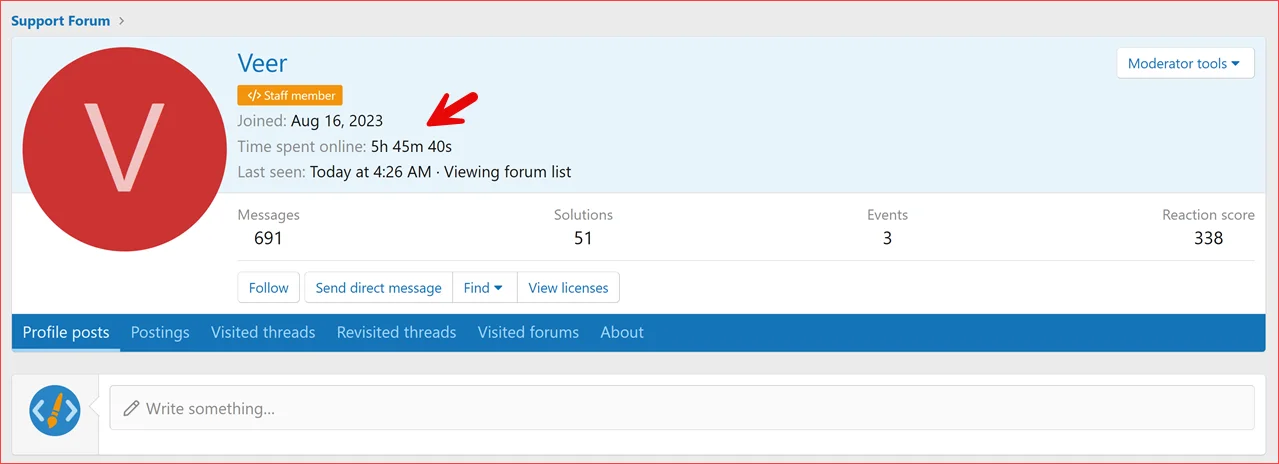
Member Profile
ATTACH type="full" width="990px" size="1278x621"]12280[/ATTACH]
Notable Members
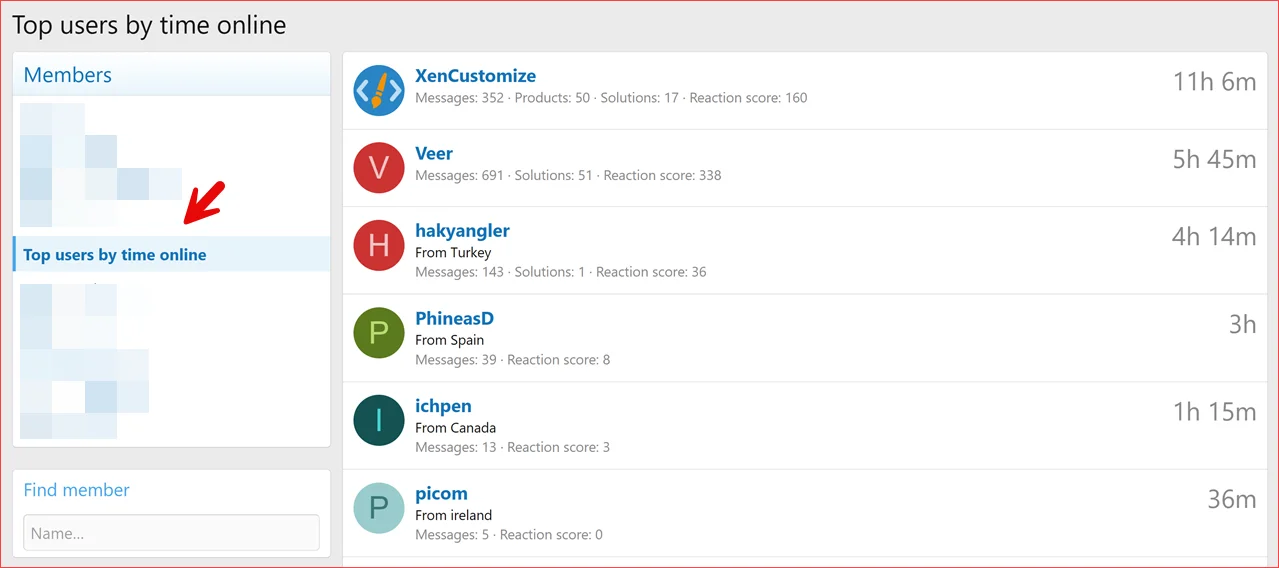
Notable Members - Top Users by Time Online
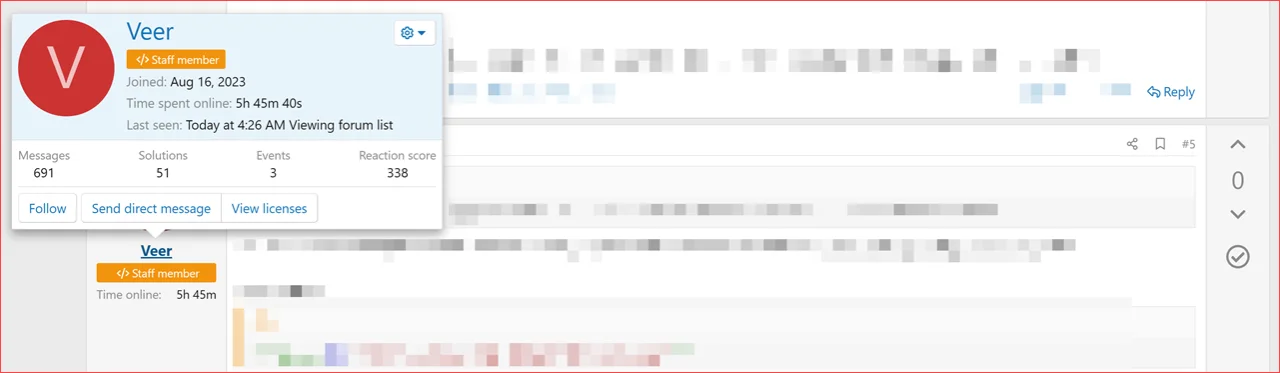
Member Tooltip
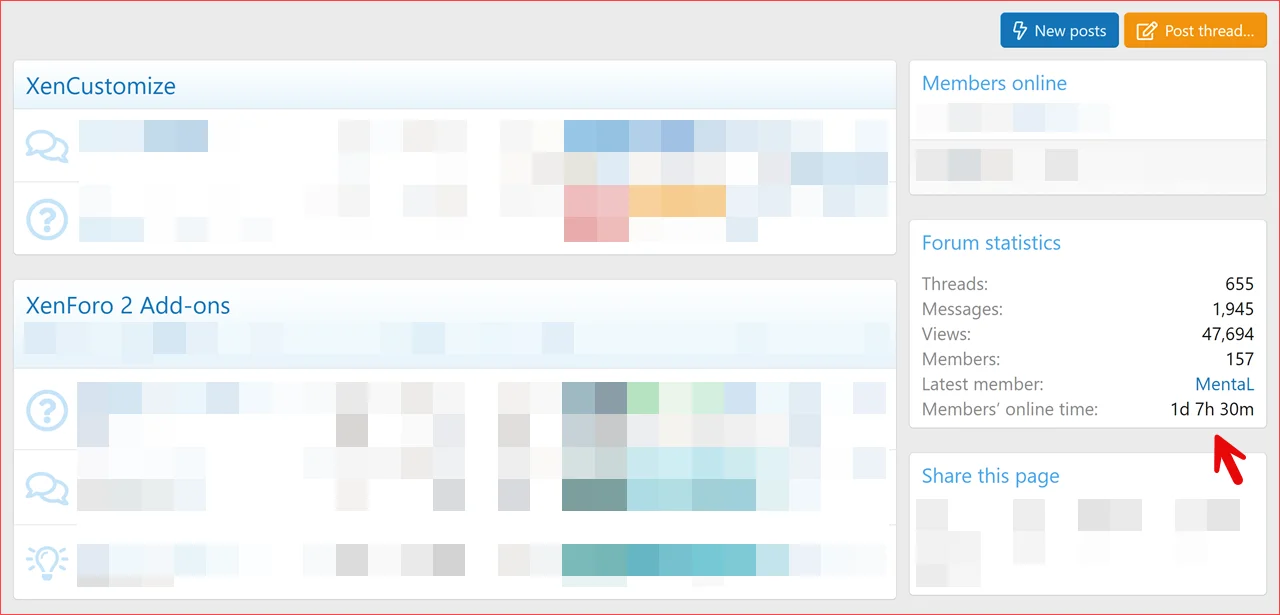
Forum Statistics - Members Online Time
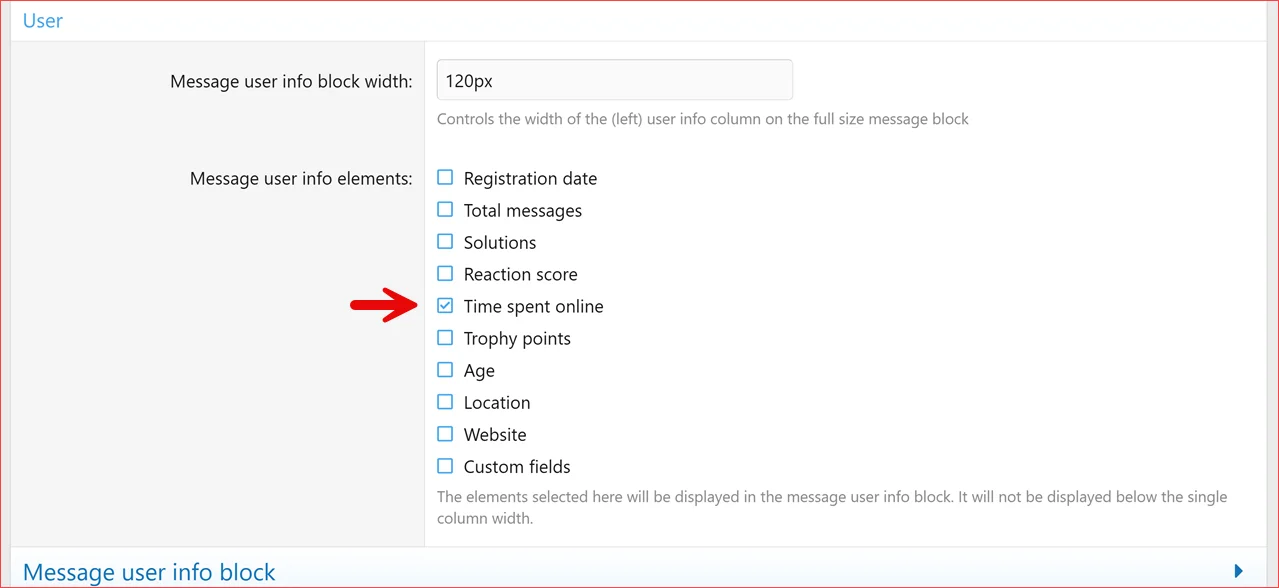
Style Properties - Messages - Message User Info Elements
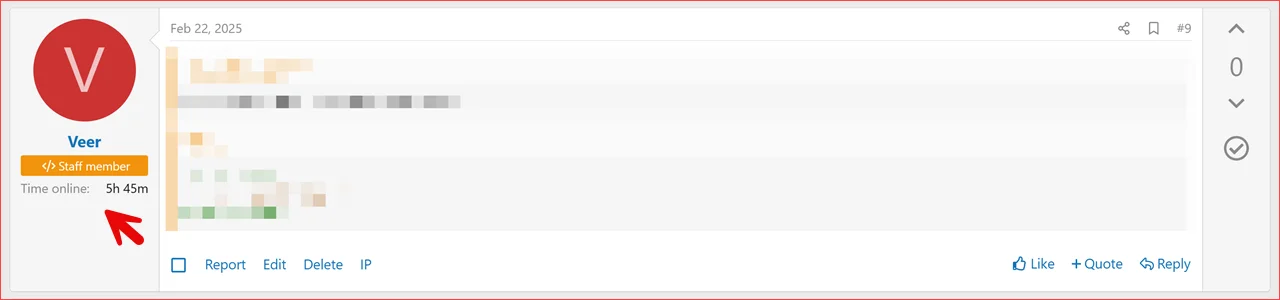
Thread Message
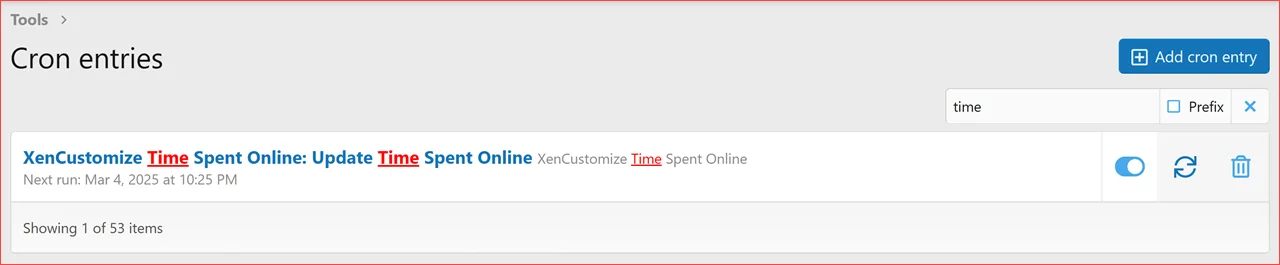
Cron

Télécharger V2.2.2 :
- XenCustomize Core Library 1.0.1
XenCustomize Online Time Tracker for XenForo 2
Track, display, and understand member online time in a way that feels native to XenForo.Want to highlight your most active users and encourage engagement? XenCustomize Online Time Tracker tracks and displays how much time users have spent on your XenForo forum—creating a fun, competitive, and interactive experience for your community!
This feature motivates engagement, encourages competition, and enhances community interaction effortlessly. With detailed statistics, interactive charts, and a real-time tracking system, admins can gain valuable insights into user activity.
 Why Online Time Tracker stands out
Online time tracking for logged-in members Profile, tooltip, and message user info displays for individual online time Top users by online time through XenForo member statistics Online Time Statistics page with daily and community-wide engagement insights Country-based statistics using bundled MaxMind GeoIP2 data Age and gender breakdowns when the relevant profile data is available User group permissions plus member privacy control for individual online time visibility Admin options and style properties for dashboard sections and presentation XenForo-native integration using permissions, templates, cron, jobs, entities, and member stats Core highlights
Track member online timeThe addon tracks active logged-in member sessions and stores accumulated online time for each user. Guests, bots, and banned users are not counted.
Show online time where members naturally lookIndividual online time can appear on member profiles, member tooltips, and message user info, depending on permissions, privacy settings, and style property choices.
Dedicated Online Time Statistics pageThe statistics page gives members and permitted viewers a broader look at online activity, including daily averages, today's personal time, community totals, most engaged user today, and comparison-style summary content.
Recognize your most active membersOnline Time Tracker integrates with XenForo's member statistics system so communities can highlight top users by time online.
Privacy-aware visibilityMembers can control who may view their individual online time through XenForo's account privacy settings. Admins still keep control through the addon permissions.
Country, age, and gender insightsWhen enabled, the statistics page can show engagement breakdowns by age group, gender, and country. Country detection uses bundled MaxMind GeoIP2 data so the feature works immediately after installation.
 Feature breakdown
Online Time Tracking
- Tracks online time for logged-in members
- Stores total online time on the user record
- Stores daily online time records for statistics
- Uses XenForo cron and job queue processing
- Avoids counting guests, bots, and banned users
- Includes protections against invalid or future activity timestamps
- Supports very large accumulated online time values
Member Profile, Tooltip & Message Display
- Displays total online time on member profiles
- Displays total online time in member tooltips
- Can display compact online time in message user info
- Message display is integrated with XenForo's Message user info elements style property
- Visibility is controlled by user group permissions
- Individual member visibility also respects the account privacy option added in v2.2.3
Privacy & Permission Controls
- Can view own online time
- Can view online time of others
- Can view online time statistics
- New account privacy option: View your online time
- Members can choose who can view their individual online time:
- All visitors
- Members only
- People they follow
- Nobody
- Staff with permission to bypass user privacy may still view individual online time when they also have the addon permission to view online time of others
Online Time Statistics Dashboard
- Dedicated public statistics page
- Members navigation link for easy access
- Access controlled by the Can view online time statistics permission
- Community-wide average daily online time
- Current visitor's online time today
- Current visitor's average daily online time
- User comparison / percentile style summary
- Most engaged user today
- Total online time spent by the community today
- Clickable member profile links for usernames shown in the statistics summary
 Visual Statistics & Charts
- CSS-based bar charts for supported breakdowns
- Time spent by age group
- Time spent by gender
- Time spent by country
- Color-coded low, medium, and high engagement indicators
- Admin options to enable or disable supported statistics sections
- Admin option to control how many countries are shown per page
- Dedicated country statistics page with pagination
Country Detection with MaxMind GeoIP2
- Uses MaxMind GeoIP2 for country detection
- GeoLite2 country database is bundled with the addon release
- No separate GeoIP setup is required for the bundled database to work
- Country data is stored on the user record for statistics use
- GeoIP lookup failures gracefully fall back without breaking tracking
Member Statistics & Forum Statistics
- Adds online time as a member statistics / leaderboard option
- Highlights top users by time online
- Adds total members' online time to the Forum Statistics widget
- Forum statistics display is permission-controlled
Admin Options, Styling & Maintenance
- Options to enable or disable age, gender, and country statistics
- Batch size option for online time update processing
- Countries-per-page option for country statistics
- Style properties for statistics cards, summary area, and chart colors
- Cron entry and job queue support for background processing
- XenCustomize Core Library dependency for shared premium-addon support and licensing integration
 Importers / Migration Support
- Automatic data migration from [WMTech] Time Spent Online v2.0.3 when previous data is detected
- Automatic data migration from [Yugensoft] Time Spent Online v2.0.6 when previous data is detected
- Migration support from earlier XenCustomize time spent data structures when detected
- Imports existing accumulated online time into the Online Time Tracker user total
- Imports supported daily time records into the Online Time Tracker daily statistics table
- Designed to help preserve existing time spent data during supported migrations
- No separate importer page is required; supported migration checks run during installation when matching legacy data exists
Designed the XenForo way
- Uses XenForo entities, repositories, permissions, template modifications, cron, jobs, and member stats
- Uses XenForo account privacy settings for member-controlled online time visibility
- Uses template modifications instead of core template edits
- Uses style properties for configurable presentation
- Keeps online time displays familiar within the XenForo member experience
 Ideal use cases
- Communities that want to recognize loyal and active members
- Forums that want a lightweight activity leaderboard based on time online
- Gaming, support, education, hobby, and fan communities that value member presence
- Premium communities that want visible engagement indicators for members
- Admins who want basic community engagement statistics without installing a full analytics platform
 Specifications
- Supported XenForo versions: XenForo 2.2.0+
- PHP requirement: PHP 7.4.0+
- Core Library requirement: XenCustomize Core Library 1.0.1+
- Tracks guests: No
- Tracks bots: No
- Tracks banned users: No
- Member statistics integration: Yes
- Forum statistics integration: Yes
- Public statistics page: Yes
- GeoIP country statistics: Yes, using bundled MaxMind GeoIP2 data
- Privacy option for members: Yes
- Permissions included: Yes
- Style properties included: Yes
- Translation-ready phrases: Yes
- Visible branding: Yes, unless a valid branding-free license is purchased and configured
 License setup
After installation, go to the add-on options and open the License options tab to enter your license key. If you have a branding-free license key, you may enter it there as well to remove branding.License verification may use XenCustomize.com with local caching. Normal installation and uninstallation do not depend on our server being available. An expired license does not disable normal use of the add-on, but an active valid license is required for official support and access to new downloads or updates released after the license expires.
 Notes / Limitations
- Online time tracking is based on member activity/session behavior and is intended as an engagement indicator, not a payroll-grade time clock.
- Exact update timing depends on XenForo activity, cron, and job queue processing.
- Age-based statistics depend on member date-of-birth data being available.
- Gender-based statistics depend on the configured gender custom field data being available.
- Country-based statistics depend on IP-based GeoIP lookup and the bundled GeoLite2 country database.
- The addon is designed with performance in mind, but very large or very high-traffic forums should test carefully and contact us before purchase if unsure.
 Feature documentation & screenshots
Click on each documentation thread below for additional details and screenshots where available.- Online Time Tracker: Time Spent Statistics Dashboard
- Online Time Tracker: New Interactive Bar Charts
- Online Time Tracker: Time Spent by Age Group
- Online Time Tracker: Time Spent by Gender
- Online Time Tracker: Time Spent by Country
- Online Time Tracker: User Group Permission - Can View Time Spent Statistics
- Online Time Tracker: Admin Options to Enable/Disable Specific Statistics
- Online Time Tracker: Sub-Navigation Link for Time Spent Statistics
- Online Time Tracker: Customize Statistics Page with Style Properties
 A practical engagement layer for XenForo
If you want to recognize active members, show meaningful online time displays, and add a simple engagement statistics page to your community, XenCustomize Online Time Tracker gives you that in a familiar XenForo-friendly package.Screenshots (v2.1.x)
Stats Cards and Stats Summary CSS Bar Charts User Group Permissions Admin Options Style PropertiesScreenshots (v2.0.x)
Member ProfileATTACH type="full" width="990px" size="1278x621"]12280[/ATTACH]
Notable Members Notable Members - Top Users by Time Online Member Tooltip Forum Statistics - Members Online Time Style Properties - Messages - Message User Info Elements Thread Message CronTélécharger V2.2.2 :
Pour consulter le contenu, vous devez : Se connecter ou S'inscrire.
![[XenCustomize] Testimonials: Client Feedback & Reviews Manager 2.3.3](https://www.societyfrenchmodding.net/data/attachments/12/12271-e42a3da88eace7e35be0d36484829911.jpg)
Pièces jointes


![[XenCustomize] Limit Resource Downloads 2.3.3](https://www.societyfrenchmodding.net/data/attachments/8/8984-0e4dabcd105d66151019eee52508ded6.jpg)
![[XenCustomize] Profile Audio Player & Library - Music and Lyrics 2.2.4](https://www.societyfrenchmodding.net/data/attachments/8/8856-af5e43605fc54727503ae2fbf873cc04.jpg)
![[XenCustomize] Resource Views & Visitors 1.0.1](https://www.societyfrenchmodding.net/data/attachments/10/10195-8c24112a9ea072499ddbbd2b09750904.jpg)
![[XenCustomize] Thread Prefix Filter 2.0.4](https://www.societyfrenchmodding.net/data/attachments/10/10754-f7de422224ee703c2c387712dd37058f.jpg)
![[XenCustomize] Limit Attachment Downloads 2.3.3](https://www.societyfrenchmodding.net/data/attachments/10/10326-0d3ae1c2ad51c231043d4b5ee3fac3e4.jpg)