


Additional requirements :
- PHP 7.2+
- XenForo CAPTCHA enabled.

XF Bot Guard
Challenge suspicious bots before they scrape your forum.
XF Bot Guard is a XenForo-native anti-scraping and bot challenge layer for public forums. It identifies risky visitor behaviour, builds reputation from hashed browser/session/IP signals, and challenges suspicious traffic using XenForo’s own CAPTCHA system.
It is built for forum owners who want a practical application-layer defence against anonymous crawlers, content scrapers, aggressive bots, repeated automated visitors, and browser-like traffic that basic blocks do not catch.
This is not a “CAPTCHA everyone” add-on. XF Bot Guard watches first, scores behaviour, gives normal browsers a short chance to identify themselves, and challenges visitors when their risk profile reaches your configured threshold.
What it protects against
XF Bot Guard combines local browser fingerprint collection, collector proof validation, browser coherence checks, request velocity, route awareness, IP/session/fingerprint reputation, CAPTCHA history, official crawler IP verification, bootstrap history protection, and XenForo route context.
It is designed to detect and challenge traffic showing signs such as:
Built for XenForo
XF Bot Guard runs inside XenForo. It understands forum routes, request methods, sessions, users, content context, CAPTCHA state, online activity, XenForo cache configuration, and XenForo’s normal page flow.
It does not require a proxy challenge page, external SaaS bot platform, paid fingerprinting service, or third-party XenForo add-on.
Native XenForo CAPTCHA challenge
XF Bot Guard uses the CAPTCHA provider configured in XenForo.
That keeps the challenge experience native to your forum. Configure CAPTCHA in XenForo first, then enable XF Bot Guard.
After a visitor completes CAPTCHA, Bot Guard temporarily trusts that visitor for the configured trust duration and returns them to the originally requested safe page where possible. Unsafe return targets are rejected automatically.
Safe challenge behaviour
XF Bot Guard challenges safe public page views. Other request types can still be observed, counted, and used for reputation where appropriate, but the CAPTCHA redirect is kept away from sensitive flows.
This protects forum browsing without breaking forms, AJAX, API requests, login/register flows, payment callbacks, webhook-style paths, static assets, or XenForo CAPTCHA routes.
In practical terms:
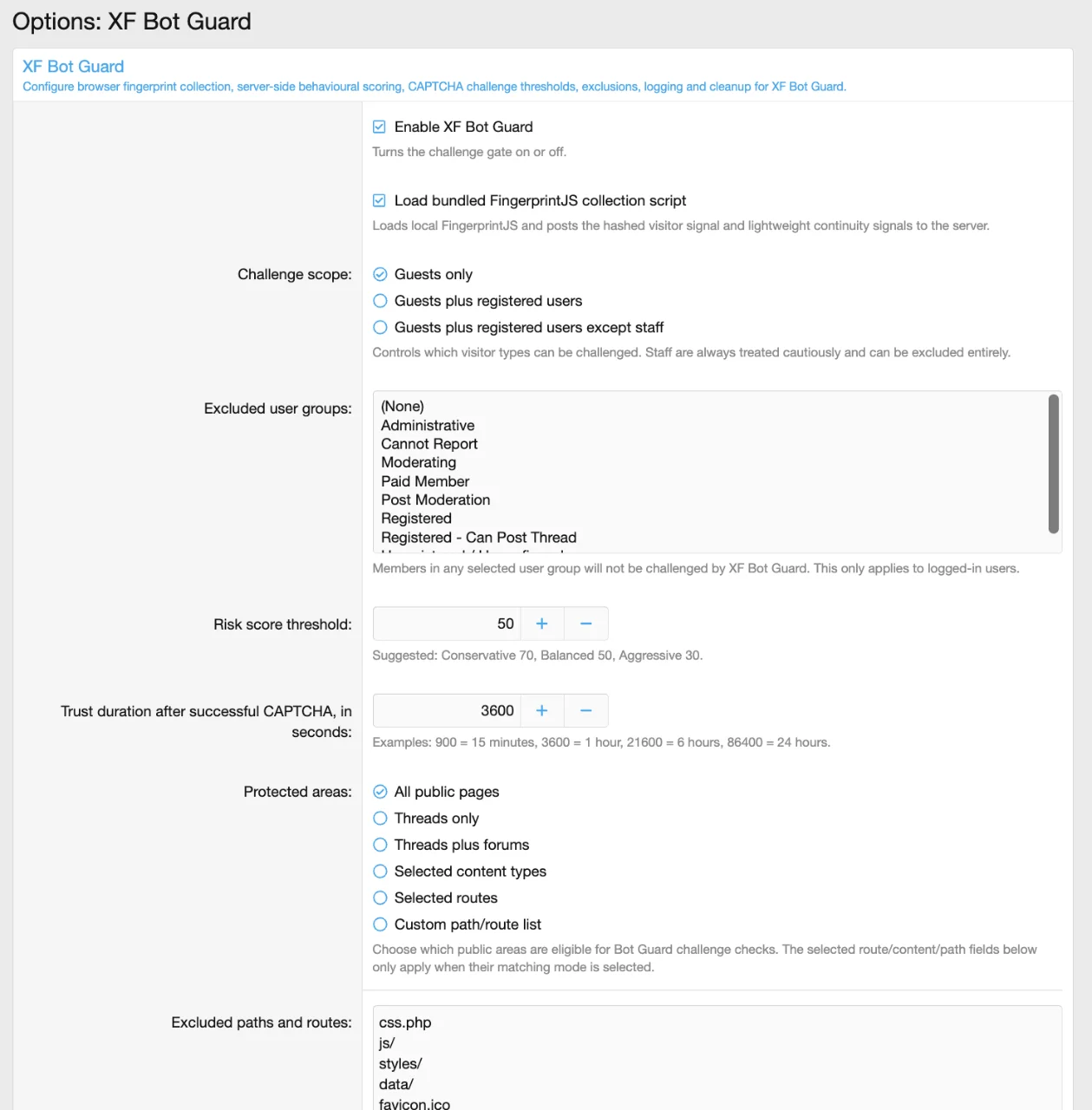
You decide what Bot Guard protects:
Explainable risk scoring
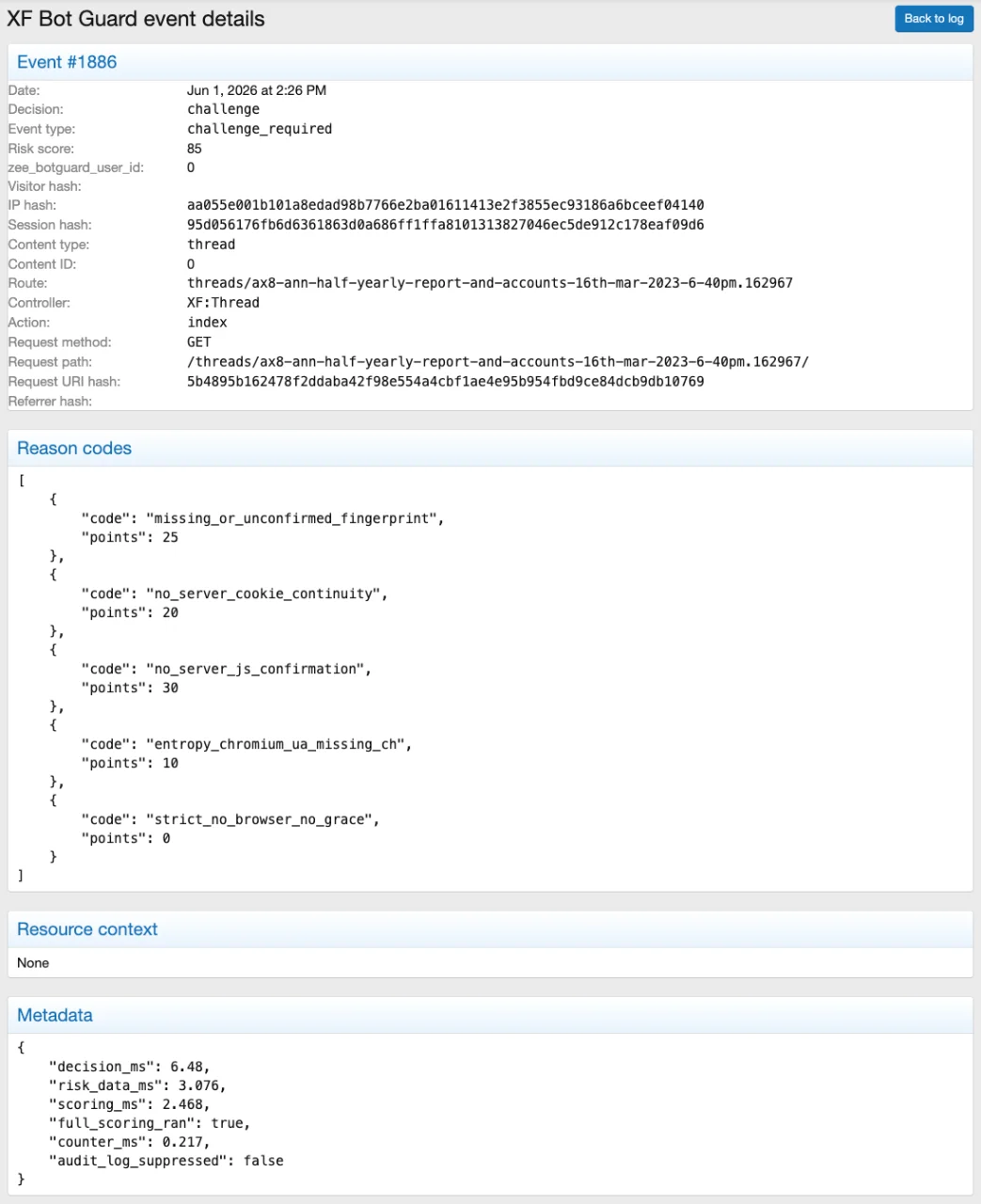
XF Bot Guard uses an explainable risk score. You can see why a visitor was allowed, observed, challenged, trusted, or failed.
Risk can increase from missing fingerprint data, missing cookie continuity, invalid collector proof, browser coherence contradictions, automation markers, changing IP/fingerprint relationships, repeated bootstrap-only behaviour without browser collection, route probing, scraping-sensitive route families, high velocity, and CAPTCHA failures.
Risk can decrease for logged-in users, staff, recently verified visitors, and trusted known crawler header requests when that feature is safely enabled.
Official crawler/fetcher IP matches are handled before risk scoring as a direct allow decision, because official provider-published IP ranges are the trust source for that feature.
You control the challenge threshold. Suggested starting points are shown in the options.
Browser collector and proof validation
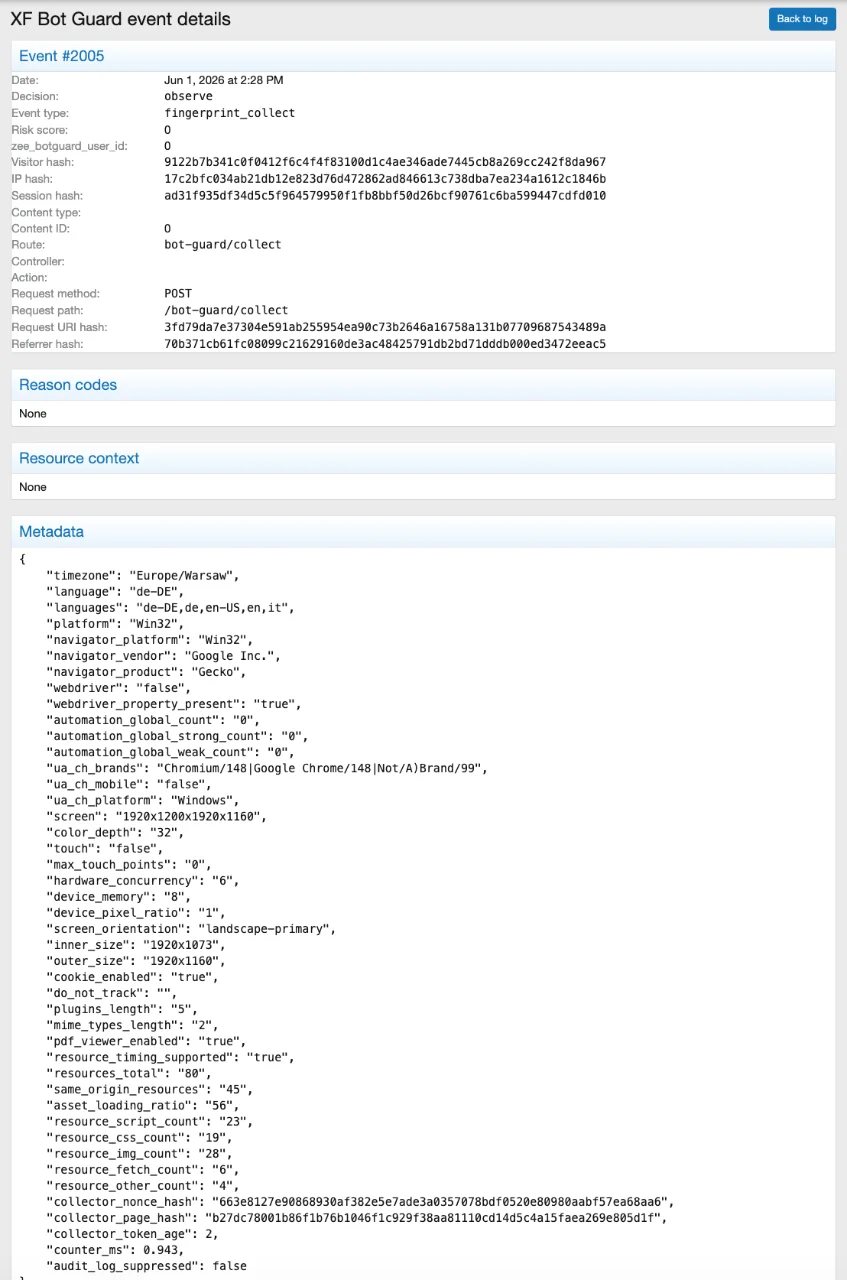
XF Bot Guard includes a local browser collector using the bundled FingerprintJS library.
The collector posts a hashed visitor signal and lightweight browser continuity/coherence metadata back to XenForo. It also uses short-lived server-issued proof so collector submissions are tied to the current page, session, and timing window.
Invalid, expired, reused, missing, or mismatched proof is not accepted as trusted browser evidence. It is handled safely and contributes to scoring/logging.
Operational counters without audit-log bloat
XF Bot Guard keeps short-window operational counters separately from retained audit logs.
That matters on real forums. Scoring and rate-limit decisions continue to use recent activity counters even when routine low-value allow/skip rows are not written to the event log.
Bootstrap history protection also uses these counters. This means repeated bootstrap-only access can still be detected even when routine bootstrap allow rows are not retained as audit events.
When XenForo cache is configured, Bot Guard uses read-through and write-through cache for counter buckets to reduce repeated database reads. The database remains authoritative. If cache is unavailable, Bot Guard uses the database path.
Security-relevant events remain available for review when audit logging is enabled, while normal safe browsing does not have to create a log row for every ordinary request.
Event log and decision visibility
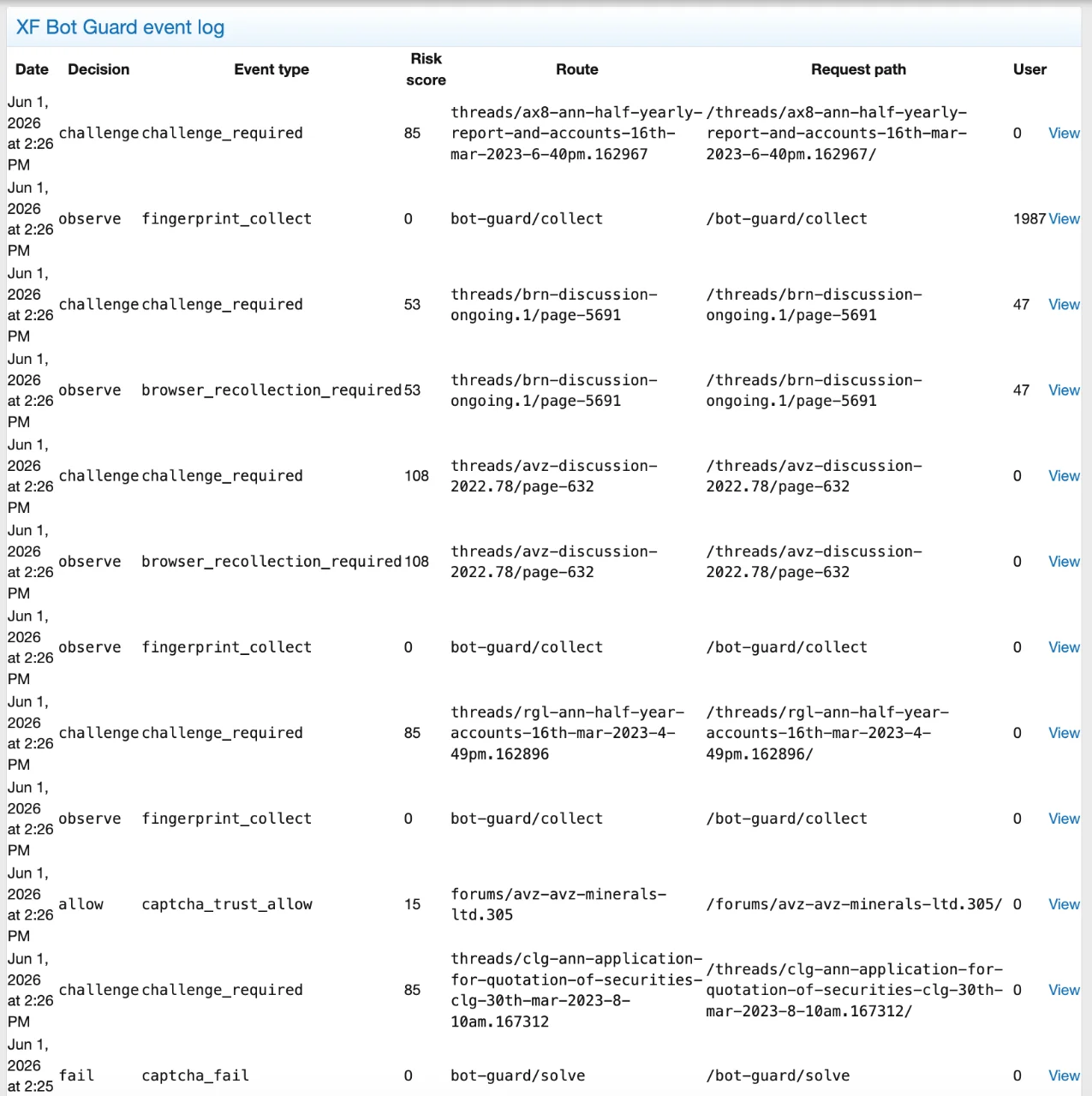
The admin event log shows Bot Guard decisions and the reasons behind them.
Logged events include:
Admin health/status page
XF Bot Guard includes a health/status page in the admin control panel.
It checks the add-on toggle, JavaScript collector status, XenForo CAPTCHA configuration, PAGE_CONTAINER template modification, bundled JavaScript assets, audit logging, low-value logging, event/session/visitor retention, counter retention, official crawler source/range import status, known crawler header trust, origin-lockdown acknowledgement, event/counter table size, and hash-secret/globalSalt availability.
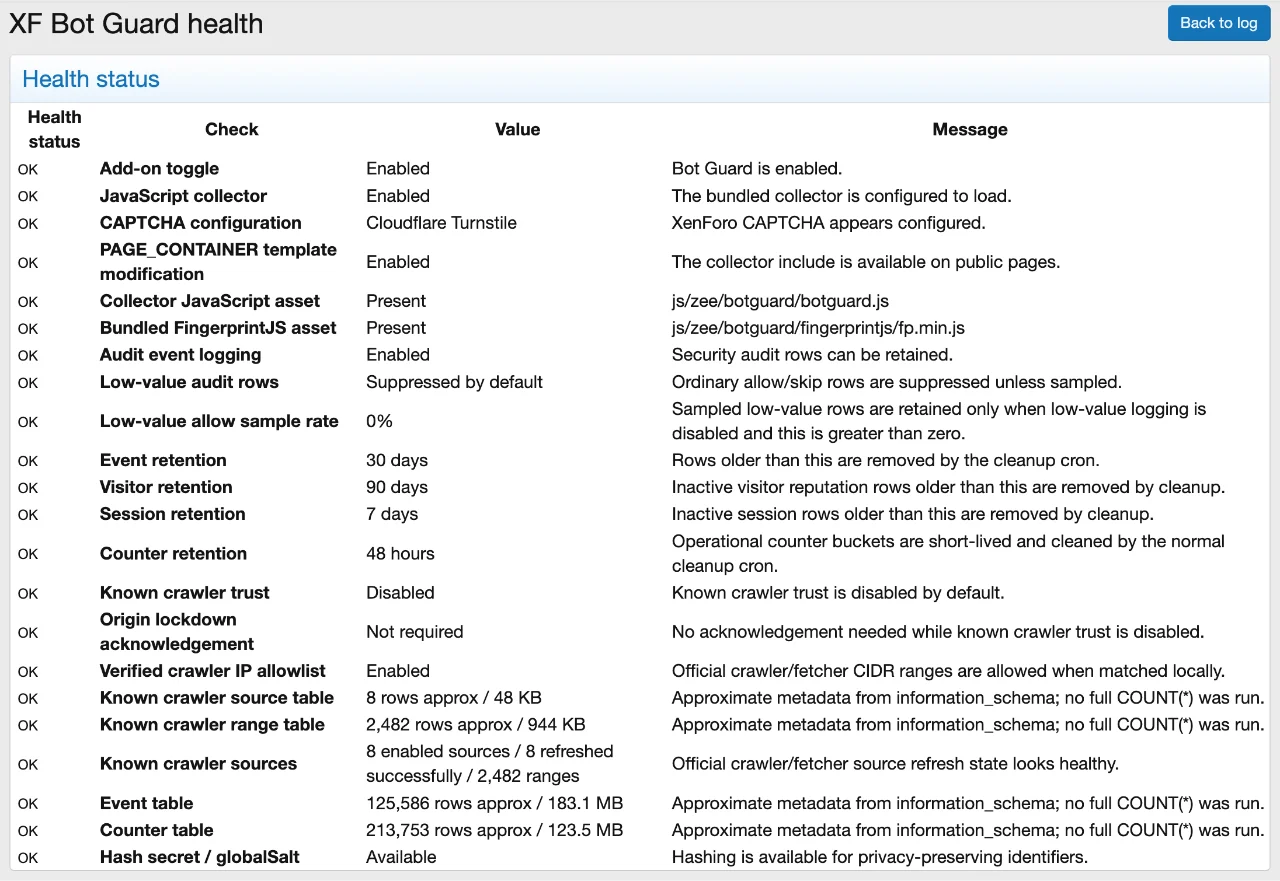
Current visitors visibility
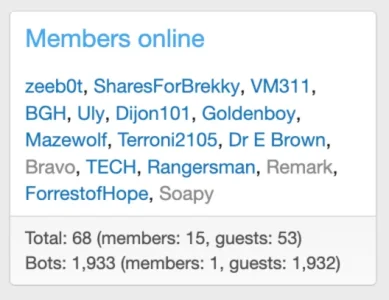
Bot Guard verification routes appear clearly in XenForo’s Current visitors / Members online area.
Challenged visitors can also be separated into a Bot Guard “Bots” count, so they do not inflate normal online visitor totals while they are still pending verification.
The activity text does not expose return URLs, visitor hashes, IP hashes, fingerprint IDs, collector proof values, or challenge metadata.
Known crawler support
XF Bot Guard supports two crawler trust paths.
Official source support includes Google crawler/fetcher feeds, Bingbot, Applebot, and DuckDuckBot. The health page shows whether the official source rows and imported IP ranges are available.
Privacy-conscious storage
XF Bot Guard is designed not to store raw IP addresses or raw browser fingerprint IDs in its own tables.
It stores hashed identifiers for reputation and anti-abuse decisions. Browser fingerprint collection runs locally with the bundled FingerprintJS library. No external fingerprinting account is required.
Bot Guard stores compact anti-abuse metadata and browser-coherence signals. It does not store raw FingerprintJS component entropy by default, and raw collector proof values are not stored in the event log.
Site owners should update their privacy policy because the add-on performs anti-abuse fingerprinting, behavioural monitoring, and challenge decisions.
No external service account required
XF Bot Guard does not require:
Works alongside Cloudflare and server security
Cloudflare, WAF rules, server firewall rules, and rate limits can block traffic before it reaches XenForo.
XF Bot Guard works at the XenForo layer, where it can see forum routes, sessions, cookies, CAPTCHA trust, collector state, content context, and hashed visitor reputation.
Use it as an additional XenForo-native layer, not as a replacement for good server/CDN security.
What this is not
XF Bot Guard is not a firewall, reverse proxy, CDN, WAF, nginx rule, Apache rule, LiteSpeed rule, or iptables block.
It does not stop requests before they reach PHP.
A sophisticated scraper using a real browser, stable cookies, JavaScript execution, careful timing, and CAPTCHA solving can still pass. XF Bot Guard is built to stop, slow, and expose unwanted automated visitors by forcing risky traffic through an explainable XenForo challenge flow.
Requirements
Proprietary freeware.
This resource is free to use, but it is not open source. Redistribution, resale, sublicensing, publishing modified versions, or removing copyright/license notices is not permitted without written permission from the developer.
Summary
XF Bot Guard gives XenForo forums a native, stable, configurable, explainable challenge layer for suspicious bots and scrapers.
It watches behaviour, validates browser evidence, verifies official crawler/fetcher IP ranges, tracks repeated bootstrap-only access, builds reputation, keeps operational counters separate from audit logs, uses XenForo cache for counter reads when configured, provides clear admin visibility, and challenges risky visitors before they can continue freely browsing protected content.
Télécharger V1.0.3 :
New checks include:
High-confidence automation indicators, such as explicit WebDriver or headless browser evidence, can still contribute strongly to the risk score.
Collected metadata is limited to compact browser and request-coherence signals used for bot-risk evaluation.
A successful CAPTCHA now properly honours the configured trust duration. During the active trust window, the visitor is allowed through without being challenged again.
CAPTCHA trust-window allows are also logged clearly, making it easier to understand when a visitor was allowed because they had recently completed verification.
XF Bot Guard now preserves the originally requested safe URL through the challenge flow and returns the visitor to that page after successful verification.
This includes first-visit and new-session challenge flows, such as visitors opening a protected thread or forum page before they already have an established forum session.
Unsafe return targets are rejected automatically, including external URLs, Bot Guard routes, login/logout/register routes, API routes, admin/install paths, webhook-style paths, payment callback-style paths, and malformed values.
If the original return URL is missing or unsafe, XF Bot Guard safely falls back to the forum index as before.
Previously, known crawler detection reduced the risk score but could still result in a challenge if the request scored highly enough for other reasons.
XF Bot Guard now still calculates and logs the score for observability, but verified known crawler requests can be allowed at the decision layer rather than being challenged unnecessarily.
This keeps crawler handling visible in the event log while making the trusted crawler setting behave more consistently.
This makes collector submissions harder to replay or synthesize independently from a genuine page load.
Collector proof is validated before browser metadata is accepted as trusted collector evidence. Invalid, expired, reused, missing, or mismatched collector proof is handled safely and logged for observability.
This hardening is designed to fail safely without breaking normal page loads.
Examples include:
Examples include:
XF Bot Guard now uses the configured Bot Guard hash secret where available, or XenForo’s global salt where available.
If neither is available, XF Bot Guard avoids generating predictable hashes, fails open for visitor access where appropriate, and logs the configuration issue so the administrator can correct it.
Cookies now set SameSite=Lax, use Secure when served over HTTPS, and only allow JavaScript access where the browser collector genuinely requires it.
This improves cookie behaviour consistency across modern browsers while preserving compatibility with the add-on’s supported XenForo versions.
Visitors on the verification flow should now show generic verification-related activity rather than appearing as an unknown or unrecognised route.
The displayed activity text does not expose sensitive return URLs, visitor hashes, IP hashes, fingerprint IDs, nonce values, or challenge metadata.
New or improved event visibility includes:
The harness covers key behaviours such as CAPTCHA trust overrides, known crawler overrides, return URL validation, unsafe return rejection, Bot Guard self-route rejection, collector proof validation, metadata sanitisation, entropy scoring fixtures, route classification, excluded paths/routes/methods, and Bot Guard online activity support.
This internal tooling complements the usual manual XenForo 2.1, 2.2, and 2.3 compatibility testing.
Administrators using trusted crawler handling should ensure their proxy/header environment is appropriately controlled, as trusted crawler decisions depend on request headers being reliable.
This release focuses on making the 1.0.x foundation safer, quieter, faster, and easier to monitor on real production XenForo forums. The core protection model remains the same, but the internal behaviour has been hardened for serious forums running conservative settings.
The main goals of this release are:
Earlier 1.0.x versions established the core challenge flow, browser collector, trusted crawler handling, scoring model, and verification behaviour. This release hardens that foundation for broader production use.
The add-on is still disabled by default after installation, and the default operating mode remains conservative.
Previously, some scoring and rate-limit decisions relied heavily on recent rows in the audit event table. That made it harder to safely reduce noisy low-value logging, because suppressing those rows could also affect scoring visibility.
In 1.0.6, short-window operational counters are stored independently and used for decisions such as recent request activity, recent error-route activity, recent sensitive-route activity, and CAPTCHA failure rate limiting.
This means XF Bot Guard can now reduce audit log pressure without weakening the scoring and rate-limit behaviour that depends on recent activity.
By default, XF Bot Guard no longer writes ordinary low-value allow/skip rows for every normal safe guest request.
This helps prevent busy forums from filling the Bot Guard event table with endless routine browsing activity while still retaining useful security events.
Important events continue to be logged when audit logging is enabled, including:
This allows administrators to keep a small sample of otherwise low-value allow rows for visibility without logging every normal safe request.
For example, a busy forum can keep audit logging enabled for security events while sampling only a small percentage of routine allow decisions.
The default sample rate is 0%.
XF Bot Guard still tracks useful relationship signals such as visitor/IP relationships, visitor country/ASN variation, and IP/fingerprint relationships, but these are now refreshed periodically instead of repeatedly queried on every scored request.
This reduces database pressure on normal repeat guest browsing while preserving the same general scoring signals.
Counter rows are short-lived and are pruned after approximately 48 hours.
This keeps the counter table focused on recent operational decisions and prevents it from growing indefinitely.
Existing event, visitor, session, fingerprint/IP, and online challenge cleanup behaviour remains in place.
The health page provides clear OK, warning, and error rows for important configuration and runtime checks, including:
Trusted crawler decisions depend on crawler-related request headers being reliable. Those headers are only trustworthy if visitors cannot bypass the proxy/CDN layer and hit the origin server directly while spoofing headers.
If known crawler trust is enabled but origin lockdown has not been acknowledged, XF Bot Guard now shows a warning in the health page.
This does not block operation. It is an admin safety warning only.
This may include decision time, risk-data time, scoring time, counter time, and whether full scoring was run.
This is intended to help diagnose production behaviour without exposing debug output on public pages.
In particular:
This table stores short-lived operational counters used for scoring and rate-limit decisions.
The table is maintained automatically by XF Bot Guard and cleaned up through the existing cleanup process.
Administrators using trusted crawler handling should also confirm their proxy/CDN and origin-server setup prevents direct origin access before acknowledging origin lockdown.
Administrators who previously relied on very verbose allow-row logging can re-enable low-value event logging or configure allow-event sampling in the Bot Guard options.
Administrations should also review the new Bot Guard health/status page, linked to from the logs page.
It reduces routine event log growth, moves scoring counters out of the audit log, lowers hot-path database pressure, adds better admin visibility, improves retention behaviour, and keeps the default configuration conservative.
This is the recommended stable foundation for production XenForo forums using XF Bot Guard.
Télécharger V1.0.6 :
Télécharger V1.1.1 :
Télécharger V1.1.5 :
Télécharger V1.2.2 :
Télécharger V1.2.3 :
- PHP 7.2+
- XenForo CAPTCHA enabled.
XF Bot Guard
Challenge suspicious bots before they scrape your forum.
XF Bot Guard is a XenForo-native anti-scraping and bot challenge layer for public forums. It identifies risky visitor behaviour, builds reputation from hashed browser/session/IP signals, and challenges suspicious traffic using XenForo’s own CAPTCHA system.
It is built for forum owners who want a practical application-layer defence against anonymous crawlers, content scrapers, aggressive bots, repeated automated visitors, and browser-like traffic that basic blocks do not catch.
This is not a “CAPTCHA everyone” add-on. XF Bot Guard watches first, scores behaviour, gives normal browsers a short chance to identify themselves, and challenges visitors when their risk profile reaches your configured threshold.
What it protects against
XF Bot Guard combines local browser fingerprint collection, collector proof validation, browser coherence checks, request velocity, route awareness, IP/session/fingerprint reputation, CAPTCHA history, official crawler IP verification, bootstrap history protection, and XenForo route context.
It is designed to detect and challenge traffic showing signs such as:
- No JavaScript or fingerprint signal
- Missing or inconsistent Bot Guard cookies
- No browser proof signals at all
- Missing, expired, invalid, reused, or mismatched collector proof
- Repeated bootstrap-only access without successful browser collection
- Browser identity, platform, screen, language, timezone, or request-header contradictions
- WebDriver, headless browser, automation, or browser-control artefacts
- Suspiciously thin rendering/resource-loading profiles
- One browser-like identity appearing across multiple IPs
- One IP appearing with many browser identities
- Unexpected User-Agent changes
- Country/ASN changes where trusted proxy headers provide that data
- Unusual request velocity
- Repeated sensitive-route or error-route hits
- Search, find-new, listing, member, profile, and deep-pagination patterns commonly associated with scraping
- Fake crawler user-agents from IPs that do not match official crawler/fetcher ranges
- Recent CAPTCHA failure
Built for XenForo
XF Bot Guard runs inside XenForo. It understands forum routes, request methods, sessions, users, content context, CAPTCHA state, online activity, XenForo cache configuration, and XenForo’s normal page flow.
It does not require a proxy challenge page, external SaaS bot platform, paid fingerprinting service, or third-party XenForo add-on.
Native XenForo CAPTCHA challenge
XF Bot Guard uses the CAPTCHA provider configured in XenForo.
That keeps the challenge experience native to your forum. Configure CAPTCHA in XenForo first, then enable XF Bot Guard.
After a visitor completes CAPTCHA, Bot Guard temporarily trusts that visitor for the configured trust duration and returns them to the originally requested safe page where possible. Unsafe return targets are rejected automatically.
Safe challenge behaviour
XF Bot Guard challenges safe public page views. Other request types can still be observed, counted, and used for reputation where appropriate, but the CAPTCHA redirect is kept away from sensitive flows.
This protects forum browsing without breaking forms, AJAX, API requests, login/register flows, payment callbacks, webhook-style paths, static assets, or XenForo CAPTCHA routes.
In practical terms:
- Suspicious behaviour can be monitored across safe request contexts.
- CAPTCHA challenges occur on safe primary page navigation requests.
- Visitors who pass CAPTCHA are trusted for the configured trust window.
- Visitors who fail or cannot complete CAPTCHA cannot continue freely through protected pages.
- Successful visitors are returned to the original safe page where possible.
You decide what Bot Guard protects:
- All public pages
- Threads only
- Threads plus forums
- Selected content types
- Selected route prefixes
- Custom path/route lists
- Guests only
- Guests plus registered users
- Guests plus registered users except staff
- Excluded user groups
- Excluded IPs/CIDRs
Explainable risk scoring
XF Bot Guard uses an explainable risk score. You can see why a visitor was allowed, observed, challenged, trusted, or failed.
Risk can increase from missing fingerprint data, missing cookie continuity, invalid collector proof, browser coherence contradictions, automation markers, changing IP/fingerprint relationships, repeated bootstrap-only behaviour without browser collection, route probing, scraping-sensitive route families, high velocity, and CAPTCHA failures.
Risk can decrease for logged-in users, staff, recently verified visitors, and trusted known crawler header requests when that feature is safely enabled.
Official crawler/fetcher IP matches are handled before risk scoring as a direct allow decision, because official provider-published IP ranges are the trust source for that feature.
You control the challenge threshold. Suggested starting points are shown in the options.
Browser collector and proof validation
XF Bot Guard includes a local browser collector using the bundled FingerprintJS library.
The collector posts a hashed visitor signal and lightweight browser continuity/coherence metadata back to XenForo. It also uses short-lived server-issued proof so collector submissions are tied to the current page, session, and timing window.
Invalid, expired, reused, missing, or mismatched proof is not accepted as trusted browser evidence. It is handled safely and contributes to scoring/logging.
Operational counters without audit-log bloat
XF Bot Guard keeps short-window operational counters separately from retained audit logs.
That matters on real forums. Scoring and rate-limit decisions continue to use recent activity counters even when routine low-value allow/skip rows are not written to the event log.
Bootstrap history protection also uses these counters. This means repeated bootstrap-only access can still be detected even when routine bootstrap allow rows are not retained as audit events.
When XenForo cache is configured, Bot Guard uses read-through and write-through cache for counter buckets to reduce repeated database reads. The database remains authoritative. If cache is unavailable, Bot Guard uses the database path.
Security-relevant events remain available for review when audit logging is enabled, while normal safe browsing does not have to create a log row for every ordinary request.
Event log and decision visibility
The admin event log shows Bot Guard decisions and the reasons behind them.
Logged events include:
- Challenge required events
- Bootstrap suppression events
- CAPTCHA pass/fail/rate-limit events
- Verified official crawler/fetcher IP allows
- Known crawler header allow decisions
- Collector submissions and collector proof failures
- Browser re-collection requests
- Route, controller, action, method, and path context
- Reason codes and risk score
- Hashed visitor, IP, session, URI, and referrer identifiers
- Decision timing metadata
Admin health/status page
XF Bot Guard includes a health/status page in the admin control panel.
It checks the add-on toggle, JavaScript collector status, XenForo CAPTCHA configuration, PAGE_CONTAINER template modification, bundled JavaScript assets, audit logging, low-value logging, event/session/visitor retention, counter retention, official crawler source/range import status, known crawler header trust, origin-lockdown acknowledgement, event/counter table size, and hash-secret/globalSalt availability.
Current visitors visibility
Bot Guard verification routes appear clearly in XenForo’s Current visitors / Members online area.
Challenged visitors can also be separated into a Bot Guard “Bots” count, so they do not inflate normal online visitor totals while they are still pending verification.
The activity text does not expose return URLs, visitor hashes, IP hashes, fingerprint IDs, collector proof values, or challenge metadata.
Known crawler support
XF Bot Guard supports two crawler trust paths.
| Crawler trust path | How it works |
|---|---|
| Official crawler/fetcher IP ranges | Bot Guard imports official provider-published JSON CIDR feeds and allows matching request IPs locally. This is enabled by default and does not trust user-agent strings, reverse DNS, or spoofable headers. |
| Trusted crawler headers | Bot Guard can trust known verified crawler headers when you explicitly enable that option. Use this only when the headers come from trusted infrastructure and direct origin access is blocked. |
Official source support includes Google crawler/fetcher feeds, Bingbot, Applebot, and DuckDuckBot. The health page shows whether the official source rows and imported IP ranges are available.
Privacy-conscious storage
XF Bot Guard is designed not to store raw IP addresses or raw browser fingerprint IDs in its own tables.
It stores hashed identifiers for reputation and anti-abuse decisions. Browser fingerprint collection runs locally with the bundled FingerprintJS library. No external fingerprinting account is required.
Bot Guard stores compact anti-abuse metadata and browser-coherence signals. It does not store raw FingerprintJS component entropy by default, and raw collector proof values are not stored in the event log.
Site owners should update their privacy policy because the add-on performs anti-abuse fingerprinting, behavioural monitoring, and challenge decisions.
No external service account required
XF Bot Guard does not require:
- A paid subscription
- An API key
- A cloud account
- A CDN account
- An external bot-detection service account
- A third-party XenForo add-on
Works alongside Cloudflare and server security
Cloudflare, WAF rules, server firewall rules, and rate limits can block traffic before it reaches XenForo.
XF Bot Guard works at the XenForo layer, where it can see forum routes, sessions, cookies, CAPTCHA trust, collector state, content context, and hashed visitor reputation.
Use it as an additional XenForo-native layer, not as a replacement for good server/CDN security.
What this is not
XF Bot Guard is not a firewall, reverse proxy, CDN, WAF, nginx rule, Apache rule, LiteSpeed rule, or iptables block.
It does not stop requests before they reach PHP.
A sophisticated scraper using a real browser, stable cookies, JavaScript execution, careful timing, and CAPTCHA solving can still pass. XF Bot Guard is built to stop, slow, and expose unwanted automated visitors by forcing risky traffic through an explainable XenForo challenge flow.
Requirements
- XenForo 2.1.0+
- PHP 7.2+
- A configured XenForo CAPTCHA provider for challenge use
- A theme that includes the standard PAGE_CONTAINER output
- Optional: XenForo cache configured for counter read-load reduction
- Upload the add-on files to your XenForo installation.
- Install XF Bot Guard from the XenForo admin control panel.
- Configure XenForo CAPTCHA if it is not already configured.
- Review the Bot Guard options.
- Review the Bot Guard health/status page.
- Confirm official crawler/fetcher IP sources imported successfully.
- Enable the add-on.
- Monitor the event log and adjust the threshold/scope as needed.
- Confirm XenForo CAPTCHA is configured and working.
- Confirm the Bot Guard JavaScript files are reachable.
- Confirm the PAGE_CONTAINER template modification is enabled.
- Confirm official crawler/fetcher source ranges are imported in the health page.
- If using a proxy/CDN, confirm XenForo receives the correct real visitor IP.
- If trusting known crawler headers, confirm direct origin access is blocked first.
- Start with guests only and the default threshold before tightening.
Proprietary freeware.
This resource is free to use, but it is not open source. Redistribution, resale, sublicensing, publishing modified versions, or removing copyright/license notices is not permitted without written permission from the developer.
Summary
XF Bot Guard gives XenForo forums a native, stable, configurable, explainable challenge layer for suspicious bots and scrapers.
It watches behaviour, validates browser evidence, verifies official crawler/fetcher IP ranges, tracks repeated bootstrap-only access, builds reputation, keeps operational counters separate from audit logs, uses XenForo cache for counter reads when configured, provides clear admin visibility, and challenges risky visitors before they can continue freely browsing protected content.
Télécharger V1.0.3 :
Pour consulter le contenu, vous devez : Se connecter ou S'inscrire.
Browser Signal Hardening & CAPTCHA Trust Improvements
This update improves XF Bot Guard’s browser verification and challenge handling without changing the core protection model.Improved browser coherence checks
XF Bot Guard now collects and evaluates a broader set of lightweight browser signals to better identify suspicious or automated traffic patterns. These checks help distinguish normal browser activity from sessions that appear inconsistent, incomplete, automated, or artificially constructed.New checks include:
- WebDriver and automation artefact detection
- User-Agent and Client Hints consistency checks
- Platform, screen, touch, and hardware profile consistency checks
- Language, timezone, and country plausibility checks
- Resource loading and rendering profile checks
- Cookie capability consistency checks
Safer scoring behaviour
Browser-coherence signals are now capped so that unusual but legitimate browsers, privacy extensions, older devices, or uncommon network setups are not over-penalised.High-confidence automation indicators, such as explicit WebDriver or headless browser evidence, can still contribute strongly to the risk score.
Improved metadata handling
The browser collector now stores richer but still privacy-conscious metadata. XF Bot Guard continues to avoid storing raw FingerprintJS component entropy, raw IP addresses, or unbounded client-side data.Collected metadata is limited to compact browser and request-coherence signals used for bot-risk evaluation.
Fixed CAPTCHA trust-window behaviour
Fixed an issue where a visitor who successfully completed CAPTCHA could immediately be challenged again if their underlying risk score remained high.A successful CAPTCHA now properly honours the configured trust duration. During the active trust window, the visitor is allowed through without being challenged again.
Improved logging and observability
New browser-coherence risk factors now appear in the existing XF Bot Guard event log as named reason codes with point values.CAPTCHA trust-window allows are also logged clearly, making it easier to understand when a visitor was allowed because they had recently completed verification.
No admin action required
This update does not add new configuration options and does not require any database schema changes.Redirect, Collector Hardening & Verification Flow Improvements
This update improves XF Bot Guard’s verification flow, browser collector integrity, trusted crawler handling, and XenForo integration polish without changing the core protection model.Fixed post-CAPTCHA return behaviour
Fixed an issue where visitors who completed CAPTCHA could be returned to the forum homepage instead of the original page they were trying to access.XF Bot Guard now preserves the originally requested safe URL through the challenge flow and returns the visitor to that page after successful verification.
This includes first-visit and new-session challenge flows, such as visitors opening a protected thread or forum page before they already have an established forum session.
Unsafe return targets are rejected automatically, including external URLs, Bot Guard routes, login/logout/register routes, API routes, admin/install paths, webhook-style paths, payment callback-style paths, and malformed values.
If the original return URL is missing or unsafe, XF Bot Guard safely falls back to the forum index as before.
Improved trusted crawler handling
Known allowed crawler detection now works as a true allow decision when trusted crawler handling is enabled.Previously, known crawler detection reduced the risk score but could still result in a challenge if the request scored highly enough for other reasons.
XF Bot Guard now still calculates and logs the score for observability, but verified known crawler requests can be allowed at the decision layer rather than being challenged unnecessarily.
This keeps crawler handling visible in the event log while making the trusted crawler setting behave more consistently.
Collector proof and replay hardening
The browser collector now uses short-lived server-issued proof to better bind collector submissions to the current page, session, and timing window.This makes collector submissions harder to replay or synthesize independently from a genuine page load.
Collector proof is validated before browser metadata is accepted as trusted collector evidence. Invalid, expired, reused, missing, or mismatched collector proof is handled safely and logged for observability.
This hardening is designed to fail safely without breaking normal page loads.
Suspicion-triggered browser re-collection
XF Bot Guard can now request fresh browser collection when request context changes in ways that may make older collector metadata less reliable.Examples include:
- User-Agent family changes
- Country changes
- ASN changes where available
- Stale collector metadata
- Suspicious route families
- Collector metadata missing despite an existing visitor fingerprint
- Fingerprint/session relationship inconsistencies
Conservative route-family scoring
This update adds a small route-family risk layer for routes commonly associated with scraping or enumeration behaviour.Examples include:
- Search pages
- Find-new / what’s-new style pages
- Member list and profile enumeration
- Deep pagination
- Repeated listing or index traversal
Safer hash-secret behaviour
Removed the predictable fallback hash secret path.XF Bot Guard now uses the configured Bot Guard hash secret where available, or XenForo’s global salt where available.
If neither is available, XF Bot Guard avoids generating predictable hashes, fails open for visitor access where appropriate, and logs the configuration issue so the administrator can correct it.
Explicit cookie attributes
Bot Guard marker cookies now use explicit modern cookie attributes.Cookies now set SameSite=Lax, use Secure when served over HTTPS, and only allow JavaScript access where the browser collector genuinely requires it.
This improves cookie behaviour consistency across modern browsers while preserving compatibility with the add-on’s supported XenForo versions.
Improved Current visitors activity
Bot Guard verification routes now display clearer activity text in XenForo’s Current visitors / online users area.Visitors on the verification flow should now show generic verification-related activity rather than appearing as an unknown or unrecognised route.
The displayed activity text does not expose sensitive return URLs, visitor hashes, IP hashes, fingerprint IDs, nonce values, or challenge metadata.
Improved logging and observability
The existing XF Bot Guard event log now provides clearer visibility for the new behaviours.New or improved event visibility includes:
- CAPTCHA return URL restored or safely discarded
- Known crawler decision-layer allow overrides
- Collector proof validation failures
- Browser re-collection requests
- Route-family risk modifiers
- Hash secret / global salt configuration issues
Internal sanity and health-check tooling
This release includes an internal developer sanity and health-check harness used to improve release testing.The harness covers key behaviours such as CAPTCHA trust overrides, known crawler overrides, return URL validation, unsafe return rejection, Bot Guard self-route rejection, collector proof validation, metadata sanitisation, entropy scoring fixtures, route classification, excluded paths/routes/methods, and Bot Guard online activity support.
This internal tooling complements the usual manual XenForo 2.1, 2.2, and 2.3 compatibility testing.
No admin action required
This update does not require a new database schema change and does not add a new admin configuration page.Administrators using trusted crawler handling should ensure their proxy/header environment is appropriately controlled, as trusted crawler decisions depend on request headers being reliable.
XF Bot Guard 1.0.6 — First Stable Release & Production Hardening
XF Bot Guard 1.0.6 is now considered the first stable release of the add-on.This release focuses on making the 1.0.x foundation safer, quieter, faster, and easier to monitor on real production XenForo forums. The core protection model remains the same, but the internal behaviour has been hardened for serious forums running conservative settings.
The main goals of this release are:
- Reducing event log noise
- Separating operational counters from audit logs
- Improving hot-path performance
- Adding clearer admin health/status visibility
- Improving cleanup and retention behaviour
- Keeping defaults conservative for stable production use
First stable release
Version 1.0.6 is the first XF Bot Guard release marked as stable.Earlier 1.0.x versions established the core challenge flow, browser collector, trusted crawler handling, scoring model, and verification behaviour. This release hardens that foundation for broader production use.
The add-on is still disabled by default after installation, and the default operating mode remains conservative.
Operational counters are now separate from audit logs
XF Bot Guard now keeps lightweight internal counters separately from the main event log.Previously, some scoring and rate-limit decisions relied heavily on recent rows in the audit event table. That made it harder to safely reduce noisy low-value logging, because suppressing those rows could also affect scoring visibility.
In 1.0.6, short-window operational counters are stored independently and used for decisions such as recent request activity, recent error-route activity, recent sensitive-route activity, and CAPTCHA failure rate limiting.
This means XF Bot Guard can now reduce audit log pressure without weakening the scoring and rate-limit behaviour that depends on recent activity.
Reduced event log pressure
Low-value audit rows are now controlled separately from important security and verification events.By default, XF Bot Guard no longer writes ordinary low-value allow/skip rows for every normal safe guest request.
This helps prevent busy forums from filling the Bot Guard event table with endless routine browsing activity while still retaining useful security events.
Important events continue to be logged when audit logging is enabled, including:
- Challenge required events
- CAPTCHA pass/fail events
- CAPTCHA rate limiting
- Known crawler allow decisions
- Collector failure events
- Collector nonce/proof failures
- Hash secret or collector hash configuration problems
- Browser re-collection requests
- Error-route activity
Optional allow-event sampling
A new allow-event sample rate option has been added.This allows administrators to keep a small sample of otherwise low-value allow rows for visibility without logging every normal safe request.
For example, a busy forum can keep audit logging enabled for security events while sampling only a small percentage of routine allow decisions.
The default sample rate is 0%.
Hot-path performance hardening
Several relationship-count checks have been throttled so they are no longer recalculated on every eligible request.XF Bot Guard still tracks useful relationship signals such as visitor/IP relationships, visitor country/ASN variation, and IP/fingerprint relationships, but these are now refreshed periodically instead of repeatedly queried on every scored request.
This reduces database pressure on normal repeat guest browsing while preserving the same general scoring signals.
Counter cleanup and retention
The new operational counter table is automatically cleaned up by the existing Bot Guard cleanup cron path.Counter rows are short-lived and are pruned after approximately 48 hours.
This keeps the counter table focused on recent operational decisions and prevents it from growing indefinitely.
Existing event, visitor, session, fingerprint/IP, and online challenge cleanup behaviour remains in place.
New ACP health/status page
XF Bot Guard now includes an admin health/status page to make production setup easier to review.The health page provides clear OK, warning, and error rows for important configuration and runtime checks, including:
- Bot Guard enabled/disabled state
- JavaScript collector status
- XenForo CAPTCHA configuration
- PAGE_CONTAINER template modification status
- Bundled Bot Guard JavaScript asset presence
- Bundled FingerprintJS asset presence
- Audit logging status
- Low-value audit logging status
- Allow-event sample rate
- Event, visitor, and session retention settings
- Known crawler trust status
- Known crawler origin-lockdown acknowledgement
- Approximate event table size
- Approximate counter table size
- Hash secret / XenForo global salt availability
Known crawler origin-lockdown warning
This release adds a new origin-lockdown acknowledgement option for forums that enable trusted crawler handling.Trusted crawler decisions depend on crawler-related request headers being reliable. Those headers are only trustworthy if visitors cannot bypass the proxy/CDN layer and hit the origin server directly while spoofing headers.
If known crawler trust is enabled but origin lockdown has not been acknowledged, XF Bot Guard now shows a warning in the health page.
This does not block operation. It is an admin safety warning only.
Decision timing metadata
Retained decision/security events can now include lightweight timing metadata.This may include decision time, risk-data time, scoring time, counter time, and whether full scoring was run.
This is intended to help diagnose production behaviour without exposing debug output on public pages.
Stable defaults review
The stable defaults remain conservative.In particular:
- Bot Guard remains disabled by default
- Guest-only protection remains the default scope
- Challenge methods remain conservative
- Known crawler trust remains disabled by default
- Hard deny remains disabled by default
- AJAX exclusion remains enabled by default
- Strict no-browser/no-grace behaviour remains enabled
- Bootstrap allow behaviour remains enabled
- Important audit logging remains enabled
- Low-value allow-row logging is disabled by default
Database schema change
This release adds a new internal table:xf_zee_botguard_counterThis table stores short-lived operational counters used for scoring and rate-limit decisions.
The table is maintained automatically by XF Bot Guard and cleaned up through the existing cleanup process.
Recommended admin review after upgrade
After upgrading, administrators should review and save the Bot Guard options, as new options have been introduced.Administrators using trusted crawler handling should also confirm their proxy/CDN and origin-server setup prevents direct origin access before acknowledging origin lockdown.
Administrators who previously relied on very verbose allow-row logging can re-enable low-value event logging or configure allow-event sampling in the Bot Guard options.
Administrations should also review the new Bot Guard health/status page, linked to from the logs page.
Summary
XF Bot Guard 1.0.6 is a stability and production-readiness release.It reduces routine event log growth, moves scoring counters out of the audit log, lowers hot-path database pressure, adds better admin visibility, improves retention behaviour, and keeps the default configuration conservative.
This is the recommended stable foundation for production XenForo forums using XF Bot Guard.
Pour consulter le contenu, vous devez : Se connecter ou S'inscrire.
Version 1.0.7 / 1.0.8 :

 xenforo.com
Version 1.0.9 :
xenforo.com
Version 1.0.9 :
xenforo.com
Version 1.1.0 :
xenforo.com
Version 1.1.1 :
xenforo.com
xenforo.com
xenforo.com
xenforo.com
xenforo.com
Pour consulter le contenu, vous devez : Se connecter ou S'inscrire.
Version 1.1.2 :
xenforo.com
Version 1.1.3 :
xenforo.com
Version 1.1.4 :
xenforo.com
Version 1.1.5 :
xenforo.com
xenforo.com
xenforo.com
xenforo.com
xenforo.com
Pour consulter le contenu, vous devez : Se connecter ou S'inscrire.
XF Bot Guard 1.1.6
Release type: Minor update
This update improves the reliability of the “Validating browser…” interstitial flow, particularly for fresh visitors who may not yet have a fully established XenForo cookie/session state.
Changes
Important for Cloudflare / CDN / cache users
This update changes the JavaScript file:
If you cache static assets through Cloudflare, another CDN, a reverse proxy, or a server-side cache layer, purge the cached copy of that file after upgrading.
If you are testing the fix immediately after upgrading, you should also visit that JavaScript URL directly in your browser and hard refresh it. This helps ensure your own browser is no longer using the old cached JavaScript.
After that, test the validating-browser flow again in a fresh private/incognito window.
XF Bot Guard 1.1.7
Release type: Minor update
This minor update improves how XF Bot Guard’s browser-validation JavaScript is loaded, helping avoid stale cached files after upgrades.
Release type: Major update
This release adds a new reverse-DNS hosting/datacentre detection layer, improves compatibility with online bot/statistics handling, and adds protection against incompatible guest-page caching configurations that can prevent XF Bot Guard from validating visitors correctly.
Changes
This update may challenge more traffic from confirmed hosting, VPS, cloud, proxy, and datacentre networks. That is intentional.
Most normal residential visitors should not be affected by the new reverse-DNS scoring layer.
If you use DigitalPoint Cloudflare and have guest page caching enabled, XF Bot Guard may warn that this configuration is incompatible. Guest page caching can serve cached HTML before XenForo and XF Bot Guard have a chance to validate the visitor, so it should be disabled when using XF Bot Guard.
If you use the Known Bots add-on, XF Bot Guard does not disable Known Bots itself. It only suppresses the overlapping public robot statistics option when XF Bot Guard is configured to manage online visitor/challenge counts.
XF Bot Guard 1.1.9
Release type: Major update
This release significantly strengthens XF Bot Guard's cache-bypass protection, adds reverse-DNS verification for additional legitimate crawlers, improves feed/RSS handling, adds browser-validation page customisation, and expands the Health Check system so site owners can more easily detect configurations that may prevent XF Bot Guard from validating visitors correctly.
Changes
This is a major update.
The most important change is the new cache-bypass protection work. XF Bot Guard now applies stronger no-store cache headers more broadly across protected responses, not just in the previous DigitalPoint Cloudflare-specific scenario.
This does not mean every possible cache configuration is automatically safe. If a CDN, reverse proxy, server cache, optimisation add-on, or page-cache rule force-caches protected HTML before XenForo and XF Bot Guard can run, it can still bypass visitor validation. XF Bot Guard now detects and warns about more of these cases, but protected XenForo pages should still not be served from a shared full-page HTML cache.
Static assets such as images, CSS, JavaScript, fonts, and attachments can still be cached normally. The concern is cached public HTML pages that should have passed through XenForo and XF Bot Guard first.
The new reverse-DNS crawler verification layer is intended to reduce false positives for legitimate crawlers that identify themselves correctly but are not always covered by official published IP ranges. XF Bot Guard does not trust the User-Agent alone. Reverse DNS must match an expected crawler domain and forward DNS must confirm the same IP.
Be careful with the new custom trusted crawler reverse-DNS domains option. Only add domains for crawlers you genuinely trust. XF Bot Guard will still verify the DNS relationship, but trusting the wrong domain is still a site-owner configuration risk.
Feed handling has also changed. RSS and Atom feed clients should no longer be pushed into normal interactive browser validation. Trusted feed requests can be allowed, while suspicious feed requests can be denied without serving a CAPTCHA or browser-validation page.
If you use aggressive CDN, proxy, server-level, LiteSpeed, NGINX, Varnish, Cloudflare, or optimisation add-on caching, review the XF Bot Guard Health Check after upgrading.
XF Bot Guard 1.2.0
Release type: Major update
This release adds Cloudflare Edge Enforcement, an optional new protection layer that allows XF Bot Guard to feed high-confidence application-level abuse intelligence back into Cloudflare.
For heavily botted forums using Cloudflare, this is a significant step forward. XF Bot Guard can now detect repeat abusive behaviour inside XenForo, promote the worst offending public IPs into a managed Cloudflare IP list, and have Cloudflare issue a Managed Challenge before those requests continue reaching XenForo.
In plain terms: XF Bot Guard still performs the intelligent application-level detection, but Cloudflare can now help enforce against repeat offenders at the edge.
Changes
Before this release, XF Bot Guard could detect, score, challenge, deny, and log suspicious traffic once that traffic had already reached XenForo.
That is still useful, but repeat abusive traffic can still consume origin resources. The request still reaches Cloudflare, then your server, then PHP, then XenForo, then XF Bot Guard.
With Cloudflare Edge Enforcement enabled, XF Bot Guard can escalate the worst repeat offenders back to Cloudflare.
Before Cloudflare Edge Enforcement:
After promotion and Cloudflare sync:
This is the important part of 1.2.0.
XF Bot Guard is no longer only protecting at the application layer after the request reaches XenForo. For suitable forums using Cloudflare, it can now contribute application-level intelligence back into the edge protection layer.
For heavily botted sites, this can be extremely valuable. Repeat abusive traffic can be challenged before it continues hitting PHP, XenForo routing, sessions, challenge pages, counters, logs, and database-backed behaviour checks.
This is not intended to replace XF Bot Guard's normal protection. It is an escalation layer. XF Bot Guard identifies the behaviour inside XenForo, then Cloudflare helps absorb repeat abuse earlier in the request path.
How IP promotion works
XF Bot Guard does not send every challenged visitor to Cloudflare.
Promotion is deliberately conservative.
An IP generally needs to be an anonymous public IP showing repeated or high-confidence abusive behaviour. XF Bot Guard looks for signals such as excessive request velocity, repeated failed validation, repeated CAPTCHA failure or rate limiting, suspicious automation behaviour, invalid collector/proof activity, abnormal fingerprint behaviour, and other strong bot-like patterns.
Some severe events may be promoted faster than weaker signals, but XF Bot Guard still applies safety checks first.
XF Bot Guard is designed to avoid promoting:
What happens when a promoted IP returns
When a promoted IP has been synced to Cloudflare, Cloudflare applies a Managed Challenge before the request reaches XenForo.
This does not mean the IP is permanently banned.
A Cloudflare Managed Challenge is intentionally softer than a hard block. Many real human visitors can pass it. Many bots, scripts, scrapers, headless clients, and low-quality automated requests cannot.
That is the balance XF Bot Guard is aiming for: move repeat abuse away from the origin, without turning the feature into a blunt permanent firewall ban.
Cloudflare rule used
XF Bot Guard manages a Cloudflare WAF rule using its managed IP list.
The rule is based on this logic:
The action is:
This means requests from IPs in the XF Bot Guard managed list receive a Cloudflare Managed Challenge, while Cloudflare-recognised verified bots are excluded.
A quick note on the Admin Control Panel pages
Before the setup instructions, a fair warning: the Cloudflare Edge Enforcement ACP pages are functional, but they are still very much first-pass admin pages.
They do what they need to do: setup, health checks, candidate review, sync logs, repair actions, and disable tools are all there. But, like some of XF Bot Guard's existing reports and tables, they are not yet as tidy or polished as I want them to be.
The protection layer is the important part of this release, and that is where the focus has been. The next minor releases will be concentrating heavily on admin quality-of-life improvements, tidier tables, clearer reports, better page flow, and generally making the ACP feel less like it was assembled during a bot attack.
Which, to be fair, parts of it probably were.
Setup
Cloudflare Edge Enforcement is optional and disabled by default.
Dry-run mode is enabled by default. In dry-run mode, XF Bot Guard can evaluate and queue local candidates, but it will not write changes to Cloudflare.
To set it up:
After that, the integration is active. The cron will keep the Cloudflare list in sync automatically.
At the time of this release, XF Bot Guard expects Cloudflare permissions for account rule lists, zone read access, and zone WAF editing. The setup page provides guidance and the API token link is pre-filled with the required permissions.
Important notes
This is a major update.
The Cloudflare Edge Enforcement layer is optional. If you do not use Cloudflare, or do not want XF Bot Guard to manage a Cloudflare IP list and WAF rule, you can leave this feature disabled.
This feature is most valuable for forums that are already behind Cloudflare and receive heavy bot, scraper, spam, automation, or abusive guest traffic.
Raw IP storage is required for Cloudflare Edge Enforcement. XF Bot Guard cannot sync an IP to Cloudflare if it is only storing hashed IP data. Before enabling raw IP storage, review your own privacy policy and local requirements.
Dry-run is enabled by default for a reason. Use it first. It allows you to see what XF Bot Guard would do before it starts writing to Cloudflare.
You should be reasonably comfortable with Cloudflare before enabling this feature. You do not need to be a Cloudflare expert, and XF Bot Guard provides setup, test, sync, health check, repair, and disable tools. However, this feature does interact with Cloudflare account-level lists and zone WAF rules, so it should be enabled carefully rather than blindly switched on.
As noted above, the next minor releases will focus heavily on admin quality-of-life improvements across XF Bot Guard.
Cloudflare Edge Enforcement should be treated as an escalation layer, not a replacement for XF Bot Guard's normal protection. XF Bot Guard still performs the application-level detection. Cloudflare simply helps enforce against the worst repeat offenders earlier, before they continue consuming XenForo resources.
XF Bot Guard 1.2.1
Release type: Minor update
This minor update gives XF Bot Guard’s admin pages a much-needed quality-of-life pass. The old ACP layouts worked, but let’s be honest: some of those tables were doing their best impression of a car crash.
This update makes the admin-side pages cleaner, easier to scan, and much less painful when dealing with long bot data, hashes, paths, metadata, and Cloudflare edge records.
Release type: Minor update
This update improves the reliability of the “Validating browser…” interstitial flow, particularly for fresh visitors who may not yet have a fully established XenForo cookie/session state.
Changes
- Improved handling of the interstitial browser-validation collect request so it is processed earlier in the XenForo request lifecycle.
- Added a small client-side breathing-space delay before the interstitial collect request is sent.
- Added automatic back-off and retry handling if the interstitial collect request temporarily fails.
- Added a fallback path: if the interstitial collect still cannot complete after retries, the visitor is redirected to the full XF Bot Guard challenge page instead of being left stuck on the validating screen.
- Ensured XF Bot Guard’s own challenge route is never served through the lightweight interstitial flow.
- Added clearer AJAX/JSON request handling for the collector request.
Important for Cloudflare / CDN / cache users
This update changes the JavaScript file:
Code:
/js/zee/botguard/botguard.jsIf you are testing the fix immediately after upgrading, you should also visit that JavaScript URL directly in your browser and hard refresh it. This helps ensure your own browser is no longer using the old cached JavaScript.
After that, test the validating-browser flow again in a fresh private/incognito window.
XF Bot Guard 1.1.7
Release type: Minor update
This minor update improves how XF Bot Guard’s browser-validation JavaScript is loaded, helping avoid stale cached files after upgrades.
- Loads Bot Guard’s main JavaScript directly instead of through XenForo’s normal JS include/combiner path.
- Adds version-based cache busting to Bot Guard’s JavaScript and bundled fingerprinting script.
- Helps Cloudflare, CDN, browser, and JavaScript-combiner caches pick up the latest Bot Guard files more reliably after an update.
- Keeps the script base path unversioned internally so dynamically loaded assets continue resolving correctly.
Release type: Major update
This release adds a new reverse-DNS hosting/datacentre detection layer, improves compatibility with online bot/statistics handling, and adds protection against incompatible guest-page caching configurations that can prevent XF Bot Guard from validating visitors correctly.
Changes
- Added reverse-DNS hosting and datacentre detection for public IP addresses.
- Added a new hosting/datacentre reverse-DNS score option, enabled by default.
- Added a new reverse-DNS cache table so confirmed hosting/datacentre results can be reused without repeated DNS lookups.
- Added support for detecting many common hosting, cloud, VPS, proxy, and datacentre networks by confirmed reverse-DNS patterns.
- Improved handling of visitors coming from confirmed hosting/datacentre networks so they can be scored more accurately before the final allow/challenge decision is made.
- Added new Health Check entries for reverse-DNS hosting detection, including cache status, confirmed matches, resolver errors, and stale pending lookups.
- Improved compatibility with the Known Bots add-on when XF Bot Guard is managing online visitor and challenge statistics.
- When XF Bot Guard’s online-count adjustment is enabled, XF Bot Guard now suppresses overlapping public robot statistics from Known Bots so visitor counts are not double-handled or misrepresented.
- Added ongoing compatibility enforcement for Known Bots during install, upgrade, online-count calculation, and scheduled cleanup.
- Added compatibility detection for DigitalPoint Cloudflare guest page caching.
- Added a new option to disable incompatible DigitalPoint Cloudflare guest page caching when XF Bot Guard is active.
- Added a Health Check warning when DigitalPoint Cloudflare guest page caching is enabled in a way that may bypass XF Bot Guard validation.
- Added a Health Check action button to disable the incompatible DigitalPoint Cloudflare guest page cache configuration directly from the XF Bot Guard health page.
- Added public HTML cache-header hardening when DigitalPoint Cloudflare compatibility protection is enabled.
- Improved Members Online template modification compatibility.
This update may challenge more traffic from confirmed hosting, VPS, cloud, proxy, and datacentre networks. That is intentional.
Most normal residential visitors should not be affected by the new reverse-DNS scoring layer.
If you use DigitalPoint Cloudflare and have guest page caching enabled, XF Bot Guard may warn that this configuration is incompatible. Guest page caching can serve cached HTML before XenForo and XF Bot Guard have a chance to validate the visitor, so it should be disabled when using XF Bot Guard.
If you use the Known Bots add-on, XF Bot Guard does not disable Known Bots itself. It only suppresses the overlapping public robot statistics option when XF Bot Guard is configured to manage online visitor/challenge counts.
XF Bot Guard 1.1.9
Release type: Major update
This release significantly strengthens XF Bot Guard's cache-bypass protection, adds reverse-DNS verification for additional legitimate crawlers, improves feed/RSS handling, adds browser-validation page customisation, and expands the Health Check system so site owners can more easily detect configurations that may prevent XF Bot Guard from validating visitors correctly.
Changes
- Added a new protected-response cache shield for XF Bot Guard routes, challenge pages, browser-validation pages, collection endpoints, redirects, and protected public HTML responses.
- Expanded cache-header hardening beyond the previous DigitalPoint Cloudflare-specific compatibility handling.
- XF Bot Guard now sends stronger no-store/no-cache headers for protected responses, including headers intended for browsers, proxies, CDNs, LiteSpeed, NGINX, Cloudflare, surrogate caches, and other shared cache layers.
- Added a new Health Check probe that can test whether protected pages or XF Bot Guard routes appear to be served from a shared or full-page cache.
- Added Health Check reporting for common cache indicators such as Cloudflare, LiteSpeed, Varnish, proxy cache, FastCGI cache, NGINX cache, CDN cache, and other shared-cache headers.
- Added a Health Check action to refresh the shared full-page cache probe.
- Added clearer Health Check warnings when a server, CDN, proxy, or optimisation layer may be caching protected HTML in a way that can bypass XF Bot Guard.
- Added reverse-DNS and forward-DNS verification for additional legitimate crawlers that are not always covered by official published IP range data.
- Added verified crawler support for Yandex, Qwant, Seznam, and Applebot-style reverse-DNS verification.
- Added a new trusted crawler reverse-DNS domains option, allowing site owners to trust additional crawler domains when reverse DNS and forward DNS both confirm the request IP.
- Improved verified crawler logging so XF Bot Guard records whether a crawler was trusted by official IP range data or by confirmed reverse-DNS verification.
- Improved robot/activity classification so reverse-DNS verified crawlers can be represented more accurately in XenForo's online activity systems.
- Added dynamic robot definitions for custom trusted reverse-DNS crawler domains.
- Improved RSS, Atom, and feed request handling so feed clients are not redirected to interactive browser validation or CAPTCHA pages.
- Feed requests can now be allowed, scored, or quietly denied depending on trust status and risk, rather than being handled like normal browser page views.
- Added empty 403 responses for denied non-interactive feed requests.
- Added browser-validation page customisation options for the page title, heading, and message.
- Added safe text handling for browser-validation page customisation, including escaping, length limits, and line-break support for the message.
- Added an option to retain browser-validation allow logs without needing to enable all low-value event logging.
- Added self-server IP detection so XF Bot Guard can recognise its own server-side health-check and XenForo unfurl requests and avoid treating them like normal visitors.
- Added storage and cleanup for self-server IP detection data.
- Added storage and cleanup for reverse-DNS crawler verification results.
- Improved protection policy handling by centralising route, scope, static asset, AJAX, excluded IP, protected-area, and cache-shield decisions.
- Improved handling of failed browser-validation interstitial generation by falling back to the normal challenge flow instead of leaving the request in an unclear state.
- Improved online visitor handling by suppressing anonymous HEAD request activity updates when XF Bot Guard's online-count adjustment is enabled.
- Added an admin navigation entry for XF Bot Guard logs under the XenForo logs area.
- Added install and upgrade repair logic to ensure the XF Bot Guard admin navigation entry is present.
- Improved option parsing for textbox-style lists by allowing blank lines and comments.
- Updated Health Check wording and option explanations to better describe cache protection and verified crawler handling.
This is a major update.
The most important change is the new cache-bypass protection work. XF Bot Guard now applies stronger no-store cache headers more broadly across protected responses, not just in the previous DigitalPoint Cloudflare-specific scenario.
This does not mean every possible cache configuration is automatically safe. If a CDN, reverse proxy, server cache, optimisation add-on, or page-cache rule force-caches protected HTML before XenForo and XF Bot Guard can run, it can still bypass visitor validation. XF Bot Guard now detects and warns about more of these cases, but protected XenForo pages should still not be served from a shared full-page HTML cache.
Static assets such as images, CSS, JavaScript, fonts, and attachments can still be cached normally. The concern is cached public HTML pages that should have passed through XenForo and XF Bot Guard first.
The new reverse-DNS crawler verification layer is intended to reduce false positives for legitimate crawlers that identify themselves correctly but are not always covered by official published IP ranges. XF Bot Guard does not trust the User-Agent alone. Reverse DNS must match an expected crawler domain and forward DNS must confirm the same IP.
Be careful with the new custom trusted crawler reverse-DNS domains option. Only add domains for crawlers you genuinely trust. XF Bot Guard will still verify the DNS relationship, but trusting the wrong domain is still a site-owner configuration risk.
Feed handling has also changed. RSS and Atom feed clients should no longer be pushed into normal interactive browser validation. Trusted feed requests can be allowed, while suspicious feed requests can be denied without serving a CAPTCHA or browser-validation page.
If you use aggressive CDN, proxy, server-level, LiteSpeed, NGINX, Varnish, Cloudflare, or optimisation add-on caching, review the XF Bot Guard Health Check after upgrading.
XF Bot Guard 1.2.0
Release type: Major update
This release adds Cloudflare Edge Enforcement, an optional new protection layer that allows XF Bot Guard to feed high-confidence application-level abuse intelligence back into Cloudflare.
For heavily botted forums using Cloudflare, this is a significant step forward. XF Bot Guard can now detect repeat abusive behaviour inside XenForo, promote the worst offending public IPs into a managed Cloudflare IP list, and have Cloudflare issue a Managed Challenge before those requests continue reaching XenForo.
In plain terms: XF Bot Guard still performs the intelligent application-level detection, but Cloudflare can now help enforce against repeat offenders at the edge.
Changes
- Added optional Cloudflare Edge Enforcement, allowing XF Bot Guard to escalate repeat high-confidence abusive IPs to Cloudflare.
- Added automatic Cloudflare IP list and WAF rule management, so repeat offenders can receive a Cloudflare Managed Challenge before reaching XenForo.
- Added local edge-candidate tracking so XF Bot Guard can identify, score, expire, and sync abusive IPs safely.
- Added dry-run mode, enabled by default, so site owners can review what would be synced before XF Bot Guard writes anything to Cloudflare.
- Added safety protections to avoid promoting staff, logged-in users, verified crawlers, excluded IPs, private/internal IPs, and manually protected IPs.
- Added Cloudflare setup, connection testing, health checks, manual sync, sync logs, candidate review, repair, and disable tools in the Admin Control Panel.
- Added encrypted storage for the Cloudflare API token.
- Added a manual never-export list for IPs that should not be synced to Cloudflare.
- Updated FingerprintJS from 5.1.0 to 5.2.0.
Before this release, XF Bot Guard could detect, score, challenge, deny, and log suspicious traffic once that traffic had already reached XenForo.
That is still useful, but repeat abusive traffic can still consume origin resources. The request still reaches Cloudflare, then your server, then PHP, then XenForo, then XF Bot Guard.
With Cloudflare Edge Enforcement enabled, XF Bot Guard can escalate the worst repeat offenders back to Cloudflare.
Before Cloudflare Edge Enforcement:
Code:
Bot or abusive client
-> Cloudflare
-> XenForo / PHP / database
-> XF Bot Guard detects, challenges, denies, or logs
After promotion and Cloudflare sync:
Code:
Bot or abusive client
-> Cloudflare Managed Challenge
-> usually never reaches XenForo
This is the important part of 1.2.0.
XF Bot Guard is no longer only protecting at the application layer after the request reaches XenForo. For suitable forums using Cloudflare, it can now contribute application-level intelligence back into the edge protection layer.
For heavily botted sites, this can be extremely valuable. Repeat abusive traffic can be challenged before it continues hitting PHP, XenForo routing, sessions, challenge pages, counters, logs, and database-backed behaviour checks.
This is not intended to replace XF Bot Guard's normal protection. It is an escalation layer. XF Bot Guard identifies the behaviour inside XenForo, then Cloudflare helps absorb repeat abuse earlier in the request path.
How IP promotion works
XF Bot Guard does not send every challenged visitor to Cloudflare.
Promotion is deliberately conservative.
An IP generally needs to be an anonymous public IP showing repeated or high-confidence abusive behaviour. XF Bot Guard looks for signals such as excessive request velocity, repeated failed validation, repeated CAPTCHA failure or rate limiting, suspicious automation behaviour, invalid collector/proof activity, abnormal fingerprint behaviour, and other strong bot-like patterns.
Some severe events may be promoted faster than weaker signals, but XF Bot Guard still applies safety checks first.
XF Bot Guard is designed to avoid promoting:
- staff members;
- logged-in users;
- verified crawlers;
- private, reserved, or internal IP ranges;
- IPs excluded from XF Bot Guard handling;
- IPs added to the never-export list.
What happens when a promoted IP returns
When a promoted IP has been synced to Cloudflare, Cloudflare applies a Managed Challenge before the request reaches XenForo.
This does not mean the IP is permanently banned.
A Cloudflare Managed Challenge is intentionally softer than a hard block. Many real human visitors can pass it. Many bots, scripts, scrapers, headless clients, and low-quality automated requests cannot.
That is the balance XF Bot Guard is aiming for: move repeat abuse away from the origin, without turning the feature into a blunt permanent firewall ban.
Cloudflare rule used
XF Bot Guard manages a Cloudflare WAF rule using its managed IP list.
The rule is based on this logic:
Code:
(ip.src in $xf_bot_guard_edge_ips and not cf.client.bot)The action is:
Code:
managed_challengeThis means requests from IPs in the XF Bot Guard managed list receive a Cloudflare Managed Challenge, while Cloudflare-recognised verified bots are excluded.
A quick note on the Admin Control Panel pages
Before the setup instructions, a fair warning: the Cloudflare Edge Enforcement ACP pages are functional, but they are still very much first-pass admin pages.
They do what they need to do: setup, health checks, candidate review, sync logs, repair actions, and disable tools are all there. But, like some of XF Bot Guard's existing reports and tables, they are not yet as tidy or polished as I want them to be.
The protection layer is the important part of this release, and that is where the focus has been. The next minor releases will be concentrating heavily on admin quality-of-life improvements, tidier tables, clearer reports, better page flow, and generally making the ACP feel less like it was assembled during a bot attack.
Which, to be fair, parts of it probably were.
Setup
Cloudflare Edge Enforcement is optional and disabled by default.
Dry-run mode is enabled by default. In dry-run mode, XF Bot Guard can evaluate and queue local candidates, but it will not write changes to Cloudflare.
To set it up:
- Upgrade XF Bot Guard to 1.2.0.
- Review your privacy policy before enabling raw IP storage.
- In the Admin Control Panel, go to Add-ons.
- Open XF Bot Guard -> Cloudflare Edge Enforcement.
- Open Setup using the top-right button.
- Enable raw IP storage.
- Enable Cloudflare Edge Enforcement.
- Leave Dry-run mode enabled for now.
- In a new browser tab, log in to Cloudflare.
- Copy your Cloudflare Account ID and Cloudflare Zone ID into the XF Bot Guard setup page. Cloudflare documentation: Find account and zone IDs
- Back in the XF Bot Guard setup page, click Create Cloudflare API token.
- Create the Cloudflare API token using the pre-filled permissions.
- Copy the Cloudflare API token into the XF Bot Guard setup page.
- Press Save.
- After saving, scroll down and click Set up Cloudflare automatically.
- Return to the Cloudflare Edge Enforcement overview.
- Click Sync now.
- Review the health checks.
- Periodically open Candidates to review what XF Bot Guard would sync while dry-run mode is still enabled.
- Once you are happy with what Cloudflare Edge Enforcement would have enforced, go back to Setup and disable dry-run mode.
- Run Sync now again, or allow the cron to perform the next sync automatically.
After that, the integration is active. The cron will keep the Cloudflare list in sync automatically.
At the time of this release, XF Bot Guard expects Cloudflare permissions for account rule lists, zone read access, and zone WAF editing. The setup page provides guidance and the API token link is pre-filled with the required permissions.
Important notes
This is a major update.
The Cloudflare Edge Enforcement layer is optional. If you do not use Cloudflare, or do not want XF Bot Guard to manage a Cloudflare IP list and WAF rule, you can leave this feature disabled.
This feature is most valuable for forums that are already behind Cloudflare and receive heavy bot, scraper, spam, automation, or abusive guest traffic.
Raw IP storage is required for Cloudflare Edge Enforcement. XF Bot Guard cannot sync an IP to Cloudflare if it is only storing hashed IP data. Before enabling raw IP storage, review your own privacy policy and local requirements.
Dry-run is enabled by default for a reason. Use it first. It allows you to see what XF Bot Guard would do before it starts writing to Cloudflare.
You should be reasonably comfortable with Cloudflare before enabling this feature. You do not need to be a Cloudflare expert, and XF Bot Guard provides setup, test, sync, health check, repair, and disable tools. However, this feature does interact with Cloudflare account-level lists and zone WAF rules, so it should be enabled carefully rather than blindly switched on.
As noted above, the next minor releases will focus heavily on admin quality-of-life improvements across XF Bot Guard.
Cloudflare Edge Enforcement should be treated as an escalation layer, not a replacement for XF Bot Guard's normal protection. XF Bot Guard still performs the application-level detection. Cloudflare simply helps enforce against the worst repeat offenders earlier, before they continue consuming XenForo resources.
XF Bot Guard 1.2.1
Release type: Minor update
This minor update gives XF Bot Guard’s admin pages a much-needed quality-of-life pass. The old ACP layouts worked, but let’s be honest: some of those tables were doing their best impression of a car crash.
This update makes the admin-side pages cleaner, easier to scan, and much less painful when dealing with long bot data, hashes, paths, metadata, and Cloudflare edge records.
- Improves the layout and styling of XF Bot Guard ACP pages.
- Adds cleaner spacing, padding, button alignment, and table handling across the admin interface.
- Improves wide data tables so long values, dates, paths, JSON, hashes, and error messages are better contained.
- Improves filter panels so fields are easier to read and take up less unnecessary vertical space.
- Improves event detail and Edge candidate detail pages with cleaner code block and metadata presentation.
- Improves health check/status display readability.
- Adds a small optional support/development contribution prompt in the relevant XF Bot Guard admin pages.
- Does not change public-facing challenge behaviour or bot detection logic.
XF Bot Guard 1.2.2
Release type: Major update
This release adds the new XF Bot Guard Dashboard, a visual single-page overview designed to show what Bot Guard is doing, why traffic is being challenged, where suspicious activity is coming from, and whether the system is healthy.
This is not just a prettier log page.
The dashboard is designed to tell the full Bot Guard story:
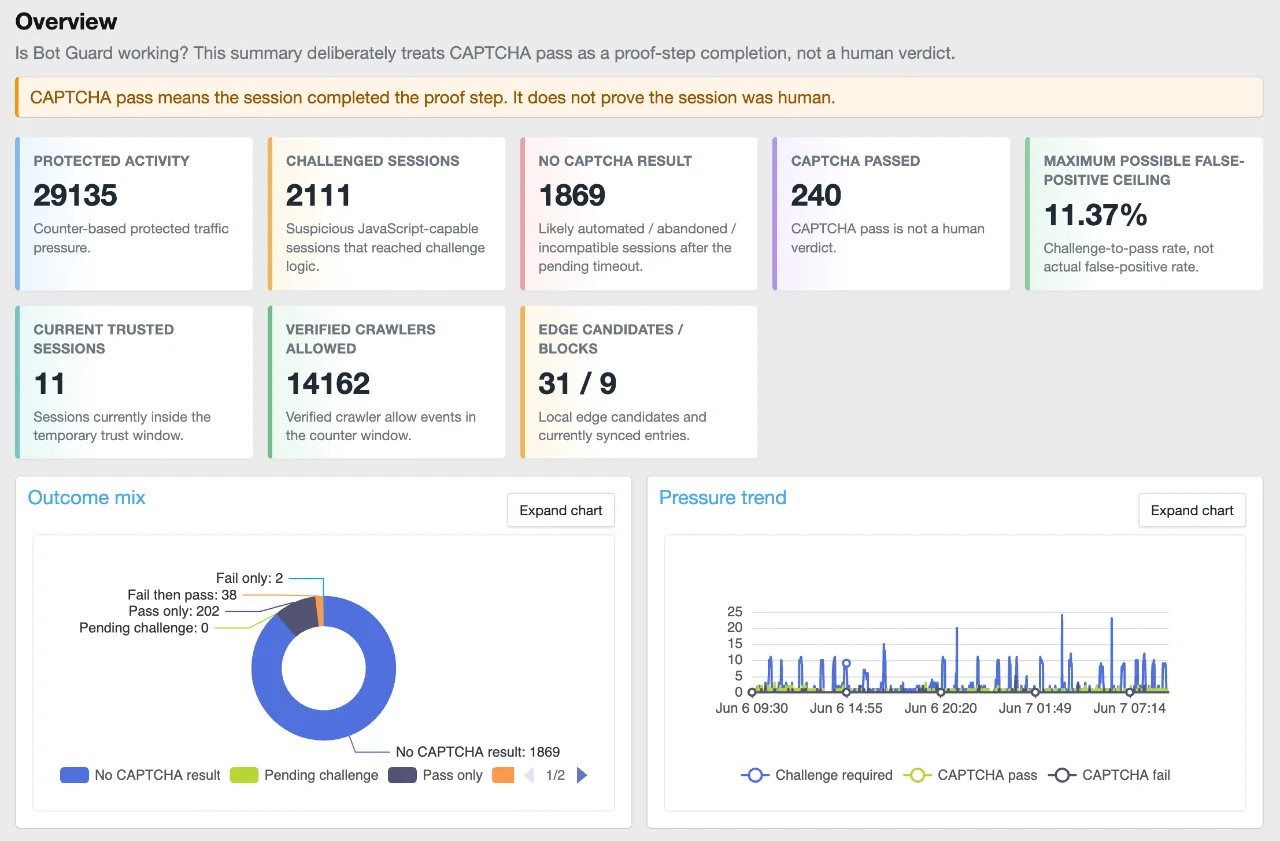
The screenshot above only shows part of it. There is quite a bit more further down the page, including traffic journey charts, challenge outcomes, interstitial/browser proof activity, risk signals, route pressure, CAPTCHA trust-window behaviour, crawler health, Cloudflare Edge Enforcement status, system health, and raw drill-down links.
After upgrading, go to:
Admin Control Panel -> Add-ons -> XF Bot Guard -> Dashboard
And enjoy.
Changes
Before this release, XF Bot Guard already recorded a lot of useful information, but most of it lived in logs, counters, health pages, and specialised admin screens.
That was useful for debugging, but not ideal for quickly answering the big question:
Is Bot Guard working?
The new dashboard is intended to answer that quickly.
Instead of making you dig through raw events first, XF Bot Guard now gives you a visual summary of what it is seeing and how traffic is moving through the protection layers.
In plain terms, the dashboard helps show:
One important part of this dashboard is the wording.
XF Bot Guard does not present a CAPTCHA pass as proof that a visitor is human.
A CAPTCHA pass means the session completed the proof step. It does not prove the session was human.
That distinction matters.
The dashboard deliberately uses wording such as:
Bot Guard is a layered system. Some weak bots are handled before CAPTCHA. Some suspicious JavaScript-capable sessions reach CAPTCHA. Some complete the proof step. Some fail. Some vanish. Some are temporarily trusted and later re-evaluated.
The new dashboard is built around that model.
The traffic journey is now much clearer
The new funnel chart is one of the most useful parts of the dashboard.
It shows the broad journey:
Release type: Major update
This release adds the new XF Bot Guard Dashboard, a visual single-page overview designed to show what Bot Guard is doing, why traffic is being challenged, where suspicious activity is coming from, and whether the system is healthy.
This is not just a prettier log page.
The dashboard is designed to tell the full Bot Guard story:
- what protected traffic Bot Guard saw;
- what was handled before CAPTCHA;
- what reached the CAPTCHA;
- what passed, failed, or never completed the challenge;
- why sessions were considered suspicious;
- which routes are under pressure;
- what crawlers and edge systems are doing;
- whether the underlying telemetry and cleanup systems look healthy.
The screenshot above only shows part of it. There is quite a bit more further down the page, including traffic journey charts, challenge outcomes, interstitial/browser proof activity, risk signals, route pressure, CAPTCHA trust-window behaviour, crawler health, Cloudflare Edge Enforcement status, system health, and raw drill-down links.
After upgrading, go to:
Admin Control Panel -> Add-ons -> XF Bot Guard -> Dashboard
And enjoy.
Changes
- Added a new single-page visual Dashboard for XF Bot Guard.
- Added dashboard charts using locally bundled Apache ECharts.
- Added a clear overview section showing protected activity, challenged sessions, no CAPTCHA result sessions, CAPTCHA passes, current trusted sessions, crawler activity, and edge candidate/block counts.
- Added a traffic journey funnel showing the path from protected request through browser proof, risk checks, CAPTCHA challenge, CAPTCHA outcome, temporary trust, and rechallenge behaviour.
- Added challenge outcome reporting, including pass-only, fail-only, fail-then-pass, pending challenge, and no CAPTCHA result sessions.
- Added counter-based pressure trend charts for challenge/pass/fail activity.
- Added interstitial and browser validation reporting so site owners can see what is being handled before CAPTCHA.
- Added risk signal reporting, including top reason codes and risk score distribution.
- Added route pressure reporting to show which areas of the forum are attracting the most suspicious challenge activity.
- Added CAPTCHA trust-window reporting, including current trusted sessions and rechallenge behaviour after trust expiry.
- Added crawler health visibility, including known and verified crawler activity.
- Added Cloudflare Edge Enforcement visibility to the dashboard where the edge feature is available.
- Added system health and telemetry availability reporting.
- Added raw drill-down links from the dashboard back into the existing event log.
- Added configurable counter retention via the new Counter retention hours option.
- Changed counter cleanup so it now respects the configured counter retention option instead of always pruning after 48 hours.
- Improved handling of malformed requests with no User-Agent header so collector-token unavailability is handled cleanly without noisy server error logging.
- Improved dashboard table scrolling, chart spacing, chart expansion, and admin-page usability.
Before this release, XF Bot Guard already recorded a lot of useful information, but most of it lived in logs, counters, health pages, and specialised admin screens.
That was useful for debugging, but not ideal for quickly answering the big question:
Is Bot Guard working?
The new dashboard is intended to answer that quickly.
Instead of making you dig through raw events first, XF Bot Guard now gives you a visual summary of what it is seeing and how traffic is moving through the protection layers.
In plain terms, the dashboard helps show:
- how much protected traffic is being seen;
- how much suspicious traffic is reaching challenge logic;
- how much is failing or disappearing before completing CAPTCHA;
- which requests are likely automated, abandoned, or incompatible;
- which routes are attracting suspicious activity;
- which risk signals are causing challenges;
- whether crawlers and Cloudflare Edge Enforcement are behaving as expected;
- whether your telemetry is complete enough for each report.
One important part of this dashboard is the wording.
XF Bot Guard does not present a CAPTCHA pass as proof that a visitor is human.
A CAPTCHA pass means the session completed the proof step. It does not prove the session was human.
That distinction matters.
The dashboard deliberately uses wording such as:
- No CAPTCHA result
- Pending challenge
- Temporary trust window
- Maximum possible false-positive ceiling
- CAPTCHA pass is not a human verdict
Bot Guard is a layered system. Some weak bots are handled before CAPTCHA. Some suspicious JavaScript-capable sessions reach CAPTCHA. Some complete the proof step. Some fail. Some vanish. Some are temporarily trusted and later re-evaluated.
The new dashboard is built around that model.
The traffic journey is now much clearer
The new funnel chart is one of the most useful parts of the dashboard.
It shows the broad journey:
Pour consulter le contenu, vous devez : Se connecter ou S'inscrire.
XF Bot Guard 1.2.3
Release type: Major update
Important: please read before upgrading
XF Bot Guard 1.2.3 is a major database, retention, reporting, and cleanup update.
This is not an update that very large forums should blindly apply without first choosing the right upgrade path.
For most small and medium forums, the normal XenForo add-on upgrade process should be fine.
For very large forums, this release may take considerably longer to upgrade because existing Bot Guard data needs to be migrated into the new structure, including internal hash storage changes and event-detail storage changes.
Before upgrading, decide which path makes sense:
If you run a very large forum and do not care about old Bot Guard telemetry, the clean uninstall/delete/install path may be the better option.
Review your retention settings after upgrading
XF Bot Guard 1.2.3 changes the retention model.
Some retention settings have moved from day-based retention to hour-based retention, and new defaults have been introduced.
After upgrading, review the new retention options and consider whether your previous settings still make sense.
The recommended starting point is to try the new defaults first.
New retention defaults
Raw event, visitor, session, and counter retention is capped at:
The new model is designed around:
If you previously increased raw retention mainly for dashboard visibility, you may no longer need to keep raw Bot Guard data for as long.
Similarly, if you previously decreased raw retention mainly to control database growth, you may wish to revise it now that cleanup and snapshot reporting have changed.
Thank you to @eva2000
A quick thank you to @eva2000 for an extensive and very useful data-growth and storage report, which helped inform the nature of this update.
That report highlighted the practical reality that very active forums can generate a large amount of Bot Guard telemetry, and included several actionable points around retention, cleanup, database growth, and long-term reporting.
XF Bot Guard 1.2.3 is largely about addressing that properly.
What this release does
This release makes the dashboard more practical long-term, especially on busy forums where keeping every raw Bot Guard event forever is not realistic.
It adds hourly dashboard snapshots, new retention options, safer cleanup behaviour, and internal database storage improvements designed to reduce database pressure over time.
In plain terms:
Release type: Major update
Important: please read before upgrading
XF Bot Guard 1.2.3 is a major database, retention, reporting, and cleanup update.
This is not an update that very large forums should blindly apply without first choosing the right upgrade path.
For most small and medium forums, the normal XenForo add-on upgrade process should be fine.
For very large forums, this release may take considerably longer to upgrade because existing Bot Guard data needs to be migrated into the new structure, including internal hash storage changes and event-detail storage changes.
Before upgrading, decide which path makes sense:
- Normal upgrade: preserves existing Bot Guard history, events, counters, sessions, visitors, and telemetry, but may take longer on large forums.
- Clean install: write down your Bot Guard configuration, uninstall/delete Bot Guard, install 1.2.3 fresh, then re-enter your configuration. This avoids migrating old Bot Guard telemetry, but historical Bot Guard data will be lost.
If you run a very large forum and do not care about old Bot Guard telemetry, the clean uninstall/delete/install path may be the better option.
Review your retention settings after upgrading
XF Bot Guard 1.2.3 changes the retention model.
Some retention settings have moved from day-based retention to hour-based retention, and new defaults have been introduced.
After upgrading, review the new retention options and consider whether your previous settings still make sense.
The recommended starting point is to try the new defaults first.
New retention defaults
| Data type | Default | Plain English |
|---|---|---|
| Raw event data | 336 hours | 14 days |
| Visitor data | 336 hours | 14 days |
| Session data | 336 hours | 14 days |
| Counter data | 336 hours | 14 days |
| Dashboard snapshots | 17,520 hours | 2 years |
| Zero-signal IP data | 2,160 hours | 90 days |
Raw event, visitor, session, and counter retention is capped at:
Code:
720 hours
= 30 days
The new model is designed around:
Code:
shorter raw data retention
+ longer dashboard snapshot retention
= useful long-term visibility without unnecessary raw database growth
If you previously increased raw retention mainly for dashboard visibility, you may no longer need to keep raw Bot Guard data for as long.
Similarly, if you previously decreased raw retention mainly to control database growth, you may wish to revise it now that cleanup and snapshot reporting have changed.
Thank you to @eva2000
A quick thank you to @eva2000 for an extensive and very useful data-growth and storage report, which helped inform the nature of this update.
That report highlighted the practical reality that very active forums can generate a large amount of Bot Guard telemetry, and included several actionable points around retention, cleanup, database growth, and long-term reporting.
XF Bot Guard 1.2.3 is largely about addressing that properly.
What this release does
This release makes the dashboard more practical long-term, especially on busy forums where keeping every raw Bot Guard event forever is not realistic.
It adds hourly dashboard snapshots, new retention options, safer cleanup behaviour, and internal database storage improvements designed to reduce database pressure over time.
In plain terms:
- the dashboard now has its own long-term snapshot data;
- raw event/session/visitor/counter data can be retained for a shorter period;
- longer-term dashboard reporting can still remain available;
- cleanup now works in safer batches;
- several internal hash fields are migrated to more compact binary storage;
- large forums get a more sustainable path forward, but should choose their upgrade path carefully.
Pour consulter le contenu, vous devez : Se connecter ou S'inscrire.
![[XenSupport] Ping 1.1.0](https://www.societyfrenchmodding.net/data/attachments/12/12295-11dadf460ff5f80fc0d38d079164df28.jpg)
![[XFSkins] Top Members Widget 1.1.0](https://www.societyfrenchmodding.net/data/attachments/12/12220-35f6cb936c41de3cdfe058b39742367d.jpg)


![[Wutime] Emoji & Smiley Guard v1.0.4](https://www.societyfrenchmodding.net/data/attachments/10/10939-55ad5bea4fcee9c3c9d7856a0b20b4bf.jpg)


