![[ITD] Remove User Signatures from Selected Nodes - XF 2.0 to 2.3 2.3.0](https://www.societyfrenchmodding.net/data/attachments/12/12303-82293ee2b6024ec470ad5f3efd9f86b0.jpg)


[ITD] Remove User Signatures from Selected Nodes is a clean, lightweight and stable addon that allows you to completely remove user signatures from any specific forums/nodes while keeping them visible in other areas.
This addon is especially useful for announcement forums, support sections, selling/marketplace forums, or any area where you want a cleaner and more professional appearance.
Key Features
License Agreement
ITD Standard License
This is a Free Addon developed by Mian Shahid (ITD).
 You are allowed to:
 You are not allowed to:
Premium / Paid versions of this and other addons may be released in the future with additional features and stricter licensing terms.
---
Copyright © 2026 Mian Shahid (ITD) — All Rights Reserved.
By downloading or using this resource, you agree to abide by the above terms.
SCREEN SHOTS
Before:
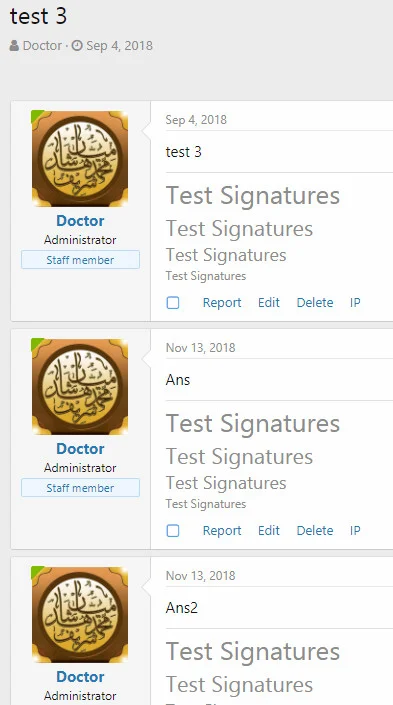
After:
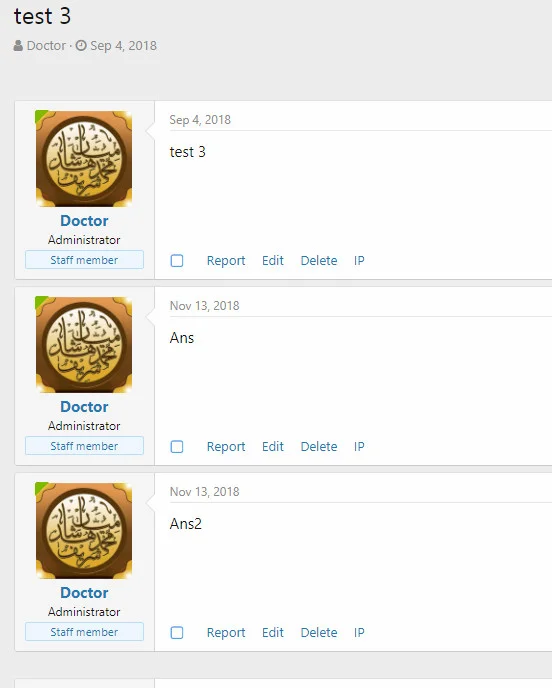
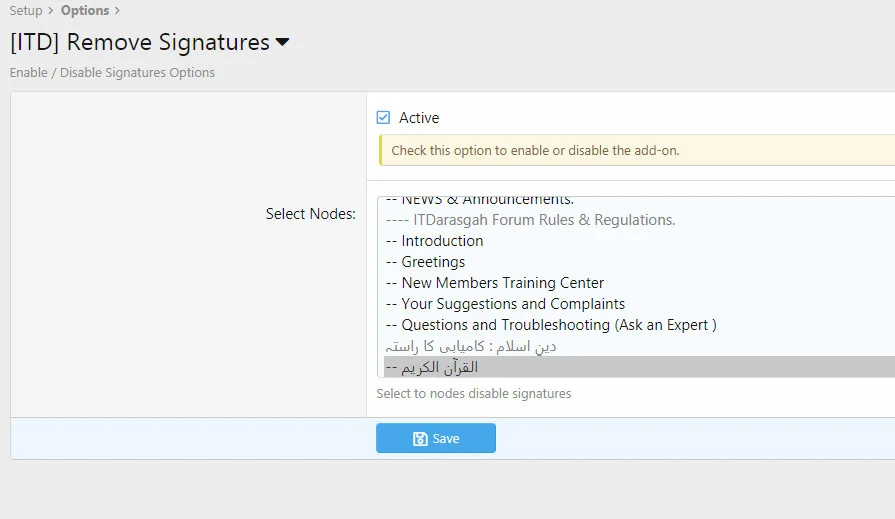
Options: You can select required forums as per below example.
Télécharger V2.3.0 :
This addon is especially useful for announcement forums, support sections, selling/marketplace forums, or any area where you want a cleaner and more professional appearance.
Key Features
- Remove signatures from selected nodes only
- Full compatibility with XenForo 2.0, 2.1, 2.2 and 2.3
- Easy configuration via Admin Control Panel
- Supports comma separated Node IDs
- Very lightweight with no performance impact
- Stable and well-tested template modifications
- XenForo 2.0
- XenForo 2.1
- XenForo 2.2
- XenForo 2.3
- Download the addon zip file and extract it.
- Log in to your XenForo Admin Control Panel.
- Go to Add-ons → Install Add-on
- Upload the XML file from the addon package.
- After successful installation, go to Options → [ITD] Remove Signatures
- Enable the addon and enter the Node IDs (comma separated) where you want to hide signatures.
- Go to Development → Rebuild Templates and run the rebuild.
License Agreement
ITD Standard License
This is a Free Addon developed by Mian Shahid (ITD).
You are allowed to:- Use this addon on any number of your own websites (personal or commercial use)
- Customize the addon for your own needs
- Use it on both live and test installations
You are not allowed to:- Redistribute, resell, share, or leak this addon (free or modified)
- Remove or hide the copyright notice / developer credits
- Rebrand or release this addon (or any modified version) as your own
Premium / Paid versions of this and other addons may be released in the future with additional features and stricter licensing terms.
---
Copyright © 2026 Mian Shahid (ITD) — All Rights Reserved.
By downloading or using this resource, you agree to abide by the above terms.
SCREEN SHOTS
Before:
After:
Options: You can select required forums as per below example.
Télécharger V2.3.0 :
Pour consulter le contenu, vous devez : Se connecter ou S'inscrire.
![[XFSkins] Top Members Widget 1.1.0](https://www.societyfrenchmodding.net/data/attachments/12/12220-35f6cb936c41de3cdfe058b39742367d.jpg)
![[MrX] Visible User Groups 1.0.5](https://www.societyfrenchmodding.net/data/avatars/l/0/2.jpg)
![[cXF] Remove Location, Website and About you field 1.4.4](https://www.societyfrenchmodding.net/data/attachments/3/3883-222b3d836f67f155265ade8287626e93.jpg)
![[MMO] Tagged Users 2.1.2 ( tag couleur )](https://www.societyfrenchmodding.net/data/avatars/s/0/2.jpg)
