![[N.O.V.A.] AdminCP Server Information 2.0.1](https://www.societyfrenchmodding.net/data/attachments/11/11342-335fca9805844f98f4ca61990c5dfe86.jpg)


Additional requirements :
- PHP 8.0 or newer
- Linux server (recommended)
- shell_exec() enabled for full functionality
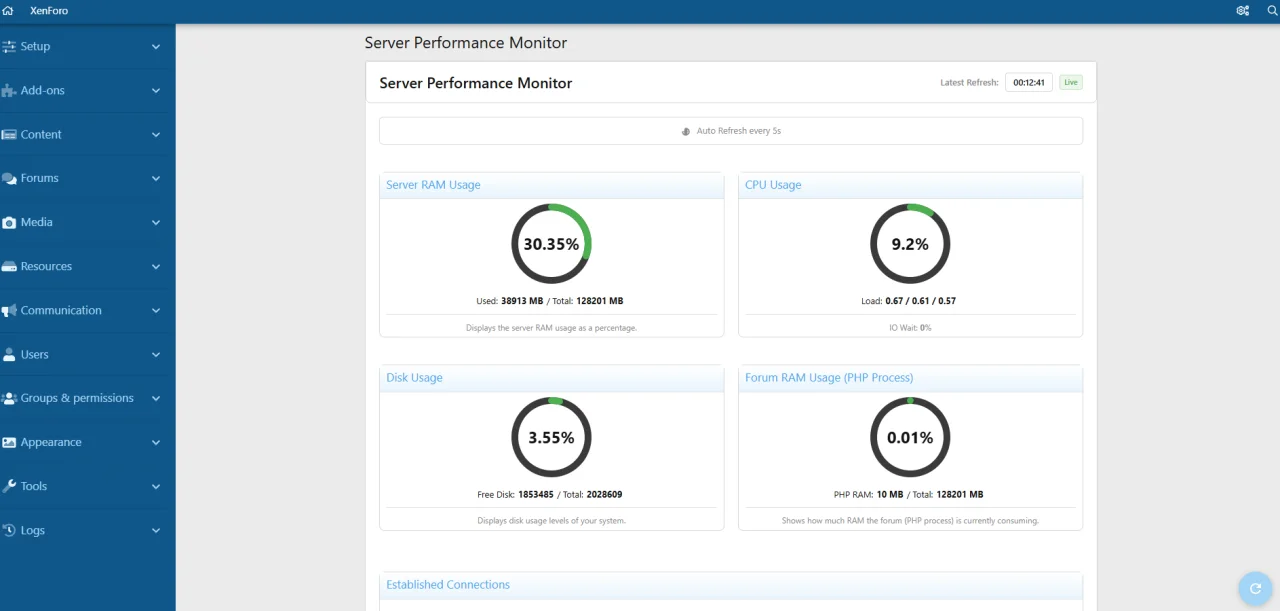
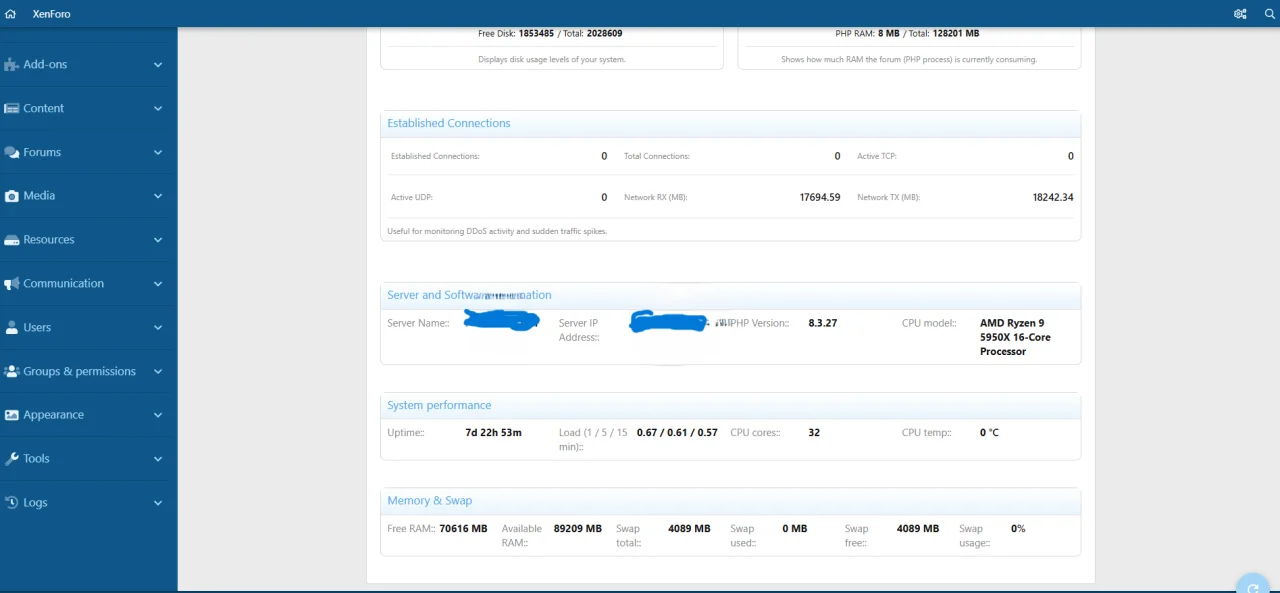
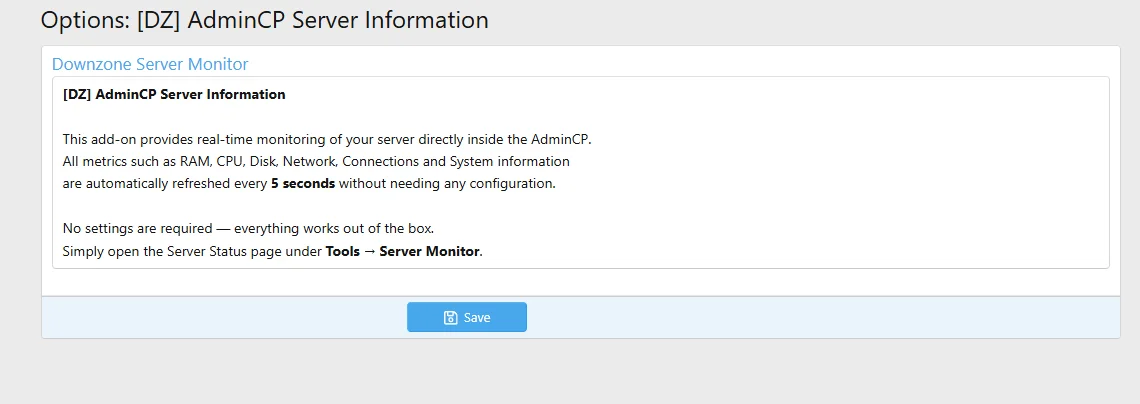
This add-on adds a fully dynamic Server Status Dashboard directly inside your AdminCP, refreshing automatically every 5 seconds.
Just install the add-on — the monitoring dashboard becomes available under:
AdminCP → Tools → Server Monitor
Télécharger V1.1.0 :
 Version 1.2.0 Released!
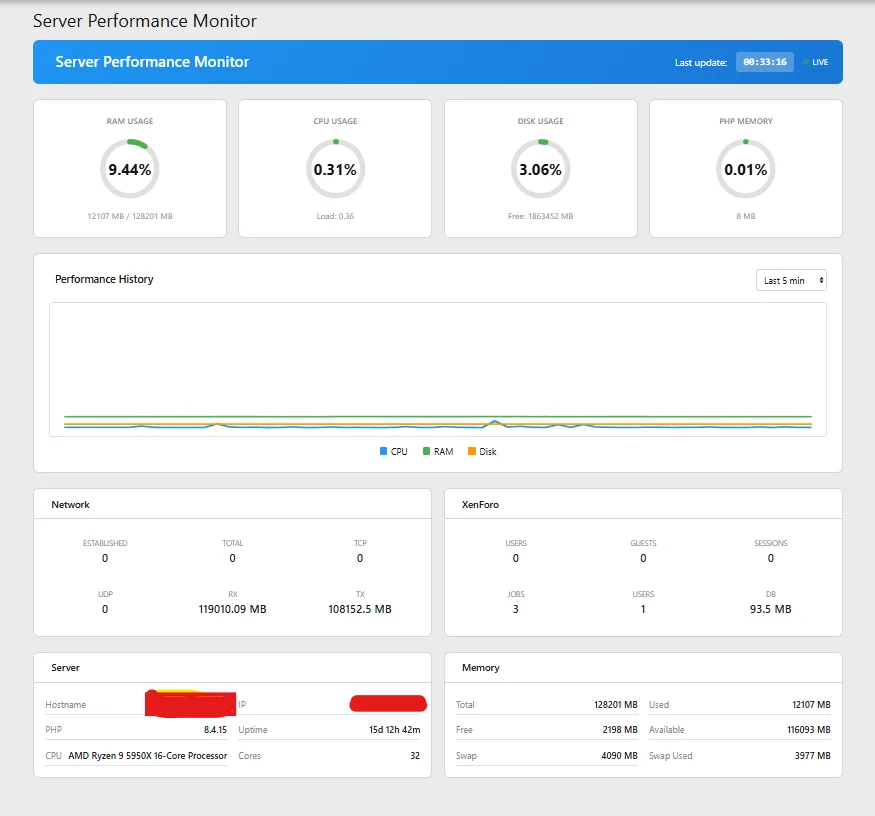
This is a major feature update bringing live performance monitoring, accurate CPU measurement, and a completely redesigned interface.
 New Features
 Technical Improvements
 UI/UX Improvements
 Requirements
 Upgrade Instructions
Simply upload the new files and rebuild the add-on from AdminCP → Add-ons → [DZ] AdminCP Server Information → Rebuild.
Télécharger V1.2.2 :
DZMods is now N.O.V.A. Digital Studio. Version 2.0.0 is a complete rebuild published under the new NOVA/ServerInformation add-on ID. The legacy DZ/Server edition remains separate: disable it before installing this release. This prevents the new code from overwriting or modifying the old add-on.
What is new in 2.0.0
• Modern responsive AdminCP dashboard with light and dark style support
• Accurate Linux metrics from PHP and /proc, without fabricated fallback values
• Dedicated FreeBSD and Windows collectors with bounded command execution
• CPU, load, I/O wait, memory, swap, disk, network and connection monitoring
• XenForo sessions, jobs, cron, content, database and optional OPcache metrics
• Five-minute scheduled history with 30, 60, 90 or 365-day retention
• History charts for 1 hour through 90 days
• Manual refresh and configurable automatic refresh intervals
• Separate administrator permissions for viewing, CSV export and sensitive hostname/IP data
• Sensitive server details disabled by default
• CSV snapshot export
• Built-in English, German, Croatian, Turkish, Russian and French translations
• Automatic XenForo language detection, configurable fallback and manual language override
• N.O.V.A. Digital Studio branding and footer
Upgrade / installation
1. Disable [DZ] AdminCP Server Information.
2. Upload and install [N.O.V.A.] AdminCP Server Information 2.0.0.
3. Review the new administrator permissions and add-on options.
The old add-on can remain disabled as a rollback reference. Version 2.0.0 does not modify its files or data.
The 2.0.0 ZIP placed src/ and js/ at the archive root, which XenForo's AdminCP web installer rejects. Version 2.0.1 now uses the required upload/ root and passes XenForo's native AddOnArchive validator.
There are no runtime behavior or stored-data changes. Existing 2.0.0 installations can update normally. If you downloaded 2.0.0 but could not install it, please download version 2.0.1.
Télécharger V2.0.1 :
- PHP 8.0 or newer
- Linux server (recommended)
- shell_exec() enabled for full functionality
[DZ] AdminCP Server Information
A lightweight but powerful system monitoring tool for XenForo 2.This add-on adds a fully dynamic Server Status Dashboard directly inside your AdminCP, refreshing automatically every 5 seconds.
 Features
- Real-time server monitoring (RAM, CPU, Disk, PHP memory)
- Live network usage (RX/TX)
- Active TCP/UDP connections
- Load averages (1 / 5 / 15 min)
- Uptime, hostname, IP address
- CPU model, core count, temperature (Linux)
- Automatic detection of system resources
- Zero configuration required
- Clean gauge-based UI optimized for XenForo 2.3 admin style
- Works across shared, VPS, dedicated and bare-metal servers
 What is monitored?
- RAM usage + available memory
- CPU usage + IO wait
- Disk capacity + free space
- PHP memory used by XenForo
- Network RX/TX since boot
- Established connections (useful for DDoS detection)
- System performance summary
 No setup required
Just install the add-on — the monitoring dashboard becomes available under:AdminCP → Tools → Server Monitor
🛠 Compatibility
- XF 2.3
- Works on all modern Linux systems
- Windows mode supported (limited metrics)
 Ideal use cases
- Monitoring server load on busy communities
- Debugging performance bottlenecks
- Detecting suspicious network activity
- AdminCP diagnostics & maintenance
Télécharger V1.1.0 :
Pour consulter le contenu, vous devez : Se connecter ou S'inscrire.
Version 1.2.0 Released!This is a major feature update bringing live performance monitoring, accurate CPU measurement, and a completely redesigned interface.
New Features- Live Performance Chart - Real-time rolling graph that updates every 5 seconds
- Time Range Selector - Choose between Last 5 min, 1 hour, 6 hours, or 24 hours view
- 4 Circular Gauges - Beautiful new gauge design showing RAM, CPU, Disk, and PHP Memory at a glance
- XenForo Metrics - Now displays users online, guests, active sessions, pending jobs, total users, and database size
- Hourly Stats History - Automatic hourly data collection for historical charts
- Live Status Indicator - Shows real-time connection status with auto-refresh countdown
Technical Improvements- Accurate CPU Measurement - Now uses /proc/stat sampling instead of top snapshot for much more stable and accurate CPU readings
- No jQuery Dependency - Rewritten in pure vanilla JavaScript for better compatibility
- Improved Caching - Smart caching to reduce server load
- Better Error Handling - More robust error recovery during AJAX refreshes
UI/UX Improvements- Completely redesigned dashboard layout
- Responsive 4-column gauge row
- Modern card-based statistics display
- Floating refresh button with spin animation
- Smooth chart animations
Requirements- XenForo 2.2+
- PHP 8.0+
Upgrade InstructionsSimply upload the new files and rebuild the add-on from AdminCP → Add-ons → [DZ] AdminCP Server Information → Rebuild.
Version 1.2.2 - Performance History Chart Improvements & Dark Mode Compatibility
Performance History Chart Enhancements
 Dark Mode Compatibility
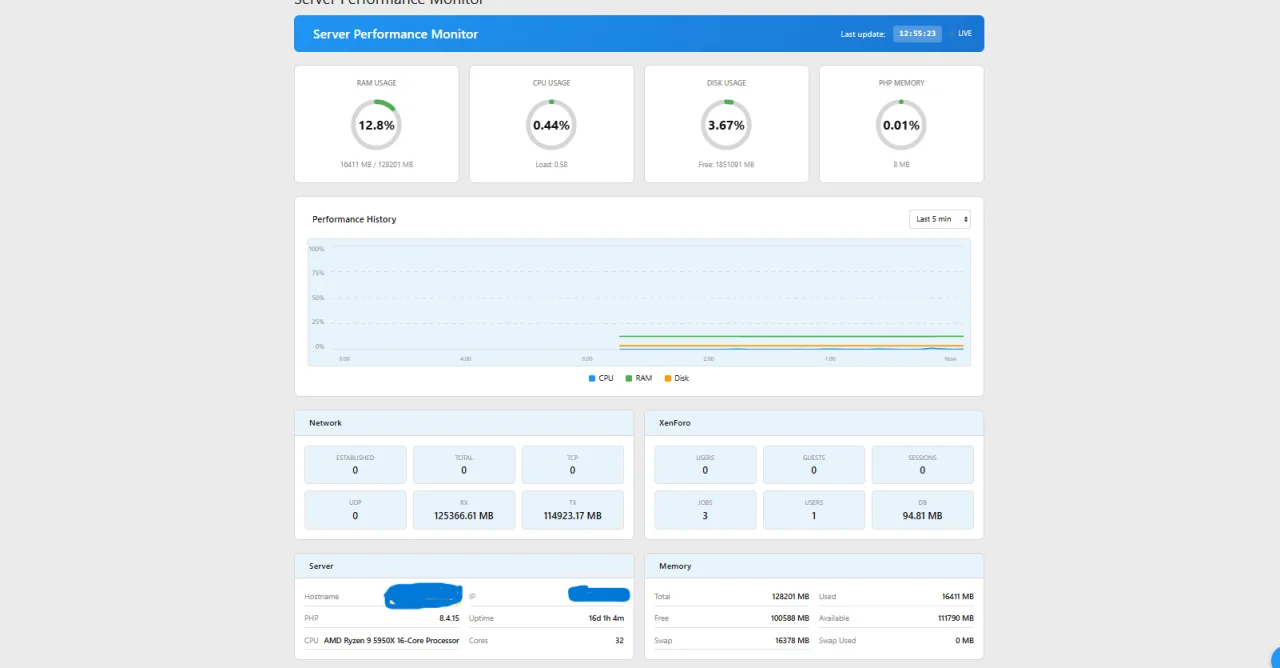
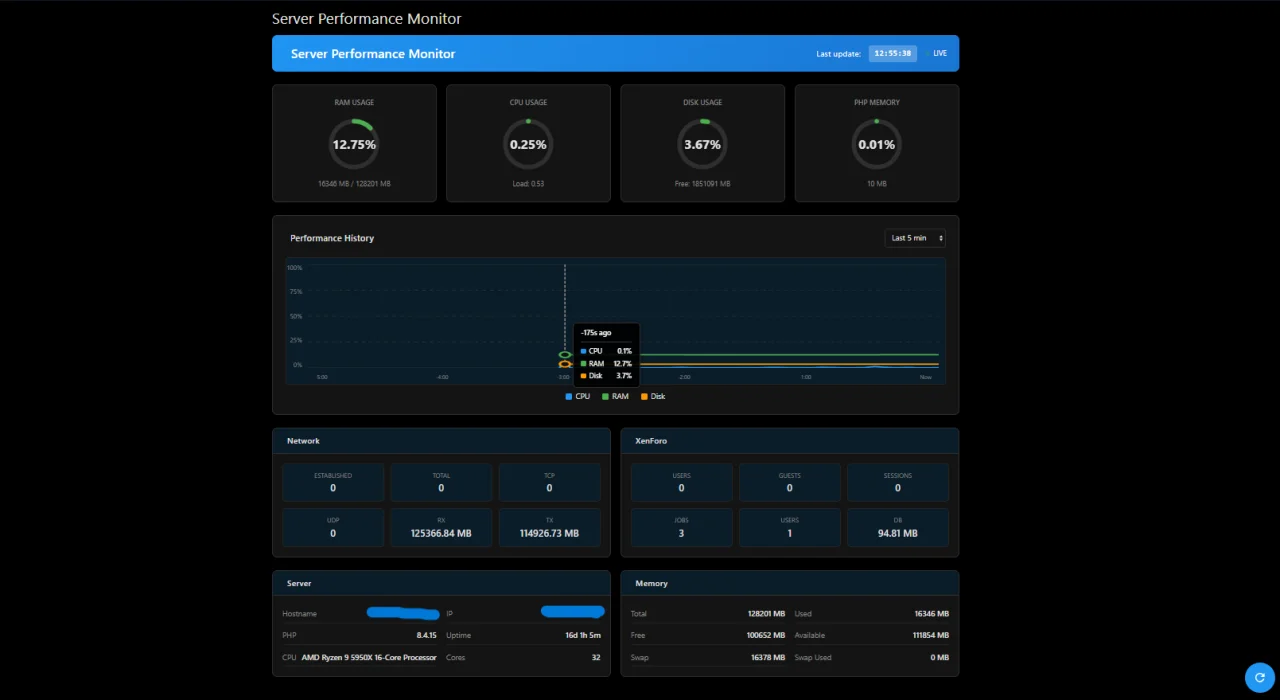
 Technical Changes
Simply upload and rebuild from AdminCP. No database changes required.
Performance History Chart Enhancements- Grid Lines - Added horizontal grid lines for easier value reading (dotted lines at 25%, 50%, 75%)
- Y-Axis Labels - Chart now displays percentage scale (0%, 25%, 50%, 75%, 100%) on the left side
- X-Axis Time Labels - Time indicators at the bottom showing relative time (-5:00, -4:00, ... Now)
- Interactive Tooltip- Hover over the chart to see detailed values:
- Vertical indicator line follows your cursor
- Colored data points highlighted on each line
- Tooltip displays CPU, RAM, and Disk values with timestamps
- Dynamic Time Scale - X-axis labels automatically adjust based on selected time range (5min/1h/6h/24h)
Dark Mode Compatibility- Fixed card headers - Network, XenForo, Server, Memory cards now display correctly in dark mode
- Fixed stat boxes - All metric boxes now have proper background and text colors
- Fixed text visibility - All values and labels are now clearly visible in both light and dark themes
- Chart background - Properly adapts to current theme
- Grid lines - Use theme-aware colors for better visibility
Technical Changes- Replaced hard-coded colors with XenForo LESS variables (@xf-contentHighlightBg, @xf-textColor, etc.)
- Improved template structure for better theme compatibility
- Added border styling to stat boxes for better definition
Simply upload and rebuild from AdminCP. No database changes required.
Pour consulter le contenu, vous devez : Se connecter ou S'inscrire.
Version 2.0.0 — N.O.V.A. rebrand and complete rebuild
Important brand and add-on identity changeDZMods is now N.O.V.A. Digital Studio. Version 2.0.0 is a complete rebuild published under the new NOVA/ServerInformation add-on ID. The legacy DZ/Server edition remains separate: disable it before installing this release. This prevents the new code from overwriting or modifying the old add-on.
What is new in 2.0.0
• Modern responsive AdminCP dashboard with light and dark style support
• Accurate Linux metrics from PHP and /proc, without fabricated fallback values
• Dedicated FreeBSD and Windows collectors with bounded command execution
• CPU, load, I/O wait, memory, swap, disk, network and connection monitoring
• XenForo sessions, jobs, cron, content, database and optional OPcache metrics
• Five-minute scheduled history with 30, 60, 90 or 365-day retention
• History charts for 1 hour through 90 days
• Manual refresh and configurable automatic refresh intervals
• Separate administrator permissions for viewing, CSV export and sensitive hostname/IP data
• Sensitive server details disabled by default
• CSV snapshot export
• Built-in English, German, Croatian, Turkish, Russian and French translations
• Automatic XenForo language detection, configurable fallback and manual language override
• N.O.V.A. Digital Studio branding and footer
Upgrade / installation
1. Disable [DZ] AdminCP Server Information.
2. Upload and install [N.O.V.A.] AdminCP Server Information 2.0.0.
3. Review the new administrator permissions and add-on options.
The old add-on can remain disabled as a rollback reference. Version 2.0.0 does not modify its files or data.
Version 2.0.1 – XenForo package installation fix
Version 2.0.1 corrects the downloadable archive structure.The 2.0.0 ZIP placed src/ and js/ at the archive root, which XenForo's AdminCP web installer rejects. Version 2.0.1 now uses the required upload/ root and passes XenForo's native AddOnArchive validator.
There are no runtime behavior or stored-data changes. Existing 2.0.0 installations can update normally. If you downloaded 2.0.0 but could not install it, please download version 2.0.1.
Télécharger V2.0.1 :
Pour consulter le contenu, vous devez : Se connecter ou S'inscrire.
![[N.O.V.A.] ImageShield 2.0.0](https://www.societyfrenchmodding.net/data/attachments/11/11576-03be40ce298182568ba921cc692c0736.jpg)
![[N.O.V.A.] AutoDelete 2.1.2](https://www.societyfrenchmodding.net/data/attachments/11/11348-3b1d5fea4530bd9d831e0ab9ee5a8ea6.jpg)

![[NX] AdminCP Server Information 1.0.0](https://www.societyfrenchmodding.net/data/attachments/11/11254-087cb4abae511df7c896eb40b0ff98dc.jpg)

![[DCom] AdminCP Style 2.2.9](https://www.societyfrenchmodding.net/data/avatars/l/5/5476.jpg)
![[MMO] Custom Ban Information 2.1.1](https://www.societyfrenchmodding.net/data/attachments/3/3122-4d776e971439c1a93671361ac7e5c702.jpg)
