


This XenForo 2.x addon adds logging functionality using the Monolog library from Seldaek/monolog
Features :
Usage Instructions
By default, this addon will log events to a file called
To use the default logging facility, do the following in your addon code :
However, it is recommended that you create your own channel for your addon to make it easier to filter log entries :
Refer to the documentation for more detailed usage instructions for Monolog.
You can create your own handler stack to customise how things are logged :
Refer to Handlers, Formatters and Processors for more information.
Télécharger V3.1.1 :
Version 4.0.0 implememts Monolog v2
Important to note is that the default date format in logs has changed for v2 - but for backwards compatibility I have reset the date format to that used by v1.
There is no new functionality in this version.
If you need Monolog v1 support - stay on the 3.x version of this addon - I will maintain that version for critical bugfixes.
Télécharger V4.0.0 :
Version 4.1.0 - XF 2.3 support :
- Added XF 2.3 support
Télécharger V4.1.0 :
Version 4.1.1 minor bugfix - assert admin permission on tools :
- Minor bugfix to explicitly enforce admin permissions on admincp tools.
Télécharger V4.1.1 :
Features :
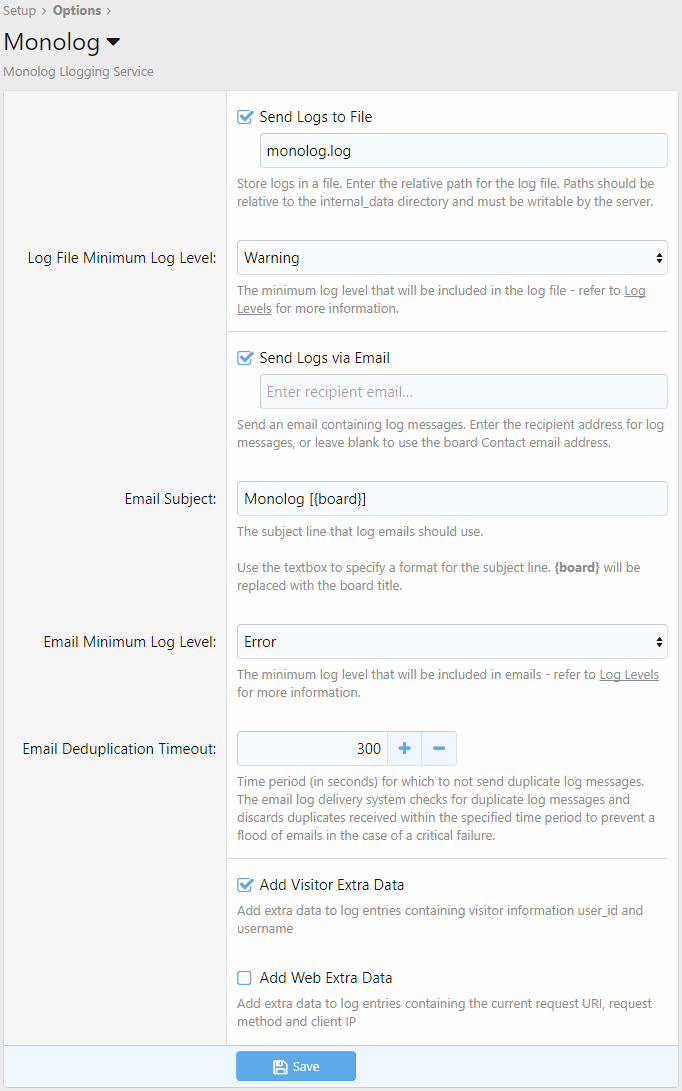
- Log to a file
- Send logs via email
- Emailed logs are deduplicated and buffered
- Configure minimum logging levels for files vs email logging
- Add extra visitor data to logs: user_id and username
- Add extra web data to logs: current request URI, request method and client IP
- Test tool included to verify that logs are being written to disk - go to
AdminCP > Tools > Checks and tests > Test Monolog
Usage Instructions
By default, this addon will log events to a file called
internal_data/monolog.log - this is configurable.To use the default logging facility, do the following in your addon code :
PHP:
use Monolog\Helper\Log;
Log::info('an info message', ['context' => 'foo']);
Log::error('an error message', ['data' => 'bar']);
However, it is recommended that you create your own channel for your addon to make it easier to filter log entries :
PHP:
$logger = \XF::app()->get('monolog')->newChannel('myaddon');
$logger->warning('a warning message', ['context' => 'foo']);
Refer to the documentation for more detailed usage instructions for Monolog.
You can create your own handler stack to customise how things are logged :
PHP:
use Monolog\Logger;

$monolog = \XF::app()->get('monolog');
$streamhandler = $monolog->stream(); // return our default stream handler for logging to a file
                            //(or create your own!)

/** @var Monolog\Logger $logger */
$logger = $monolog->logger('myaddon');
$logger->pushHandler($streamhandler); // push our stream handler onto the handler stack
// you can apply any other customisations you like here as well by adding custom handlers, formatters or processors

$logger->critical('a critical message', ['context' => 'foo']);
Refer to Handlers, Formatters and Processors for more information.
Télécharger V3.1.1 :
Pour consulter le contenu, vous devez : Se connecter ou S'inscrire.
Version 4.0.0 implememts Monolog v2
Important to note is that the default date format in logs has changed for v2 - but for backwards compatibility I have reset the date format to that used by v1.
There is no new functionality in this version.
If you need Monolog v1 support - stay on the 3.x version of this addon - I will maintain that version for critical bugfixes.
Télécharger V4.0.0 :
Pour consulter le contenu, vous devez : Se connecter ou S'inscrire.
Version 4.1.0 - XF 2.3 support :
- Added XF 2.3 support
Télécharger V4.1.0 :
Pour consulter le contenu, vous devez : Se connecter ou S'inscrire.
Version 4.1.1 minor bugfix - assert admin permission on tools :
- Minor bugfix to explicitly enforce admin permissions on admincp tools.
Télécharger V4.1.1 :
Pour consulter le contenu, vous devez : Se connecter ou S'inscrire.
Version 4.1.2 (2025-12-12)
- run enqueuePostUpgradeCleanUp during upgrades if we're running XF2.3+
- latest composer dependencies
Pour consulter le contenu, vous devez : Se connecter ou S'inscrire.

![[OzzModz] Remove Reactions From What's New Page 2.0.2](https://www.societyfrenchmodding.net/data/avatars/s/0/2.jpg)

![[Synapse-Themes] Years of Service 1.0.2](https://www.societyfrenchmodding.net/data/attachments/10/10534-31d2693cc16c7618f23f12bf5d39ddb5.jpg?hash=-BZtpwxM1n)