[FX] Mail Filter is an outgoing email filtering and control add-on for XenForo 2.2+ and XenForo 2.3+. It prevents SMTP quota exhaustion, lowers third-party email provider bills, and protects your domain sender reputation by blocking non-essential background notifications while guaranteeing 100% reliable delivery for critical transactional emails (account activations, password resets, and two-factor authentication).
By default, XenForo generates massive volumes of outgoing automated emails:
1.
2.
3.
4.
Located at Admin CP > Communications > [FX] Mail Filter (admin.php?fx-mail-filter/):
5.
Navigate to Admin CP > Setup > Options > [FX] Mail Filter (admin.php?options/groups/fx_mailfilter/):
php cmd.php xf:addon-install FX/MailFilter
Télécharger V1.0.0 :
 Why [FX] Mail Filter?
By default, XenForo generates massive volumes of outgoing automated emails:- Replies to watched threads and new threads in watched forums.
- Personal conversation messages, replies, and participant invites.
- Periodic digests and activity summaries dispatched to inactive accounts.
- Moderation reports, approval queues, and routine password/email change notices.
- Quickly Exhausting Monthly SMTP Limits: Fast depletion of free and paid quotas on services like Gmail SMTP, SendGrid, Amazon SES, Resend, Mailgun, Postmark, and Brevo.
- Domain Sender Reputation Degradation: High bounce rates and unengaged recipients damage your domain's spam score, causing critical emails to land in spam folders.
- Database Bloat & Queue Overhead: Hundreds of thousands of deferred MailSend job records bog down your xf_job table and waste CPU cycles.
It intercepts outgoing emails before they hit your SMTP transport or job queue, ensuring that ONLY essential transactional emails reach members' inboxes
 Key Features
1.  Two Flexible Filter Modes
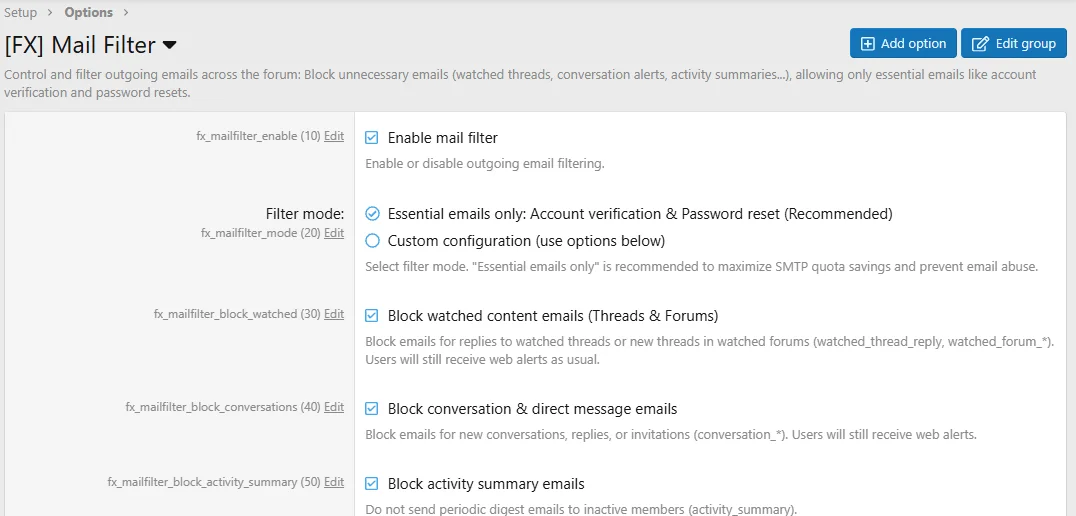
- Essential Emails Only (Recommended):
- Blocks all notification and digest emails automatically with zero configuration needed.
- Whitelists only essential security and transactional emails:
- user_email_confirmation — Account registration & email change confirmation.
- user_password_confirmation — Password reset link request.
- user_lost_password_reset — Successful password reset notice.
- user_security_lock_reset_confirmation — Security account unlock confirmation.
- two_step_login_email — Two-factor authentication (2FA) one-time login code.
- two_step_login_backup — Two-factor authentication backup code generation.
- Direct SMTP test emails sent from Admin CP > Tools > Test outbound email.
- Custom Configuration Mode:
- Granular toggle switches allowing you to selectively block or allow specific categories:
- Watched content emails: Block notifications for watched thread replies and watched forums. (Users still receive instant on-site web alerts!)
- Conversation emails: Block notifications for direct messages and conversations.
- Activity summary emails: Stop automated periodic newsletter digests.
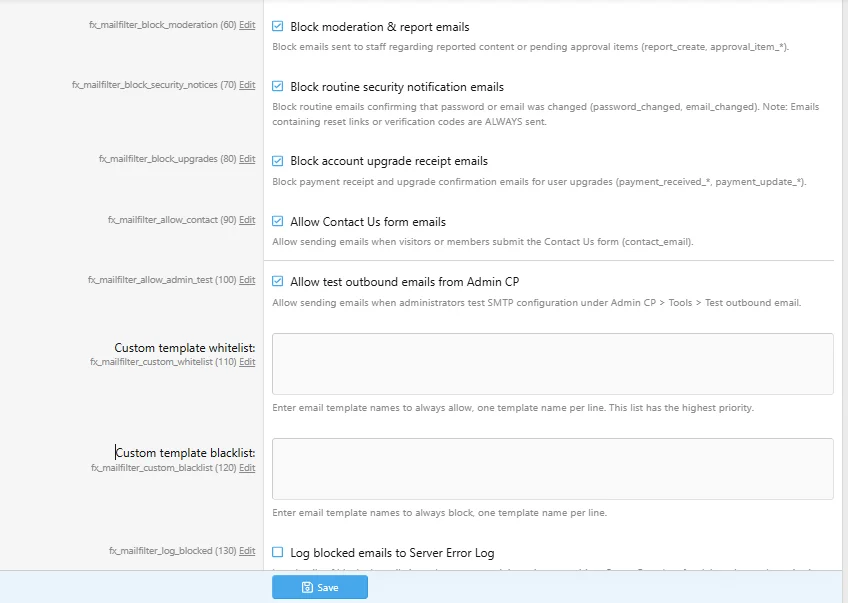
- Moderation & report emails: Prevent staff mailbox flooding from routine reports.
- Routine security change notices: Block informational notifications when an email or password was updated without affecting reset links.
- Account upgrade receipts: Block purchase receipts for user upgrades.
- Contact Us form messages: Keep public contact form submissions enabled for staff.
- Granular toggle switches allowing you to selectively block or allow specific categories:
2.  Multi-Layer Zero-Waste Architecture
- Layer 1 — Queue Interception (XF\Mail\Mail::queue()): Intercepts emails before they enter the deferred job queue, eliminating unnecessary MailSend records in xf_job.
- Layer 2 — Background Cron Optimization (XF\Job\ActivitySummaryEmail): Returns early ($this->complete()) when digests are disabled, saving 100% CPU overhead across thousands of member profiles.
- Layer 3 — Direct Send Guard (XF\Mail\Mailer::send()): Ensures direct mail dispatches from third-party add-ons are also evaluated against the filter rules before any SMTP connection is opened.
3.  Custom Whitelist & Blacklist
- Custom Template Whitelist: Enter specific template names (one per line) that should always be allowed regardless of active filter rules. Perfect for third-party commerce or ticket system add-ons.
- Custom Template Blacklist: Define custom templates that should always be blocked.
4.  Admin CP Dashboard & Analytics
Located at Admin CP > Communications > [FX] Mail Filter (admin.php?fx-mail-filter/):- Live Block Counter: Real-time counter of total emails prevented from hitting your SMTP provider, showing exact saved quota.
- Template Check Tool: Input any template name (e.g. watched_thread_reply, user_email_confirmation) to instantly preview whether it is allowed or blocked and why.
- Detected Templates Table: Comprehensive table of all XenForo email templates with color-coded badges ([Essential], [Allowed], [BLOCKED]) and plain-text rationales.
- 1-Click Member Preference Sync: Update existing members' preferences in xf_user_option in one click to stop email alerts at the source.
5.  Simulation / Test Mode
- Safely audit filter rules before going live. When enabled, emails send normally while simulated block entries are logged under Admin CP > Logs > Server error log.
 Configuration & Options Guide
Navigate to Admin CP > Setup > Options > [FX] Mail Filter (admin.php?options/groups/fx_mailfilter/):| Setting | Default | Description | Recommended |
|---|---|---|---|
| Filter Mode fx_mailfilter_mode | Essential only | Select between Essential emails only or Custom configuration. | Essential only |
| Custom template whitelist fx_mailfilter_whitelist | Empty | Template names to always permit (one per line). | As needed |
| Custom template blacklist fx_mailfilter_blacklist | Empty | Template names to always block (one per line). | As needed |
| Log blocked emails fx_mailfilter_log_blocked | Disabled | Record blocked attempts in Server Error Log for auditing. | As needed |
| Simulation / Test mode fx_mailfilter_simulation | Disabled | Log would-be blocks without actually stopping emails. | For initial testing |
System Requirements
- XenForo: 2.2.0 or higher (fully compatible with XenForo 2.2 SwiftMailer & XenForo 2.3+ Symfony Mailer).
- PHP: 7.4 to 8.4+.
- Database: MySQL 5.7+ / MariaDB 10.3+.
 Installation Guide
Method 1: Install via Admin CP (Recommended)
- Go to Admin CP > Add-ons.
- Click Install / upgrade from archive.
- Select the FX-MailFilter-1.0.0.zip package and click Upload.
- Confirm the installation prompts.
Method 2: Manual Installation via Directory
- Upload the FX/MailFilter directory to your web server at:
<web_root>/src/addons/FX/MailFilter - Navigate to Admin CP > Add-ons and click Install under [FX] Mail Filter.
Method 3: Command-Line Interface (CLI)
From your XenForo root directory, execute:php cmd.php xf:addon-install FX/MailFilter
Télécharger V1.0.0 :
Pour consulter le contenu, vous devez : Se connecter ou S'inscrire.