


Additional requirements : XenForo 2.3.12 or newer
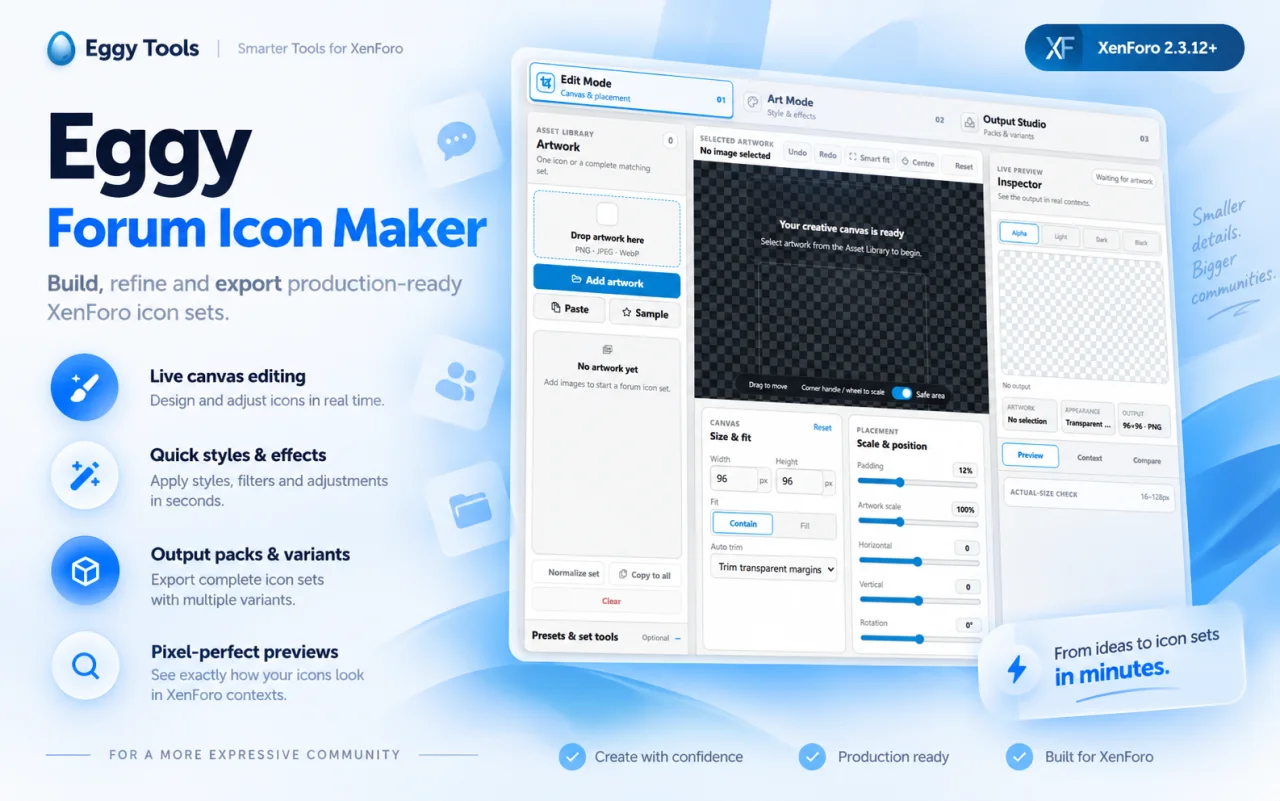
Instead of preparing every icon externally, resizing files one by one and repeatedly checking how they look against different backgrounds, Forum Icon Maker brings the entire workflow into one place. Import your artwork, position it on the canvas, apply styling and effects, preview it at real-world sizes, create visual variants and export production-ready icon packs.
Everything is designed around the sizes and presentation requirements of forum artwork rather than being a generic image editor.
Supported artwork formats include:
Artwork can also be copied between configurations, normalised as a set or used as the basis for saved presets.
You can:
The editor includes standard forum-icon sizes as well as support for custom dimensions.
Control how artwork fits the canvas using:
The workspace is divided into:
Available styling concepts include looks such as:
Create backgrounds directly behind your artwork using:
Available effect groups include:
Colour tools are designed to work alongside styles, backgrounds and effects, allowing different versions of the same source artwork to be created without maintaining multiple source files.
Variants are useful when you want:
Preview against:
Forum Icon Maker includes actual-size checks across common icon dimensions, including:
Built-in XenForo forum-icon sizes include:
Output controls include:
Presets can retain your preferred visual setup, helping maintain consistency when producing larger icon families or returning to a project later.
Settings can also be copied between artwork items rather than recreated manually.
Your source artwork does not need to be sent to an external image-processing service simply to perform the editing workflow.
It is designed specifically to handle the repetitive part that comes after you already have artwork: sizing it correctly, positioning it consistently, creating matching treatments, checking how it behaves at forum sizes and producing the final files required for XenForo.
For communities that use custom node artwork, themed forum icons or complete visual icon sets, it provides a much faster workflow than preparing every variation manually.
Télécharger V1.1.0 :
Eggy Forum Icon Maker is a complete Admin CP workspace for creating, refining and exporting forum icons directly inside XenForo.Forum Icon Maker is completely free to download and use, so you can install it, try everything out and keep using it without needing to buy anything.
Instead of preparing every icon externally, resizing files one by one and repeatedly checking how they look against different backgrounds, Forum Icon Maker brings the entire workflow into one place. Import your artwork, position it on the canvas, apply styling and effects, preview it at real-world sizes, create visual variants and export production-ready icon packs.
Everything is designed around the sizes and presentation requirements of forum artwork rather than being a generic image editor.
Artwork workspace
Import individual icons or build a complete matching set.Supported artwork formats include:
- PNG
- JPEG
- WebP
Artwork can also be copied between configurations, normalised as a set or used as the basis for saved presets.
Live canvas editing
The central canvas gives you direct control over how the artwork sits inside the final icon.You can:
- Scale artwork
- Adjust horizontal positioning
- Adjust vertical positioning
- Add internal padding
- Rotate artwork
- Flip horizontally
- Flip vertically
- Enable pixel-art processing
- Centre artwork instantly
- Smart-fit artwork to the canvas
- Reset positioning
- Show a safe-area guide
Flexible canvas sizing
Create icons at the dimensions you actually need.The editor includes standard forum-icon sizes as well as support for custom dimensions.
Control how artwork fits the canvas using:
- Contain
- Fill
- Transparent-margin trimming
- Custom width and height
- Custom padding
Art Studio
Art Mode provides a dedicated set of creative tools for turning source artwork into finished icon designs.The workspace is divided into:
- Styles
- Background
- Shape
- Effects
- Colour
- Variants
Quick Styles
Apply ready-made visual directions to artwork and then fine-tune the result.Available styling concepts include looks such as:
- Clean
- Gaming
- Neon
- Gold
Create backgrounds directly behind your artwork using:
- Transparent backgrounds
- Solid colours
- Linear gradients
- Radial gradients
- Adjustable background opacity
- Ocean
- Midnight
- Teal
- Gold
- Purple
Effects Studio
Add depth and separation using dedicated effect controls.Available effect groups include:
- Shadow
- Glow
- Atmosphere
- Outline
- Blur
- Opacity
- X offset
- Y offset
- Colour
- Strength
Colour controls
Adjust the visual treatment of artwork directly from the editor.Colour tools are designed to work alongside styles, backgrounds and effects, allowing different versions of the same source artwork to be created without maintaining multiple source files.
Variant Studio
Create multiple visual versions from one source.Variants are useful when you want:
- Different colour treatments
- Alternative backgrounds
- Different style directions
- Matching icon families
- Theme-specific versions
Live Inspector
The Inspector shows how the finished icon behaves outside the editing canvas.Preview against:
- Alpha transparency
- Light backgrounds
- Dark backgrounds
- Black backgrounds
Actual-size preview
Large editor previews can hide problems that only become obvious once an icon is reduced to its real display size.Forum Icon Maker includes actual-size checks across common icon dimensions, including:
- 16px
- 24px
- 32px
- 48px
- 64px
- 96px
- 128px
Context and comparison tools
The Inspector includes dedicated views for:- Preview
- Context
- Compare
Output Studio
Once the artwork is ready, Output Studio handles the final files.Built-in XenForo forum-icon sizes include:
- 32×32
- 48×48
- 64×64
- 96×96
- 128×128
Output controls include:
- PNG export
- Custom filename templates
- ZIP organisation options
- Multiple output sizes
- Selected visual variants
- Individual icon export
- Complete icon-pack export
Presets and reusable settings
Save configurations for designs you expect to use again.Presets can retain your preferred visual setup, helping maintain consistency when producing larger icon families or returning to a project later.
Settings can also be copied between artwork items rather than recreated manually.
Browser-local image processing
Artwork processing takes place locally in the browser while using the tool.Your source artwork does not need to be sent to an external image-processing service simply to perform the editing workflow.
Built specifically for XenForo
Forum Icon Maker is not intended to replace a full graphics package.It is designed specifically to handle the repetitive part that comes after you already have artwork: sizing it correctly, positioning it consistently, creating matching treatments, checking how it behaves at forum sizes and producing the final files required for XenForo.
For communities that use custom node artwork, themed forum icons or complete visual icon sets, it provides a much faster workflow than preparing every variation manually.
Télécharger V1.1.0 :
Pour consulter le contenu, vous devez : Se connecter ou S'inscrire.
![[XFSkins] Thread Rating 1.0.0](https://www.societyfrenchmodding.net/data/attachments/12/12697-c09b547d9ed58fc072cc83470dc41deb.jpg)
![[TC] Custom Node Icons 1.1.0](https://www.societyfrenchmodding.net/data/attachments/8/8702-56f3a6b3df37cdfb96125f83faa55397.jpg)
![[DBTech] DragonByte Favicons 2.1.0](https://www.societyfrenchmodding.net/data/avatars/l/0/2.jpg)

![[XenGenTr] Forum istatistik sistemi 4.4.3](https://www.societyfrenchmodding.net/data/attachments/10/10861-0941c49dbacee45ee695b2f32246a0b1.jpg)