

For a site that is no longer accepting new content, you might want to put it into "read only" mode, keeping the content available online for users but preventing users from logging in or posting new content.
You will also want to optimise the site to remove unnecessarily functionality for guests and to improve performance.
There are quite a few configuration changes you can make using the admin UI alone, but there are some elements you will need help to change - which is where this addon comes in (see notes at the bottom of this page for limitations).
I have written a full tutorial on steps to consider when archiving a site, which is intended to followed in conjunction with using this addon: How to archive a XenForo forum to make it read-only
This addon provides the following functionality:
The process to archive users works on all users except the following:
For example, to allow user_id 5 and 293 to retain login access, add the following line to your config.php file:
XenForo will not allow you to remove all super admin users, so you will always retain the ability to log in from at least one user account, even if the config option is not set.
Important: if you have any super admin users who you no longer wish to have login rights to your site, be sure to demote them from super admin status.
Once the addon is installed, review the options to set your message on the home page or at the end of content pages (remove the messages from the options to hide them).
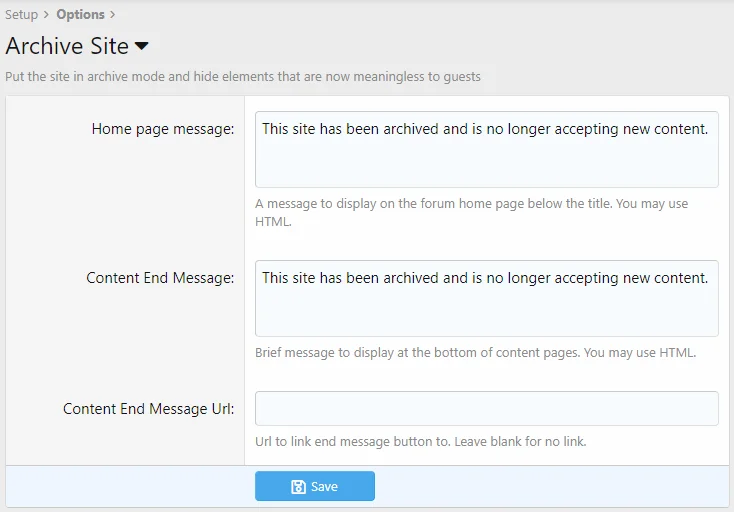
Archiving users
After you have configured your super admins and any other protected users and installed the addon, you should visit the Archive Site functions in the User section of the admin UI.
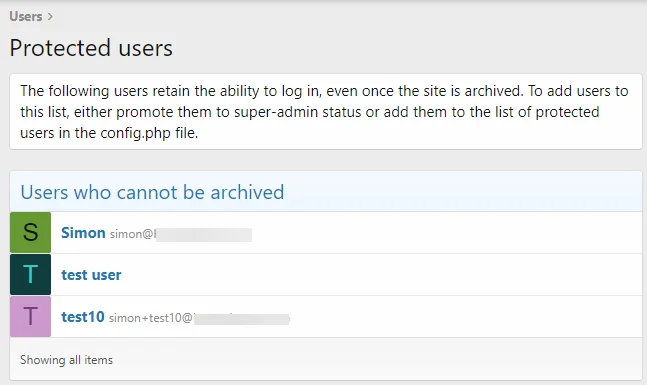
The List Protected Users screen shows all users who will retain login access:
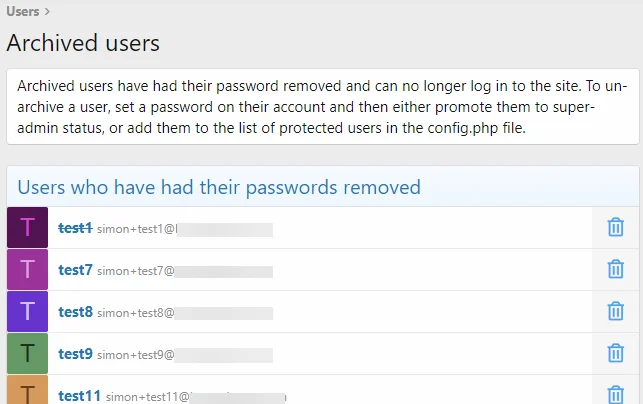
The List Archived Users screen shows users who have already had their passwords removed:
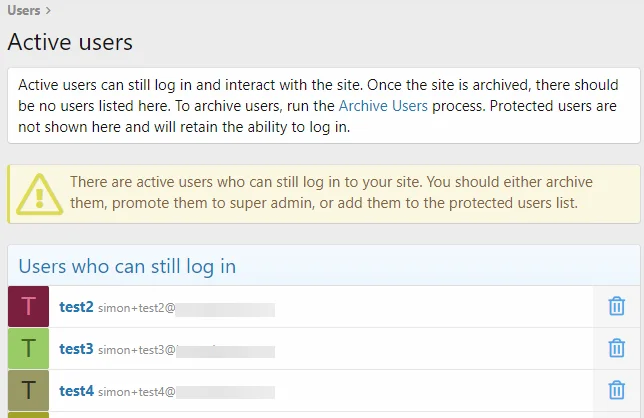
The List Active Users screen shows users who have not yet been archived:
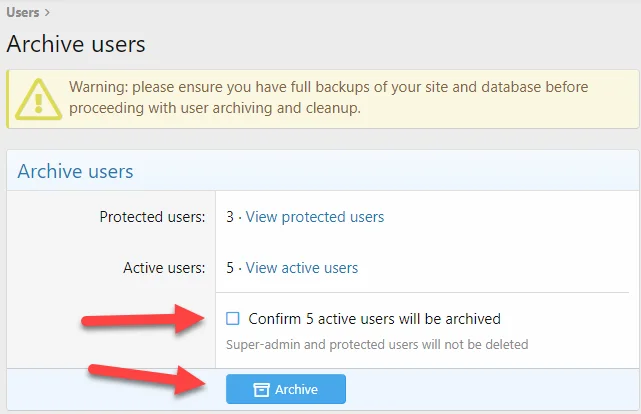
To archive users, use the Archive Users screen, validate your protected and active users, check the confirmation box and click Archive:
To restore access for a users, simply generate a new password for them and add their user_id to the protected users list in the config.php file.
UI elements hidden for guests by this addon:
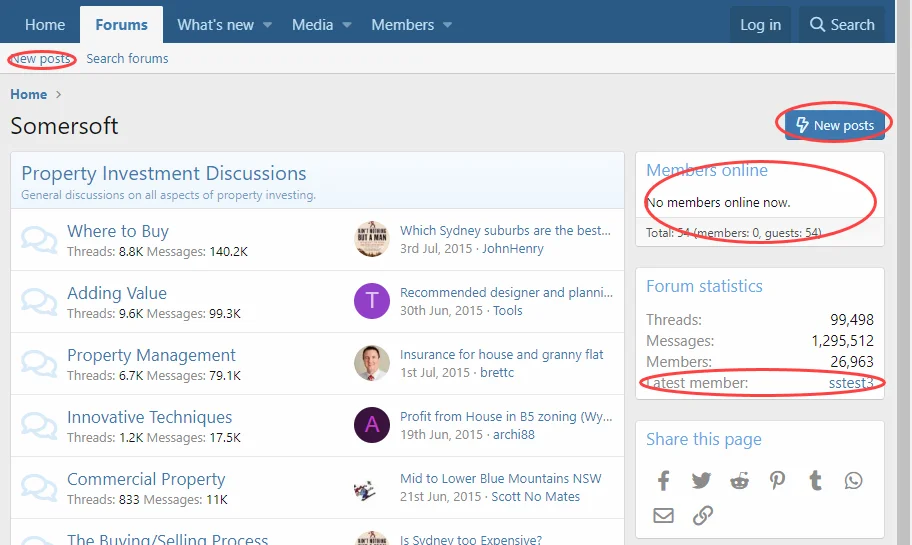
Forum home:
Thread list:
Thread view:

Mobile header:

Thread list:

Media view:
Notes:
Todo list:
Version 2.0.1 bugfix - now compatible with both XF v2.2 and v2.3 :
- bugfix: make declaration of setToUser compatible with parent in extension of Mail class for both XF v2.2 and v2.3
Télécharger V2.0.1 :
You will also want to optimise the site to remove unnecessarily functionality for guests and to improve performance.
There are quite a few configuration changes you can make using the admin UI alone, but there are some elements you will need help to change - which is where this addon comes in (see notes at the bottom of this page for limitations).
I have written a full tutorial on steps to consider when archiving a site, which is intended to followed in conjunction with using this addon: How to archive a XenForo forum to make it read-only
This addon provides the following functionality:
- a UI and CLI tool to remove passwords from users to prevent them logging in and to minimise the risk of credential leakage if your site ever gets hacked (selected users can retain login rights for maintenance and testing purposes)
- prevents emails from being sent to archived users
- provides a meaningful message to users if they try to log in, informing them that the site has been archived
- prevents archived users from resetting their passwords using the forgot password link
- show a message to users below the title on the home page
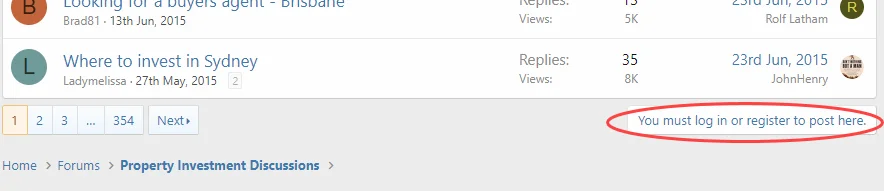
- replace the "you must log in to post" message below content on thread pages with a custom message and optionally a link (eg to a new site)
- hides UI elements from guests:
- New posts button on forum home page
- What's new link in header on mobile devices
- Followers list on member profile pages
- Following list on member profile pages
- Lock symbol on locked threads in thread list
- Link to latest member from forum statistics widget
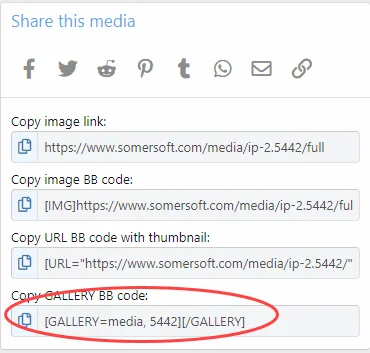
- Gallery BB Code link on media pages
- Members online widget
The process to archive users works on all users except the following:
- super admins
- any other user_id listed in the $config['archiveSiteProtectedUsers'] setting
PHP:
// all superadmins are automatically protected
// add the user_id of any additional users who will be permitted to log in to the archived site
$config['archiveSiteProtectedUsers'] = [];
For example, to allow user_id 5 and 293 to retain login access, add the following line to your config.php file:
PHP:
$config['archiveSiteProtectedUsers'] = [5, 293];XenForo will not allow you to remove all super admin users, so you will always retain the ability to log in from at least one user account, even if the config option is not set.
Important: if you have any super admin users who you no longer wish to have login rights to your site, be sure to demote them from super admin status.
Once the addon is installed, review the options to set your message on the home page or at the end of content pages (remove the messages from the options to hide them).
Archiving users
After you have configured your super admins and any other protected users and installed the addon, you should visit the Archive Site functions in the User section of the admin UI.
The List Protected Users screen shows all users who will retain login access:
The List Archived Users screen shows users who have already had their passwords removed:
The List Active Users screen shows users who have not yet been archived:
To archive users, use the Archive Users screen, validate your protected and active users, check the confirmation box and click Archive:
To restore access for a users, simply generate a new password for them and add their user_id to the protected users list in the config.php file.
UI elements hidden for guests by this addon:
Forum home:
Thread list:
Thread view:
Mobile header:
Thread list:
Media view:
Notes:
- other UI elements can be hidden using admin settings - follow the tutorial for full instructions
- template modifications are designed to work with the default theme and UI elements might not be hidden correctly on customised themes - some additional work might be required
- I have not yet implemented any changes for XF Resource Manager - that is on my todo list.
Todo list:
- look at UI elements for Resource Manager and hide any which don't make sense for guests
- consider an option to automate the bulk removal of user conversations
- consider a tool to remove deleted posts made by deleted users (you can't search for the posts because they are "guest" posts, nobody can see them because they are deleted, and it won't affect the overall post count)
- consider a tool to make bulk changes to user date of birth (personal information) and other profile fields such as location
Pour consulter le contenu, vous devez : Se connecter ou S'inscrire.
Version 2.0.1 bugfix - now compatible with both XF v2.2 and v2.3 :
- bugfix: make declaration of setToUser compatible with parent in extension of Mail class for both XF v2.2 and v2.3
Télécharger V2.0.1 :
Pour consulter le contenu, vous devez : Se connecter ou S'inscrire.
Version 2.0.2 (2026-09-22)
- security - a failed login by a member who still has a password now counts towards XenForo's brute-force limit, and they are told the password is incorrect; previously they were told the site was archived and the attempt was not counted. Only an archived account is now told the site is archived
- now requires XenForo 2.2.0 or higher
- bug fix - two template modifications had stopped applying on XenForo 2.3, which let guests see the What's New link and the gallery BB code control; both are hidden from guests again
- bug fix - archiving all users no longer stops part-way on an account that has no authentication record, and such accounts are now included in the active and archived user counts
- bug fix - restoring users in the same background job run as archiving them no longer skips them
- bug fix - the Archive Users action now always requires its confirmation box to be ticked
- bug fix - the active user count no longer includes super administrators
- bug fix - removed a "Clean Users" admin menu item that led nowhere
- upgrading now removes files that earlier versions left behind, including two command classes from 1.x that were still registered as
hg:archive-usersandhg:restore-users
Pour consulter le contenu, vous devez : Se connecter ou S'inscrire.
2.1.0 (2026-10-09)
- new setting $config['archiveSite']['allowMail'] re-enables mail to members, for a development or staging copy of an archived forum. Installing this add-on otherwise stops mail to anyone who is not a super administrator or protected
- all settings now live under one $config['archiveSite'] array, holding protectedUsers and allowMail. The old $config['archiveSiteProtectedUsers'] still works and needs no change on upgrade; the new key overrides it where both are set
- new command archive:config prints every setting and which config.php key or option it came from, which is the only way to see the protected list without the admin control panel
- new command archive:validate checks that the forum can do what it is configured to do: the protected list resolves to real accounts, the archive table is present, the class extensions apply, and every template modification still matches the template it targets - which otherwise fails silently when XenForo changes a core template. It exits 0, or 1 on a failure, with --strict for 2 on warnings alone
- security - a member whose account has no password but was never archived is no longer told the site is archived, and their failed logins now count towards XenForo's brute-force limit. This affects accounts registered through a connected account, which XenForo creates without a password
- bug fix - such a member can request a password by email again, which is how XenForo intends them to move off a passwordless account
- bug fix - restoring an account that was awaiting approval no longer fails when it is archived and restored in the same background job run
- this add-on now tells a monitoring API which of its settings are secrets - none of them are
2.2.0 (2026-10-10)
- bug fix - mail addressed to a member's email address is now refused as well as mail addressed to the member. Only the second was covered before, so an add-on that builds its own recipient list, as a newsletter or a digest does, still reached archived members
- bug fix - restoring an account that never had a password no longer gives it one. XenForo creates passwordless accounts for registrations through a connected account, and those came back reachable by lost-password where before they were not. The authentication scheme an account had is now recorded when it is archived
- bug fix - the member lists and counts no longer describe a passwordless member as partially archived, and an archived account that still has a password now appears in the archived list instead of in none of them. All three lists are keyed on whether this add-on archived the account, with "partially archived" meaning an account that is shut, has no password, and has no record here
- bug fix - restoring an account this add-on never archived leaves it alone. Naming the wrong account to archive:restore-user used to reset a real member's password
- bug fix - an archive run with nothing protected is refused and logged, instead of failing with a database error. Archiving every account including every administrator is what such a run would otherwise have done
- change - this add-on's extensions of XF\Finder\User and XF\Service\User\Login now run inside another add-on's extensions of the same classes rather than outside them, so another add-on's changes to those methods are no longer discarded
2.2.1 (2026-10-10)
- bug fix - on XenForo 2.2, archive:archive-user and archive:restore-user archived or restored the account and then failed while printing their final message, and the other two commands failed the same way when a confirmation was declined. XenForo 2.3 was unaffected
- archive:validate now reports how far the archiving has got, which it previously printed as a plain count. An account that is neither archived nor protected can still log in, so a forum that set archiving up and did not finish is a warning that says which it is - not started, or incomplete. An account with no password and no archive row warns for as long as it exists, since nothing recorded what its state was and nothing can restore it
Version 2.2.2 (2026-10-10)
archive:validatenow warns when$config['archiveSite']['protectedUsers'] names fewer accounts than the deprecated$config['archiveSiteProtectedUsers']it replaced, listing the ids that are no longer protected. Nothing else reports this: every super administrator stays protected either way, so no count reaches zero and an archive run proceedsarchive:confignow says whether the deprecated setting is in use, overridden, or discarding ids- the what's new template modification described itself as hiding a link on mobile devices. It hides the link in the page header on every device, which is what it has always done - only the description in
Admin CP; Appearance; Template modificationswas wrong README.mdcarried a second, older copy of its configuration section, which still said that mail addressed to an email address was not blocked. It has been blocked since 2.2.0
Pour consulter le contenu, vous devez : Se connecter ou S'inscrire.

XF 2.0 / 2.1 / 2.2 / 2.3
Forum Copilot - Automatic Spam and NSFW Image Detection with OpenAI ChatGPT 1.0.1



![[cXF] Remove Location, Website and About you field 1.4.4](https://www.societyfrenchmodding.net/data/attachments/3/3883-222b3d836f67f155265ade8287626e93.jpg)
![[JUM] Who Has Visited (Lite) 2.0.1](https://www.societyfrenchmodding.net/data/attachments/0/253-276dff2721fd9d6aee242d3dd3d18949.jpg)