


Additional requirements : Addon is free; requires ForumBot license key to function.
Our simple setup involves less than 10 addon settings, along with a straightforward onboarding process. Integrate as much or as little of your existing content as you like; in either case we should have you live in about 2 days max.
Setup in three steps:
Dedicated chat page
Your forum gets an onsite AI chat page. Members type questions and get answers grounded in your community's content. Guest access supported with a configurable join prompt.
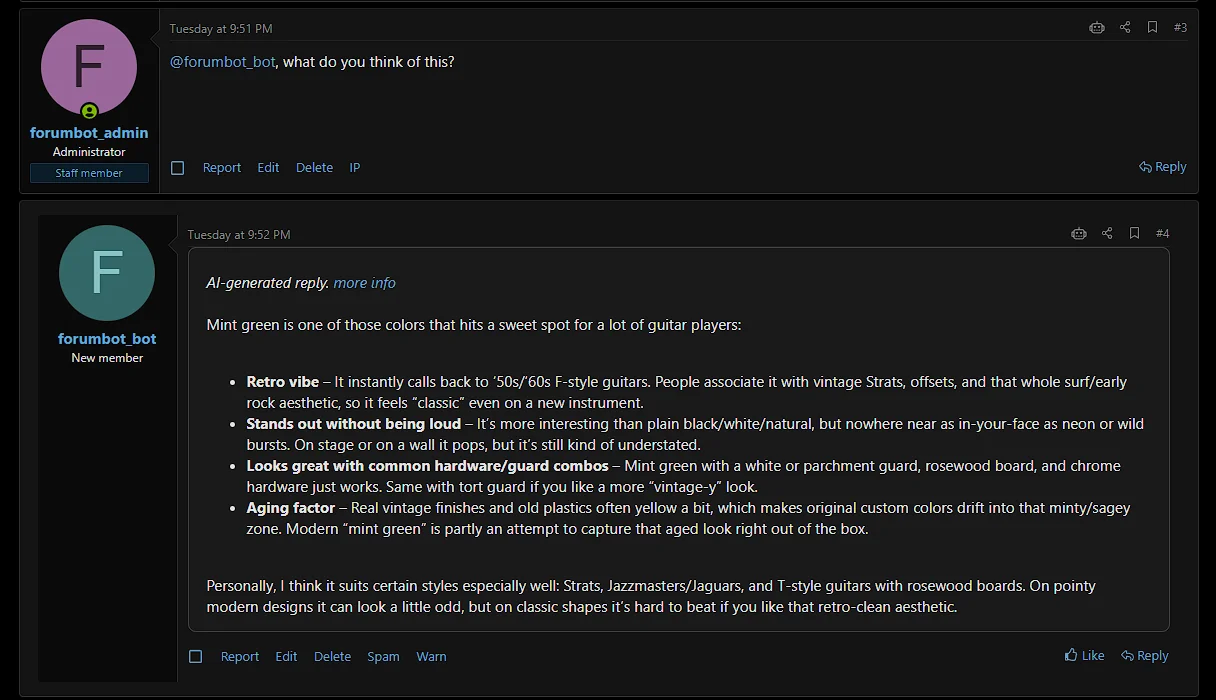
@tag in threads
Staff tag your bot by name in any post. It reads the thread context, consults your KB, and replies automatically in real time.
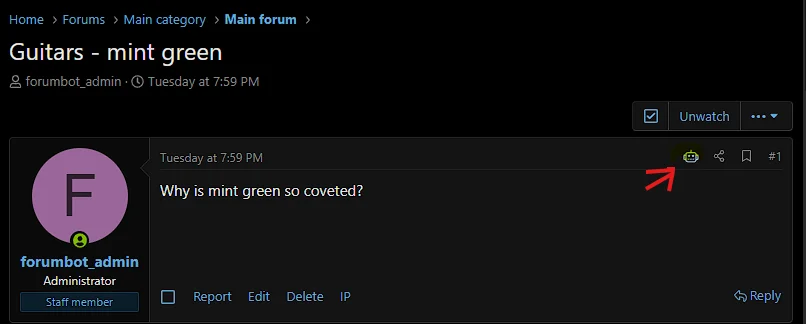
Robot icon on posts
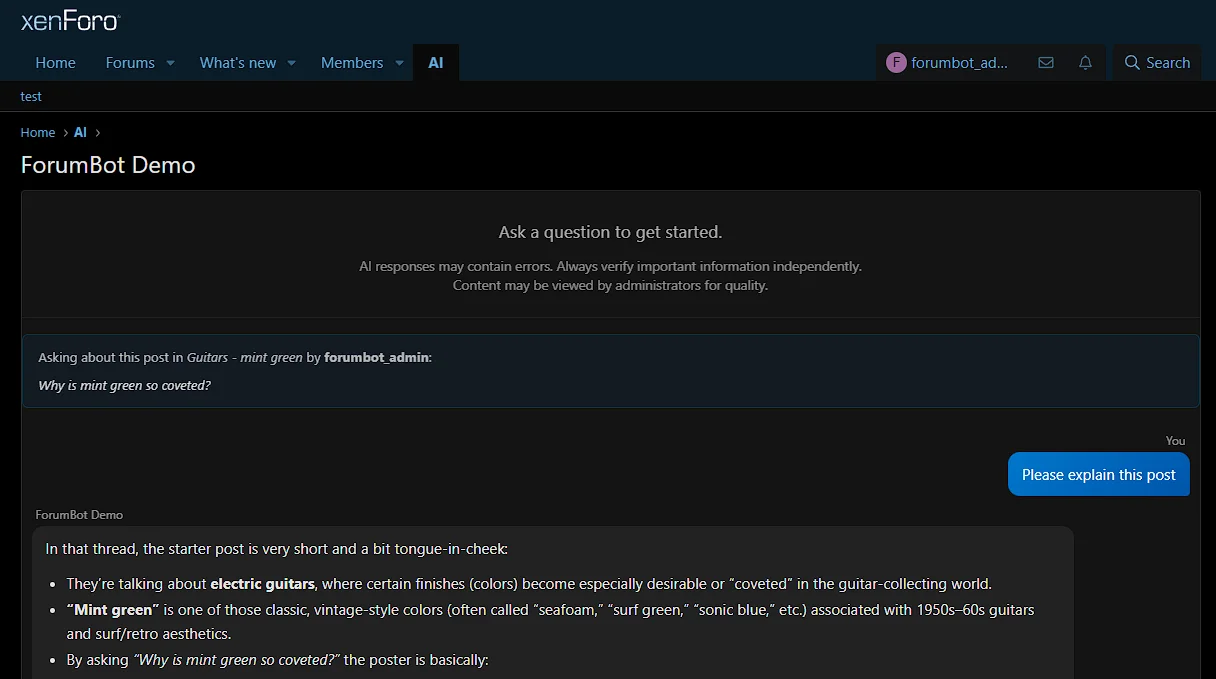
A small icon appears on every post. Clicking it takes the user to the 1:1 chat room, where the bot reads that post plus prior context and explains it, summarizes it, or answers questions about it (i.e., "explain this post").
Data stays on your server. ForumBot sends individual queries to the AI backend for processing, but your forum content, member data, and chat logs never leave your XenForo install.
$40/month. Cancel anytime (no annual commitment).
The addon is free to download. The subscription is billed separately via Stripe at forumbot.net.
Live proof: TONMO.com has run this AI stack since 2025, consistently accurate on a 25-year archive of cephalopod knowledge. Request credentials for a DEMO account: message @tonmo or email support@forumbot.net.
Explain this post (robot icon):
tagging (admins only, or admins+mods -- earlier thread context sent to AI (prior 5 posts in thread)):
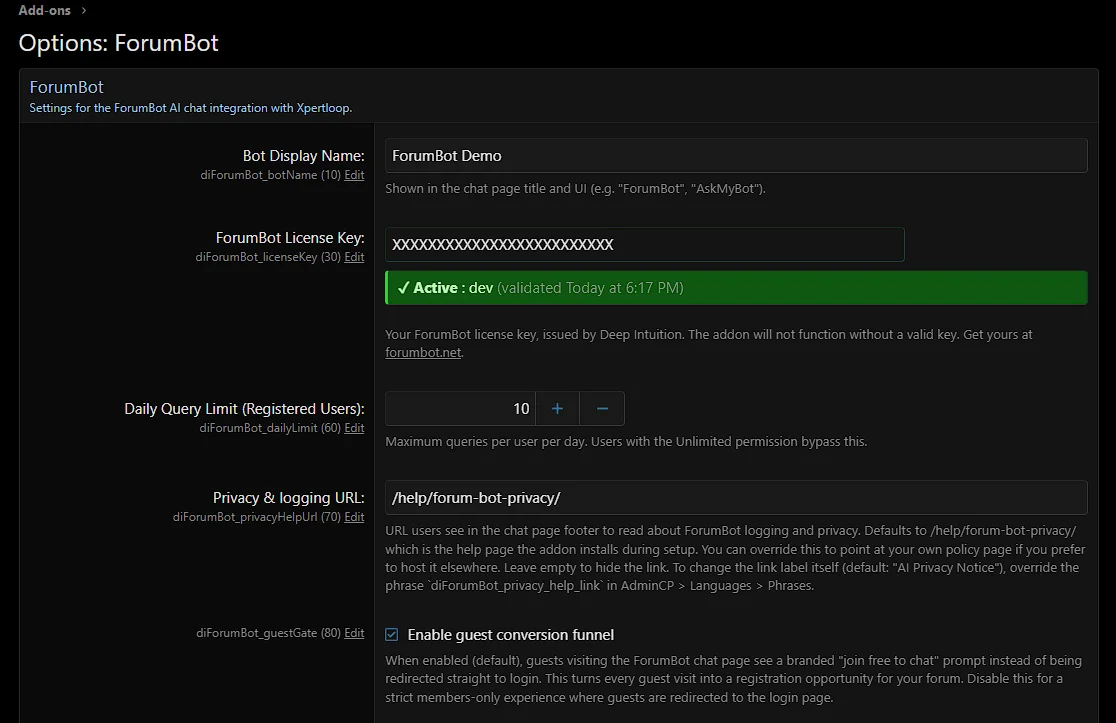
Admin :
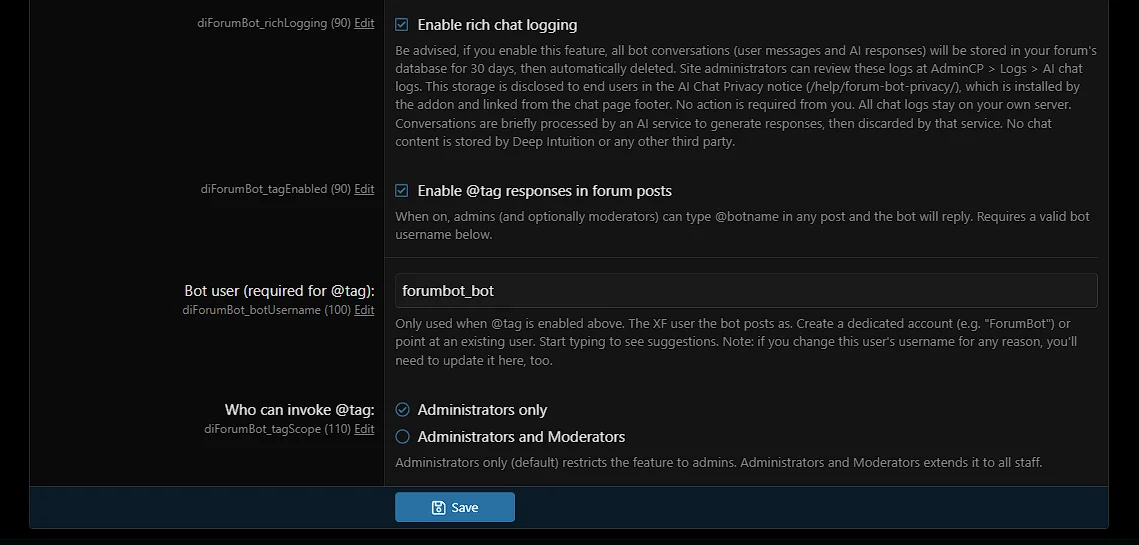
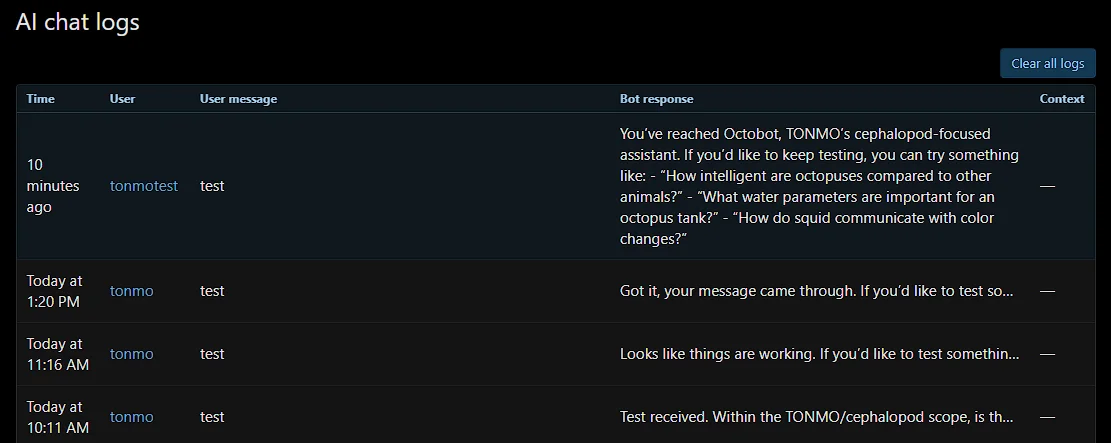
Admin Chat Logs :
Télécharger V1.0.2 :
Version 1.0.3 :
Télécharger V1.0.3 :
Version 1.0.5 :
Version 1.0.6 :
Version 1.0.7 :
Télécharger V1.0.9 :
AI grounded in your community's own knowledge.
ForumBot gives your XenForo forum a private 1:1 chat for registered members, trained on your community's own content. Members ask questions, explore your forum's subject matter, and get grounded answers without having to post publicly.Our simple setup involves less than 10 addon settings, along with a straightforward onboarding process. Integrate as much or as little of your existing content as you like; in either case we should have you live in about 2 days max.
How It Works
ForumBot is a managed service. You install the free addon, subscribe at forumbot.net, and receive a license key. That key is all you enter in AdminCP.Setup in three steps:
- Install the addon from this listing
- Visit forumbot.net to order your license key, and work with us to provision your account (e.g., content ingestion and agent definition using our Xenforo-ready template).
- Enter your license key in AdminCP, create a bot user account, and enable the features you want. Remember to set usergroup permissions for access (AI chat features are not available to guests).
Three Ways Members Interact
These are the ways ForumBot serves your community: private knowledge uplift in chat, admin-driven content in threads, and contextual help available on every post in your forum.Dedicated chat page
Your forum gets an onsite AI chat page. Members type questions and get answers grounded in your community's content. Guest access supported with a configurable join prompt.
@tag in threads
Staff tag your bot by name in any post. It reads the thread context, consults your KB, and replies automatically in real time.
Robot icon on posts
A small icon appears on every post. Clicking it takes the user to the 1:1 chat room, where the bot reads that post plus prior context and explains it, summarizes it, or answers questions about it (i.e., "explain this post").
Your Bot Knows Your Community
Every ForumBot subscription includes content ingestion from your forum. You provide an export and we upload it to your bot's knowledge base. Your bot answers questions with your community's own accumulated wisdom, not just generic AI knowledge.Data stays on your server. ForumBot sends individual queries to the AI backend for processing, but your forum content, member data, and chat logs never leave your XenForo install.
One Price; no AI Subscription Required.
Most AI addons require a separate account with OpenAI, Anthropic, or another provider, typically $20-50+/month on top of the addon cost. ForumBot is all-in.$40/month. Cancel anytime (no annual commitment).
The addon is free to download. The subscription is billed separately via Stripe at forumbot.net.
What's Included
- Dedicated (1:1) chat page (guests prompted to login)
- @tag reply system (real-time, context-aware)
- Robot icon on posts (i.e., "explain this post")
- Knowledge base trained on your content
- Bot identity configuration (name, notice text)
- XF permission system integration
- Admin chat log viewer (local, your database)
- Auto-installed privacy/help page
- Managed AI backend
Built for Specialist Communities
ForumBot works best for forums with deep, stable subject matter: reef aquariums, amateur radio, vintage cars, woodworking, medical support, niche hobbies. Forums where members ask "how do I care for X?" or "what does Y mean?"Live proof: TONMO.com has run this AI stack since 2025, consistently accurate on a 25-year archive of cephalopod knowledge. Request credentials for a DEMO account: message @tonmo or email support@forumbot.net.
Compatibility
- XenForo 2.3+ (self-hosted and XF Cloud)
- XenForo 2.4 support planned on release
About Deep Intuition LLC
Deep Intuition LLC operates TONMO.com, the internet's longest-running cephalopod community (est. 2000). ForumBot was built from the same AI stack powering TONMO's Octobot assistant. Questions or feedback: message @tonmo or email support@forumbot.net.Explain this post (robot icon):
tagging (admins only, or admins+mods -- earlier thread context sent to AI (prior 5 posts in thread)):
Admin :
Admin Chat Logs :
Télécharger V1.0.2 :
Pour consulter le contenu, vous devez : Se connecter ou S'inscrire.
Version 1.0.3 :
- License key is now masked by default with a show/hide toggle.
- Chat log retention prune now runs daily.
- 10KB cap on user chat messages.
- Updated privacy text.
- Friendlier permission-denied message.
- Various option description and metadata improvements.
Télécharger V1.0.3 :
Pour consulter le contenu, vous devez : Se connecter ou S'inscrire.
Version 1.0.5 :
- Quality feedback on bot replies: members can now thumbs-up or thumbs-down each bot response in the chat panel. Ratings show up as a column in the AdminCP chat log viewer, making it easy to spot which kinds of questions the agent is nailing and which need tuning on the prompt side. Screenshots added to the Overview page. Screenshots added to overview.
- Hardened input handling: the chat history payload now has a size cap matching the existing user-message cap, preventing oversized requests from being forwarded upstream.
- Smarter knowledge base citations: the agent now walks articles, then forums, then community CTAs in a deliberate order, combining citations rather than stopping at the first hit. Richer, more useful responses on forums that have both an article library and discussion threads in the KB.
- Cleaner forum routing: the agent now sees the full forum directory (useful for scenarios where forum-level links are warranted in the response).
- Markdown anchor escaping: special characters in thread titles no longer break the renderer when the agent links to them.
- Standardized KB filenames and associated templates: three optional knowledge-base files a customer can submit, each with a clear naming convention.
- {site}-articles-kb.csv for published articles, blog posts, KB entries, documentation, or any non-forum content the agent should be able to cite.
- {site}-forums-kb.csv for forum thread titles and post content, so the agent can draw on community discussion.
- {site}-nav-kb.csv for the list of forum sections, so the agent can route users to the right place when warranted.
Pour consulter le contenu, vous devez : Se connecter ou S'inscrire.
Version 1.0.6 :
- Suggested starter prompts: admins can configure 3-5 prompts in AdminCP > Options > ForumBot that appear as clickable chips in the empty chat state. One click sends the prompt as the first message. Closes the blank-page problem and gives admins a way to demonstrate the bot's best use cases without writing instructional copy in three places.
- Share this chat: members can now create a public read-only snapshot of a conversation, valid for 5 days. Off by default; turn on in AdminCP > Options > ForumBot > Enable chat sharing. A new "Share chat" link appears in the chat action row once a bot reply has landed; clicking it generates a public URL that auto-copies to the clipboard. Members manage their active shares (5-max with replace-oldest confirm) from a sidebar link on the chat page; admins review the full active list in AdminCP > Logs > Shared chats. Expired snapshots are pruned automatically by the existing daily cron.
- Improved chat page layout: the chat page now uses a right-sidebar layout (collapses below on mobile). Privacy policy link moved to the sidebar; "My shared chats" link appears there when a member has active shares.
Pour consulter le contenu, vous devez : Se connecter ou S'inscrire.
Version 1.0.7 :
- Fixed AdminCP navigation URLs for AdminCP > Logs > AI chat logs and AdminCP > Logs > Shared chats. Prior to this fix, both nav entries resolved to the same URL, causing both to land on the Shared chats page. Pagination and post-action redirects on the AI chat log viewer were affected by the same underlying issue. v1.0.7 restores each entry to its correct destination.
Pour consulter le contenu, vous devez : Se connecter ou S'inscrire.
Version 1.0.9 :
This release introduces Project Info, a new way for your members to give ForumBot lasting context about their situations, setups, or goals. This context can optionally be submitted with each request, so ForumBot has maximum context for each session.
Details:
Members (with requisite usergroup-level permissions) can save up to 1,500 characters describing their project, current setup, ongoing goals, or background. When chatting, they toggle Use Project Info to attach that context to a question. The bot grounds its answers in their saved details. For example, a member of a home aquarium community asking "what species fits my setup?" gets a setup-specific answer when their tank parameters are saved, instead of a generic response.
Use cases vary by community: in the case cited above, aquarium keepers save tank parameters. In other communities, hobbyists can save gear lists or current project status; researchers can save their area of focus; commerce communities can save buyer profiles. The free-form text means it adapts to whatever your forum is about.
As admin, you can add your own custom instructions in addition to ForumBot's general instructions for the end-user.
Two-layer permission gating:
This release introduces Project Info, a new way for your members to give ForumBot lasting context about their situations, setups, or goals. This context can optionally be submitted with each request, so ForumBot has maximum context for each session.
Details:
Members (with requisite usergroup-level permissions) can save up to 1,500 characters describing their project, current setup, ongoing goals, or background. When chatting, they toggle Use Project Info to attach that context to a question. The bot grounds its answers in their saved details. For example, a member of a home aquarium community asking "what species fits my setup?" gets a setup-specific answer when their tank parameters are saved, instead of a generic response.
Use cases vary by community: in the case cited above, aquarium keepers save tank parameters. In other communities, hobbyists can save gear lists or current project status; researchers can save their area of focus; commerce communities can save buyer profiles. The free-form text means it adapts to whatever your forum is about.
As admin, you can add your own custom instructions in addition to ForumBot's general instructions for the end-user.
Two-layer permission gating:
- Master option Enable Project Editor (off by default). Flip in AdminCP > Options > ForumBot when ready to enable for your community.
- Per-usergroup permissions: Use ForumBot Project Info (off by default). Grant to the usergroups who should have access (typical patterns: admins, mods, and paid tiers).
- Members with the permission but no saved project see a "Set up Project Info" link in the chat panel
- Members with saved project see a "Use Project Info" toggle chip plus a "Manage Project Info" link
- Toggle starts OFF on every page load (clean slate per session) and the Clear chat button also resets it.
- Refreshed chat panel layout: single-column with native XF block styling
- Larger welcome and intro copy for readability
- Privacy notice and My shared chats links moved to small footer-of-block links
- ForumBot permissions now appear in their own "ForumBot permissions" section in AdminCP > Groups & permissions (previously listed under General Permissions)
- New Type column in the AI chat log: shows at a glance whether a chat used Project Info context (values: chat or project)
- Various small consistency improvements in admin copy
Pour consulter le contenu, vous devez : Se connecter ou S'inscrire.

![[25517] Username Badges 1.0.1](https://www.societyfrenchmodding.net/data/attachments/12/12065-c7653cd229fa5a74aacb46f3ca622133.jpg)

