

This is a addon that will let you choose which profile tab is selected as default when someone views a members profile. If you choose a addon tab that you do not have installed or is not active, the default tab will revert to the profile posts tab. Like wise if you have a tab set as default, and that tab is not available in a members profile, then the default tab will revert to the profile posts tab.
This addon will work with XenForo resource manager and media gallery.
This addon will work with the folowing addons:
Snog Groups.
If you have any addons you wish to add as supported by this addon, I will need a copy of it to run on my development site to get it to work.
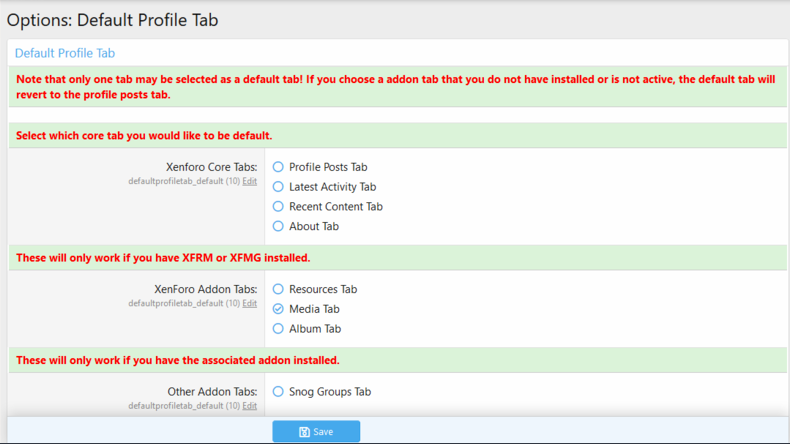
Here is a example of the options page.
Télécharger V1.0.0 :
Version 1.0.2 change : Fixed profile post tab showing as about tab.
Télécharger V1.0.2 :
[OzzModz] Default Profile Tab for XenForo 2.1+ Update 2.0.0 : Support: XF 2.2
Télécharger V2.0.0 :
Version 2.0.1 : Fix: Media tab not working.
Télécharger V2.0.1 :
Version 2.0.1 Patch Level 1 :
This addon will work with XenForo resource manager and media gallery.
This addon will work with the folowing addons:
Snog Groups.
If you have any addons you wish to add as supported by this addon, I will need a copy of it to run on my development site to get it to work.
Here is a example of the options page.
Télécharger V1.0.0 :
Pour consulter le contenu, vous devez : Se connecter ou S'inscrire.
Version 1.0.2 change : Fixed profile post tab showing as about tab.
Télécharger V1.0.2 :
Pour consulter le contenu, vous devez : Se connecter ou S'inscrire.
[OzzModz] Default Profile Tab for XenForo 2.1+ Update 2.0.0 : Support: XF 2.2
Télécharger V2.0.0 :
Pour consulter le contenu, vous devez : Se connecter ou S'inscrire.
Version 2.0.1 : Fix: Media tab not working.
Télécharger V2.0.1 :
Pour consulter le contenu, vous devez : Se connecter ou S'inscrire.
Version 2.0.1 Patch Level 1 :
- Dropped 2.1 support
- Confirm 2.3 compatibility
Pour consulter le contenu, vous devez : Se connecter ou S'inscrire.
![[OzzModz] Message Action Bar Added To Top 2.0.1](https://www.societyfrenchmodding.net/data/attachments/2/2453-c18b28d43e87a6867bba2e3d04f78ee0.jpg)


![[OzzModz] Profile Link On Member Card And Visitor Tab 2.0.0](https://www.societyfrenchmodding.net/data/attachments/4/4158-f47019f33f897c21ee80fd1b4b2f17f0.jpg?hash=9HAZ8z-JfC)
![[OzzModz] User Profile Banner Default 2.0.0](https://www.societyfrenchmodding.net/data/avatars/s/0/2.jpg)
![[OzzModz] Style Default per Domain 2.0.0 Patch Level 1](https://www.societyfrenchmodding.net/data/attachments/8/8601-68e7c25f1eb300e54181a33532e5e998.jpg)
![[OzzModz] Forum Type Discussion: Default Thread Type 2.0.0](https://www.societyfrenchmodding.net/data/attachments/7/7599-f89bbe4ac1773c8ac2d35df544379865.jpg?hash=-Ju-SsF3PI)