


- Discussions
- 4 844
- Messages
- 12 567
- Solutions
- 85
- J'aime
- 7 864
- Points
- 198
Features :

Télécharger V1.0.0.1 :
Version 1.0.1 Compatibility update :
Adds support for old versions of PHP
Adds support for old versions of XenForo (2.0.x)
Removes use of Font Awesome Duotone icons
Télécharger V1.0.1 :
Version 1.0.1.1 Fix for very old versions of PHP : Compatibility with very old (end-of-lifed for years) versions of PHP
Télécharger V1.0.1.1 :
Version 1.0.2 Some minor things/compatibility update :
Event chart based on eventCount metric (will allow you to see more than page_view events)
Better compatibility with Pixel Exit styles
Added /ICODE]Session medium[/ICODE] as dimension option for charts
Added
Added missing phrase,
Télécharger V1.0.2 :
Version 1.0.3 New reporting and link source tracking fix :
New "Totals" section of charts (for reporting on metrics you don't want to break down by dimension)
Fixes issue with medium/source tracking in RSS feed causing the RSS feed to not validate as being valid
Fixes issue with link source tracking using the wrong delimiter
Télécharger V1.0.3 :
Version 1.0.3.1 Minor usability update :
Give a more human-readable error message if there was a problem with an API call
Disable Organic Google search dimension on chart when trying to report for a specific page (it's impossible to report on data coming from Google Search Console for a singular URL)
Fixed issue with the ability to disable link source tracking for emails
Télécharger V1.0.3.1 :
Version 1.0.3.2 Minor tweaks :
Changed "javascript" route to "jc" to avoid conflict with web servers configured to internally handle requests with the string "javascript" without passing it along to XenForo (only applies when using the
Made the realtime block on admin index collapsible
Reports and realtime block have a link at top to take you directly to Google Analytics
Télécharger V1.0.3.2 :
Version 1.0.4 Adds filtering to charts :
Using XenForo's filter system to allow users to remove URI from URI-specific chart (when viewing chart from icon in staff bar).
Chart icon link in staff bar will give a thread-specific chart when viewing a thread.
Chart icon link in staff bar will give a user-specific chart when viewing a member profile.
Raised execution order of template modification that adds to staff bar (helps with compatibility with other add-ons).
The thread filtering allows you to generate charts that spans the events just for that thread (across multiple pages of the thread).

The user filtering works in a similar way where you see the events (like page views) only for a particular logged in user. As an example, this would be the site usage for a single user broken down by the device category they were using :

Télécharger V1.0.4 :
Version 1.0.4.1 New dimensions :
Added geographic dimensions (city, region, country) as options for charts.
Added "Signed in user" as an available dimension for charts.
Give a better error message about Organic Google search dimensions requiring an association to the respective Google Search Console property (including link to make that association).
Version 1.0.4.2 Compatibility fix for XF 2.0 and 2.1 : Removed usage of abstract class that required XF 2.2.0+ to exist.
Télécharger V1.0.4.2 :
Version 1.0.5 Ability to not use Google Analytics with certain user group(s) : New user group permission: Do not track with Google Analytics.
Télécharger V1.0.5 :
Version 1.0.5.1 Fix for email tracking and a few other minor things :
Fixed issue where an old installation of legacy (XF1) version of add-on would cause installation issues of this (XF2) version of add-on.
Fixed issue where some email sent/email read events wouldn't get logged if you are tracking events by user ID.
Added missing phrases for "city" and "region".
Added ability to debug events going through backend measurement protocol.
Using new Google Analytics Admin API endpoint (going from v1alpha to v1beta).
Télécharger V1.0.5.1 :
Version 1.0.6 Chart fixes and additions :
Fixed issue where chart dimensions would be mislabeled/incorrectly grouped on the chart
Added "Purchase revenue" as dimension option for charts
Added "Item purchase quantity" as dimension option for charts
Télécharger V1.0.6 :
Version 1.0.6.1 Minor update :
Suppress error if there is a transient Google Analytics API issue on the main admin page (won't show an error when attempting to display real-time map on the admin index page)
Changed the explanation text on the debug option to be more clear that it creates server error log entries for debugging server-side events.
Télécharger V1.0.6.1 :
Version 1.0.7 A minor update with the following :
- itemPurchaseQuantity metric updated to itemsPurchased (per breaking changes to Google Analytics Reporting API going into effect Dec 1, 2022)
- New item-scoped metrics added to E-commerce section of weekly heat map (itemsAddedToCart, itemsCheckedOut, itemsViewed and itemsViewedInList)
- Don't try to track emails being read if the outgoing email has no HTML part (emails being sent manually as 'Plain text')
Télécharger V1.0.7 :
Version 1.0.7.1 Adds support for XenForo's cookie consent system :
This version has nothing added other than support for XenForo's new cookie consent system. If you are using a version of XenForo prior 2.2.12, it has no effect. There's also no effect if you aren't using the new cookie consent system.
The only situation where this update would be needed is if you are using XenForo 2.2.12+ and you are using the new
Télécharger V1.0.7.1 :
Version 1.0.7.2 Fix for exception reporting :
- Fixed issue with compatibility with old versions of PHP.
- Requires PHP 7.0 or higher (just getting too annoying/difficult to maintain backward compatibility with very old versions of PHP on old versions of XenForo).
- Exception reporting works again by changing pageLocation dimension to pagePath (Google seems to not allow reporting on URLs with full query string any longer... maybe a privacy thing?)
Télécharger V1.0.7.2 :
Version 1.0.7.3 Minor things :
- Some template modification changes to work better with third-party styles
- Removed ability for purchase revenue chart to be broken down by item name (no longer allowed with Google Analytics API)
Télécharger V1.0.7.3 :
Version 1.0.7.4 switch fullPageUrl dimension to pagePath :
- Google Analytics changed what dimensions are compatible and no longer allow full page URL to be used in conjunction with most other dimensions/metrics.
- Because of that, we are switching to something that works reasonably well as far as compatibility in reporting (page path).
Télécharger V1.0.7.4 :
Version 1.0.8 Requires XenForo 2.2 now :
- Require XF 2.2 or higher (incompatible Mailer class between XF 2.1 and 2.2)
- Use <xf:fa /> for the staffBar now that XF requirement is 2.2+ (better compatibility with Font Awesome Manager)
If you aren't using Font Awesome Manager, nothing really changes with this update (if you were using XF 2.0 or 2.1, you would have gotten errors before, now it simply doesn't let you install unless you have XF 2.2).
Télécharger V1.0.8 :
Version 1.0.9 PWA tracking :
Télécharger V1.0.9.1 :
Version 1.0.10 Removed dependency on jQuery :
Version 1.0.11 XenForo 2.3 update :
Version 1.0.11.1 Update for PHP 8.3 :
Version 1.1.0 :
XenForo 2.3 updates:
It seems Google Analytics doesn't allow creation of the user property
Should look something like this:
Edit the User ID dimension:
Once you have done that, go to XenForo admin -> Options -> Analytics and click the "Set" button. If you reselect your property and data stream, it will create the new user ID dimension,
Once that is all done, your custom dimensions in Google Analytics will look something like this:

You can archive the User ID OLD dimension if you want since it's not going to be used going forward.
Télécharger V1.1.1 :
Version 1.1.2 Some minor things...
Version 1.1.2.1 : Made the template modification that injects the main JavaScript work a little better (specifically made compatible with newer versions of XenForo).
Télécharger V1.1.2.1 :
Version 1.1.2.2 Timing in XF 2.3 :
- Moved initial Analytics JavaScript higher up in page execution chain (hopefully prevents third-party gtag() code from failing if wrapped in <xf:js /> tags)
Télécharger V1.1.2.2 :
Version 1.1.2.3 Handling "what-ifs" :
- Strip non-UTF8 characters from email subject when logging emails being read
- Wrap event for email send tracking in try/catch just in case Google Analytics servers are having issues
Télécharger V1.1.2.3 :
Version 1.1.3 Compatibility / misc things :
- Serve Google Tag Manager JavaScript from your own domain
- Normally, Google forces browsers to re-download the JavaScript every 15 minutes, which can hurt your site rendering speed. If you choose to serve it from your own domain, the time between re-downloads is set to 30 days. It also allows you to serve it from the network edge (for example cached in Cloudflare's data centers).
- Google Analytics API usage for:
- Setup/configuration
- Selection of existing measurement ID
- Optionally create a new property/data stream
- Setup of custom dimensions specific to XenForo for reporting
- Reporting from within XenForo admin area
- Backend data collection
- Setup/configuration
- Ability to track XenForo overlay system as page views
- Track registered members across multiple devices
- Track the style being used
- Track nodes
- Track threads
- with or without the thread's first tag
- Track client-side errors
- Console errors
- JavaScript errors
- Images not loading
- Track user registrations and logins
- includes how they are registering/logging in (for example which type of connected account)
- Track new threads
- and replies
- Track new profile posts
- and comments
- Track new conversations
- and replies
- Track emails being sent and opened
- incudes email subject
- Done with backend data collection (multi-threaded with Guzzle's promise system so it doesn't slow down mass sending of emails).
- Track attachment views/downloads
- Track users using XenForo share buttons
- includes which platform they are sharing to
- Track users using XenForo's bookmark system
- Track user upgrades as e-commerce
- Views
- Begin checkout
- Purchase
- Track Google AdSense impressions and clicks
- Track user's user group (set user groups in a priority order for the one to track)
- Track links from RSS feed by source/medium
- Track links from emails by source/medium
- Track scrolling down page
- Track YouTube video engagement
- Start
- Progress
- Complete
- Track outbound links being clicked
- Track site searches
- Google Analytics reporting within XenForo admin
- Realtime map showing the countries users currently on your site are in
- Weekly heat maps
- Charts
- Report of client-side errors
- Does not work with Universal Analytics, only Google Analytics 4 (Universal Analytics is being deprecated and will cease processing new hits on July 1, 2023).
- You need to link your Google Analytics account and pick your property under Admin -> Options -> Analytics
- The Analytics Admin API currently can't enable Enhanced Measurement for your property's data stream. For the time being, you will need to go into your Google Analytics account, go to Admin -> Property -> Data Stream, and enable Enhanced measurement if you want to track the things enhanced measurement tracks. Once Google sorts it out with the Admin API, it will be something we can automatically do. [Google Analytics Admin API changelog]
- In exchange for being free, this addon has a single attribution link buried on the bottom of XenForo's Help -> Privacy policy page (there are no site-wide or footer links).
Télécharger V1.0.0.1 :
Pour consulter le contenu, vous devez : Se connecter ou S'inscrire.
Version 1.0.1 Compatibility update :
Adds support for old versions of PHP
Adds support for old versions of XenForo (2.0.x)
Removes use of Font Awesome Duotone icons
Télécharger V1.0.1 :
Pour consulter le contenu, vous devez : Se connecter ou S'inscrire.
Version 1.0.1.1 Fix for very old versions of PHP : Compatibility with very old (end-of-lifed for years) versions of PHP
Télécharger V1.0.1.1 :
Pour consulter le contenu, vous devez : Se connecter ou S'inscrire.
Version 1.0.2 Some minor things/compatibility update :
Event chart based on eventCount metric (will allow you to see more than page_view events)
Better compatibility with Pixel Exit styles
Added /ICODE]Session medium[/ICODE] as dimension option for charts
Added
Session source as dimension option for chartsAdded missing phrase,
ecommerceTélécharger V1.0.2 :
Pour consulter le contenu, vous devez : Se connecter ou S'inscrire.
Version 1.0.3 New reporting and link source tracking fix :
New "Totals" section of charts (for reporting on metrics you don't want to break down by dimension)
Fixes issue with medium/source tracking in RSS feed causing the RSS feed to not validate as being valid
Fixes issue with link source tracking using the wrong delimiter
Télécharger V1.0.3 :
Pour consulter le contenu, vous devez : Se connecter ou S'inscrire.
Version 1.0.3.1 Minor usability update :
Give a more human-readable error message if there was a problem with an API call
Disable Organic Google search dimension on chart when trying to report for a specific page (it's impossible to report on data coming from Google Search Console for a singular URL)
Fixed issue with the ability to disable link source tracking for emails
Télécharger V1.0.3.1 :
Pour consulter le contenu, vous devez : Se connecter ou S'inscrire.
Version 1.0.3.2 Minor tweaks :
Changed "javascript" route to "jc" to avoid conflict with web servers configured to internally handle requests with the string "javascript" without passing it along to XenForo (only applies when using the
Host Google Tag Manager JavaScript on your own domain option)Made the realtime block on admin index collapsible
Reports and realtime block have a link at top to take you directly to Google Analytics
Télécharger V1.0.3.2 :
Pour consulter le contenu, vous devez : Se connecter ou S'inscrire.
Version 1.0.4 Adds filtering to charts :
Using XenForo's filter system to allow users to remove URI from URI-specific chart (when viewing chart from icon in staff bar).
Chart icon link in staff bar will give a thread-specific chart when viewing a thread.
Chart icon link in staff bar will give a user-specific chart when viewing a member profile.
Raised execution order of template modification that adds to staff bar (helps with compatibility with other add-ons).
The thread filtering allows you to generate charts that spans the events just for that thread (across multiple pages of the thread).
The user filtering works in a similar way where you see the events (like page views) only for a particular logged in user. As an example, this would be the site usage for a single user broken down by the device category they were using :
Télécharger V1.0.4 :
Pour consulter le contenu, vous devez : Se connecter ou S'inscrire.
Version 1.0.4.1 New dimensions :
Added geographic dimensions (city, region, country) as options for charts.
Added "Signed in user" as an available dimension for charts.
Give a better error message about Organic Google search dimensions requiring an association to the respective Google Search Console property (including link to make that association).
Version 1.0.4.2 Compatibility fix for XF 2.0 and 2.1 : Removed usage of abstract class that required XF 2.2.0+ to exist.
Télécharger V1.0.4.2 :
Pour consulter le contenu, vous devez : Se connecter ou S'inscrire.
Version 1.0.5 Ability to not use Google Analytics with certain user group(s) : New user group permission: Do not track with Google Analytics.
Télécharger V1.0.5 :
Pour consulter le contenu, vous devez : Se connecter ou S'inscrire.
Version 1.0.5.1 Fix for email tracking and a few other minor things :
Fixed issue where an old installation of legacy (XF1) version of add-on would cause installation issues of this (XF2) version of add-on.
Fixed issue where some email sent/email read events wouldn't get logged if you are tracking events by user ID.
Added missing phrases for "city" and "region".
Added ability to debug events going through backend measurement protocol.
Using new Google Analytics Admin API endpoint (going from v1alpha to v1beta).
Télécharger V1.0.5.1 :
Pour consulter le contenu, vous devez : Se connecter ou S'inscrire.
Version 1.0.6 Chart fixes and additions :
Fixed issue where chart dimensions would be mislabeled/incorrectly grouped on the chart
Added "Purchase revenue" as dimension option for charts
Added "Item purchase quantity" as dimension option for charts
Télécharger V1.0.6 :
Pour consulter le contenu, vous devez : Se connecter ou S'inscrire.
Version 1.0.6.1 Minor update :
Suppress error if there is a transient Google Analytics API issue on the main admin page (won't show an error when attempting to display real-time map on the admin index page)
Changed the explanation text on the debug option to be more clear that it creates server error log entries for debugging server-side events.
Télécharger V1.0.6.1 :
Pour consulter le contenu, vous devez : Se connecter ou S'inscrire.
Version 1.0.7 A minor update with the following :
- itemPurchaseQuantity metric updated to itemsPurchased (per breaking changes to Google Analytics Reporting API going into effect Dec 1, 2022)
- New item-scoped metrics added to E-commerce section of weekly heat map (itemsAddedToCart, itemsCheckedOut, itemsViewed and itemsViewedInList)
- Don't try to track emails being read if the outgoing email has no HTML part (emails being sent manually as 'Plain text')
Télécharger V1.0.7 :
Pour consulter le contenu, vous devez : Se connecter ou S'inscrire.
Version 1.0.7.1 Adds support for XenForo's cookie consent system :
This version has nothing added other than support for XenForo's new cookie consent system. If you are using a version of XenForo prior 2.2.12, it has no effect. There's also no effect if you aren't using the new cookie consent system.
The only situation where this update would be needed is if you are using XenForo 2.2.12+ and you are using the new
Advanced (Beta) cookie consent option.Télécharger V1.0.7.1 :
Pour consulter le contenu, vous devez : Se connecter ou S'inscrire.
Version 1.0.7.2 Fix for exception reporting :
- Fixed issue with compatibility with old versions of PHP.
- Requires PHP 7.0 or higher (just getting too annoying/difficult to maintain backward compatibility with very old versions of PHP on old versions of XenForo).
- Exception reporting works again by changing pageLocation dimension to pagePath (Google seems to not allow reporting on URLs with full query string any longer... maybe a privacy thing?)
Télécharger V1.0.7.2 :
Pour consulter le contenu, vous devez : Se connecter ou S'inscrire.
Version 1.0.7.3 Minor things :
- Some template modification changes to work better with third-party styles
- Removed ability for purchase revenue chart to be broken down by item name (no longer allowed with Google Analytics API)
Télécharger V1.0.7.3 :
Pour consulter le contenu, vous devez : Se connecter ou S'inscrire.
Version 1.0.7.4 switch fullPageUrl dimension to pagePath :
- Google Analytics changed what dimensions are compatible and no longer allow full page URL to be used in conjunction with most other dimensions/metrics.
- Because of that, we are switching to something that works reasonably well as far as compatibility in reporting (page path).
Télécharger V1.0.7.4 :
Pour consulter le contenu, vous devez : Se connecter ou S'inscrire.
Version 1.0.8 Requires XenForo 2.2 now :
- Require XF 2.2 or higher (incompatible Mailer class between XF 2.1 and 2.2)
- Use <xf:fa /> for the staffBar now that XF requirement is 2.2+ (better compatibility with Font Awesome Manager)
If you aren't using Font Awesome Manager, nothing really changes with this update (if you were using XF 2.0 or 2.1, you would have gotten errors before, now it simply doesn't let you install unless you have XF 2.2).
Télécharger V1.0.8 :
Pour consulter le contenu, vous devez : Se connecter ou S'inscrire.
Version 1.0.9 PWA tracking :
- New passive tracking option: PWA (if user is in progressive web app or not)
- New event tracking option: PWA
tutorial_begin[/ICODE] = viewing installation instructions (iOS only)app_open= loading appapp_install_prompt= start installation (not all platforms support it)app_install= app installed (not all platforms support it)
- New event tracking option: Contact form usage
Télécharger V1.0.9.1 :
Pour consulter le contenu, vous devez : Se connecter ou S'inscrire.
Version 1.0.10 Removed dependency on jQuery :
- All JavaScript has been rewritten to be "native" (does not use jQuery) in preparation for removal of jQuery in XenForo 2.3.
- Fixed issue with app_install_prompt PWA event being triggered
- Added ecommerce support for DigitalPoint/Marketplace addon. Events:
- view_item_list
- view_item
- add_to_cart
- view_cart
- begin_checkout
- purchase
Pour consulter le contenu, vous devez : Se connecter ou S'inscrire.
Version 1.0.11 XenForo 2.3 update :
- Update mail class to concurrently work with XenForo 2.2 and 2.3
- If site is running XenForo 2.3, the last bit of JavaScript code that needed jQuery has been rewritten (specifically the $.on() usage is rewritten for XF.on()).
- Change JavaScript to have overlay page tracking work with is unexpected objects (third-party addon: DragonByte eCommerce)
- Raise the "all time" start date for charts to 2016 (Google API can only go so far back without throwing an exception)
Pour consulter le contenu, vous devez : Se connecter ou S'inscrire.
Version 1.0.11.1 Update for PHP 8.3 :
- Made change to Mailer class to have better compatibility with XenForo 2.3 w/ PHP 8.3
Pour consulter le contenu, vous devez : Se connecter ou S'inscrire.
Version 1.1.0 :
XenForo 2.3 updates:
- Updated overlay page tracking to work with lazy loaded core XenForo JavaScript
- Fixed compatibility issue with email tracking in XenForo 2.3 (different getTo() method)
- Changed verbiage from "conversation" to "direct message" on settings when using XenForo 2.3
- Don't try to generate an encryption key during setup if Sodium extension isn't installed
- Ignore invalid payload for email tracking (if payload can't be decrypted for whatever reason)
Pour consulter le contenu, vous devez : Se connecter ou S'inscrire.
- Fixed issue when tracking emails being opened and the encrypted payload is invalid
- Changed user property for tracking user ID from
uidtousid
It seems Google Analytics doesn't allow creation of the user property
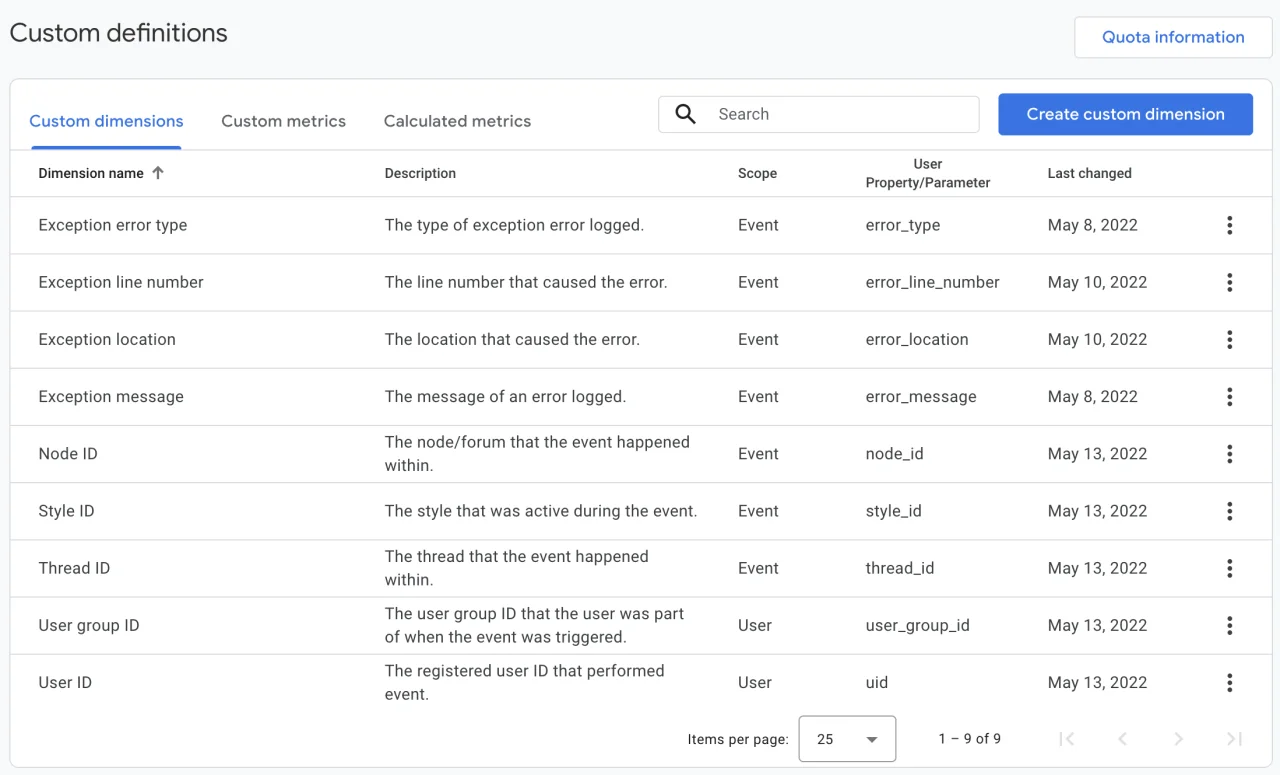
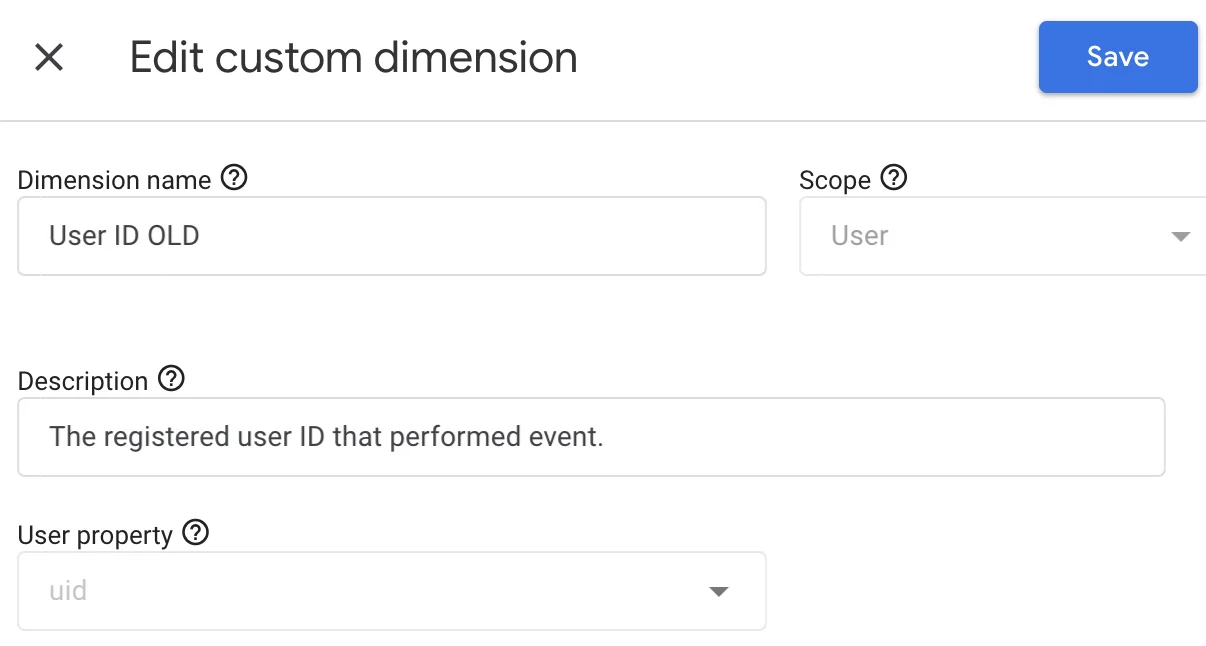
uid any longer so user ID tracked has been changed to usid. For new installations, nothing needs to change, but for existing installations, you'll want to go into your Google Analytics admin area to: Admin -> Data display -> Custom dimensions, and rename the existing User ID dimension to something else (for example User ID OLD)Should look something like this:
Edit the User ID dimension:
Once you have done that, go to XenForo admin -> Options -> Analytics and click the "Set" button. If you reselect your property and data stream, it will create the new user ID dimension,
usid automatically.Once that is all done, your custom dimensions in Google Analytics will look something like this:
You can archive the User ID OLD dimension if you want since it's not going to be used going forward.
Pour consulter le contenu, vous devez : Se connecter ou S'inscrire.
Version 1.1.2 Some minor things...
- Force user_id to be integer before sending it via Measurement API (usually for things like logging emails being read).
- Made change to Nestable usage so it works in 2.2 and 2.3 (was waiting for Nestable fix: https://xenforo.com/community/threads/nestable-not-coercing-value.225063/ )
- Added option to reset encryption key (used for email tracking) under Admin -> Tools -> Rebuild caches
- Fixed FontAwesome icon on button for setting Measurement ID
Pour consulter le contenu, vous devez : Se connecter ou S'inscrire.
Version 1.1.2.1 : Made the template modification that injects the main JavaScript work a little better (specifically made compatible with newer versions of XenForo).
Télécharger V1.1.2.1 :
Pour consulter le contenu, vous devez : Se connecter ou S'inscrire.
Version 1.1.2.2 Timing in XF 2.3 :
- Moved initial Analytics JavaScript higher up in page execution chain (hopefully prevents third-party gtag() code from failing if wrapped in <xf:js /> tags)
Télécharger V1.1.2.2 :
Pour consulter le contenu, vous devez : Se connecter ou S'inscrire.
Version 1.1.2.3 Handling "what-ifs" :
- Strip non-UTF8 characters from email subject when logging emails being read
- Wrap event for email send tracking in try/catch just in case Google Analytics servers are having issues
Télécharger V1.1.2.3 :
Pour consulter le contenu, vous devez : Se connecter ou S'inscrire.
Version 1.1.3 Compatibility / misc things :
- Drop any cookies set when static Google Tag Manager JavaScript is read from cache (fixes issue where it sometimes couldn't be cached by Cloudflare because a cookie was set)
- Using js_url() on Analytics JavaScript (adds ability to leverage Early Hints/preloading URLs when using Cloudflare addon)
- Fix for XenForo 2.3 where date presets drop-down wouldn't change the date on reporting
Pour consulter le contenu, vous devez : Se connecter ou S'inscrire.
![[BLKF] AutoDelete 1.1](https://www.societyfrenchmodding.net/data/attachments/10/10108-c52c0d882820a1d6703c24b192406a09.jpg)
![[UH] GD Gif Animations 2.3.6](https://www.societyfrenchmodding.net/data/attachments/10/10598-c9ab7bdb2ca424b344075d25152045f9.jpg)
Pièces jointes
-
 .png155.6 KB · Affichages: 32
 -
 .png176.3 KB · Affichages: 28
 -
 .png116.4 KB · Affichages: 28
 -
 .png168.3 KB · Affichages: 35
 -
 .png187.5 KB · Affichages: 33
 -
 .png81 KB · Affichages: 34
 -
 .png216.2 KB · Affichages: 30
 -
 .png216.2 KB · Affichages: 33
 -
 .png317.1 KB · Affichages: 29
 -
 .png179.5 KB · Affichages: 33
Dernière édition par un modérateur:

![[cXF] Matomo Analytics 1.1.0](https://www.societyfrenchmodding.net/data/avatars/s/0/2.jpg)
![[tl] Content Analytics 1.0.1](https://www.societyfrenchmodding.net/data/attachments/7/7174-64cbb9072416eeba20007adc5adf0e6e.jpg)
![[DigitalPoint] App for Cloudflare® 1.9.8.1](https://www.societyfrenchmodding.net/data/attachments/7/7400-9ee45e0987758685399c371eb332c18e.jpg)
![[DigitalPoint] Security & Passkeys 1.2.0.3](https://www.societyfrenchmodding.net/data/attachments/7/7168-fe98940ebc7a072f90a65d5a1352d576.jpg)
![[DigitalPoint] PWA 1.2.5.1](https://www.societyfrenchmodding.net/data/attachments/8/8802-5b202d0bba74792ac4f971998231e65a.jpg)