![[Ap Yazilim] Mini Announcement Blocks 1.3.0](https://www.societyfrenchmodding.net/data/attachments/11/11352-4e9ff0f80c4b9f0c9031258ccf5ce653.jpg)


The [Ap Yazilim] Mini Announcement Blocks plugin allows you to add up to 3 mini announcement blocks to your XenForo platform simultaneously. With this feature, you can easily share multiple announcements and communicate them effectively to your users. Its fully customizable structure in the admin panel enables you to edit your announcement areas as you wish.
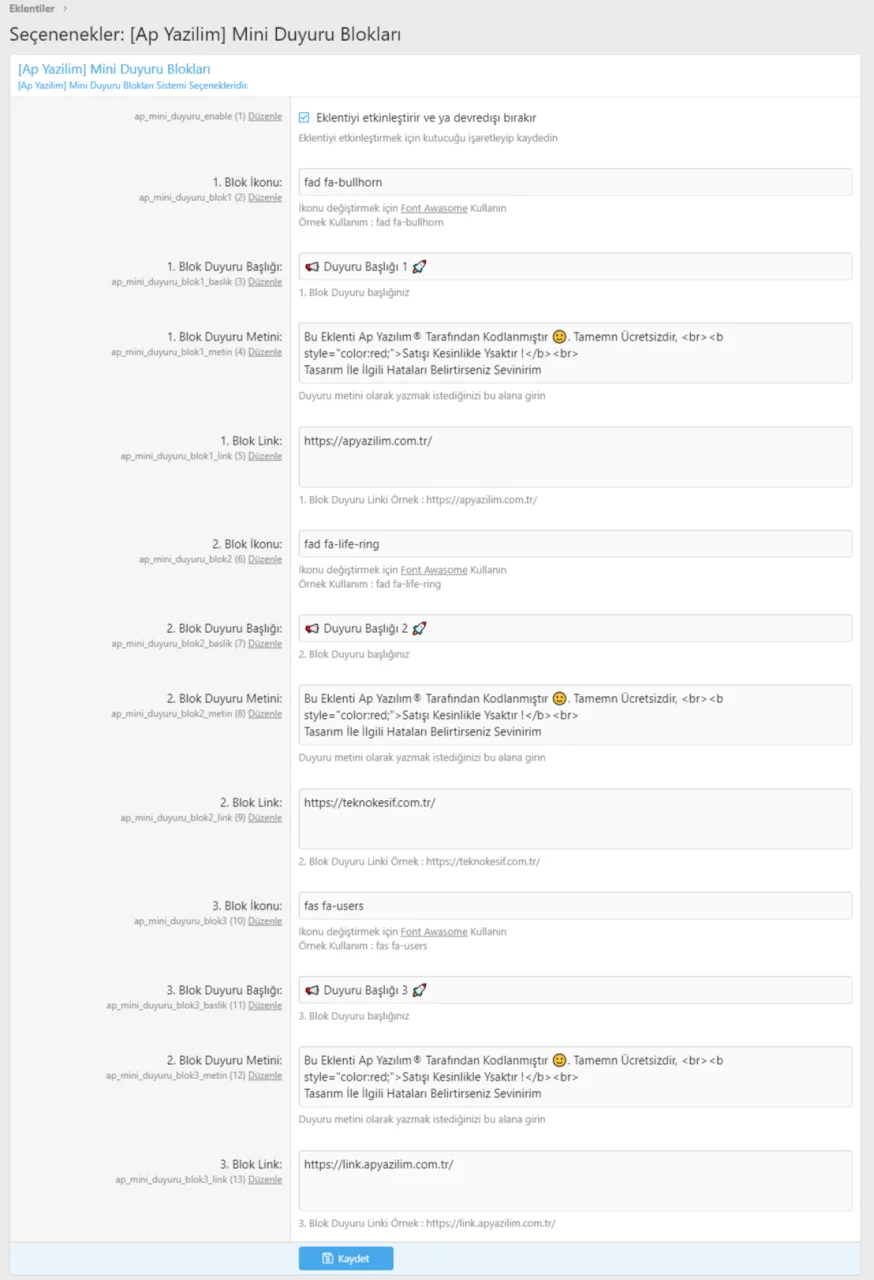
Changing Announcement Text: AdminCP >> Setup >> XF Options >> [Ap Yazilim] Mini Announcement Blocks
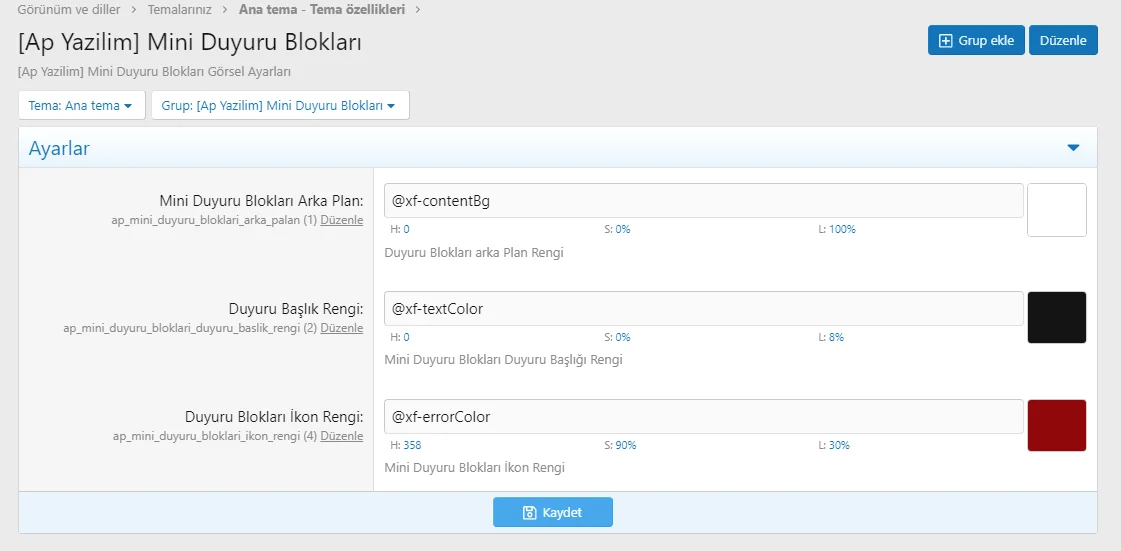
Visual Customization: AdminCP >> Style Properties >> [Ap Yazilim] Mini Announcement Blocks

Télécharger v1.0.0
Version 1.1.0 [Ap Yazilim] Mini Announcement Blocks
 [Ap Yazılım] Mini Announcement Blocks Plugin is Now More Advanced and Flexible!
 Mobile Compatibility Update: Mini Announcement Blocks now display better on mobile devices.
Hide on Mobile Feature: Added an option to hide announcements on mobile devices.
Permission Management for User Groups: You can now allow or restrict announcements for specific user groups.
Update now to take advantage of the new features!


Télécharger V1.1.0 :
Version 1.2.0 :
New Second Layout Added: A brand-new, modern design is now available for your announcement blocks – clean, stylish, and more engaging than ever!
General Improvements: We've made various enhancements under the hood to improve performance and stability.
 Update now to enjoy the fresh new look and smoother experience!


Télécharger V1.2.0 :
Version 1.3.0 : 5 new styles have been added in this update :
[Ap Yazılım] Mini Announcement Blocks – New Style Update Released!
The [Ap Yazılım] Mini Announcement Blocks add-on, designed to make your XenForo forum homepage more modern, stylish, and eye-catching, has just received a new update!
With this update, 5 brand-new announcement styles have been added to the add-on. You can now present your announcements not only effectively, but also in a way that perfectly matches your forum’s design.
What’s New in This Update?
 5 new modern & minimalist announcement styles
 Clean and professional designs fully compatible with your theme
 More aesthetic and attention-grabbing mini announcement blocks
 100% compatible with the existing system – no additional setup required
🛠 Easy Management
Announcement Texts:
AdminCP → Setup → XF Options → [Ap Yazılım] Mini Announcement Blocks
Visual & Style Settings:
AdminCP → Appearance → Theme Properties → [Ap Yazılım] Mini Announcement Blocks
With this update, you can display multiple announcements on your forum in a more professional, modern, and effective way.
 As Ap Yazılım, we will continue to improve and enhance XenForo forums.
We always welcome your feedback and suggestions!


Télécharger V1.3.0 :
Changing Announcement Text: AdminCP >> Setup >> XF Options >> [Ap Yazilim] Mini Announcement Blocks
Visual Customization: AdminCP >> Style Properties >> [Ap Yazilim] Mini Announcement Blocks
Télécharger v1.0.0
Pour consulter le contenu, vous devez : Se connecter ou S'inscrire.
Version 1.1.0 [Ap Yazilim] Mini Announcement Blocks
[Ap Yazılım] Mini Announcement Blocks Plugin is Now More Advanced and Flexible! Mobile Compatibility Update: Mini Announcement Blocks now display better on mobile devices. Hide on Mobile Feature: Added an option to hide announcements on mobile devices. Permission Management for User Groups: You can now allow or restrict announcements for specific user groups.Update now to take advantage of the new features!
Télécharger V1.1.0 :
Pour consulter le contenu, vous devez : Se connecter ou S'inscrire.
Version 1.2.0 :
New Second Layout Added: A brand-new, modern design is now available for your announcement blocks – clean, stylish, and more engaging than ever! General Improvements: We've made various enhancements under the hood to improve performance and stability. Update now to enjoy the fresh new look and smoother experience! Télécharger V1.2.0 :
Pour consulter le contenu, vous devez : Se connecter ou S'inscrire.
Version 1.3.0 : 5 new styles have been added in this update :
[Ap Yazılım] Mini Announcement Blocks – New Style Update Released!The [Ap Yazılım] Mini Announcement Blocks add-on, designed to make your XenForo forum homepage more modern, stylish, and eye-catching, has just received a new update!
With this update, 5 brand-new announcement styles have been added to the add-on. You can now present your announcements not only effectively, but also in a way that perfectly matches your forum’s design.
What’s New in This Update? 5 new modern & minimalist announcement styles Clean and professional designs fully compatible with your theme More aesthetic and attention-grabbing mini announcement blocks 100% compatible with the existing system – no additional setup required🛠 Easy Management
Announcement Texts:
AdminCP → Setup → XF Options → [Ap Yazılım] Mini Announcement Blocks
Visual & Style Settings:
AdminCP → Appearance → Theme Properties → [Ap Yazılım] Mini Announcement Blocks
With this update, you can display multiple announcements on your forum in a more professional, modern, and effective way.
As Ap Yazılım, we will continue to improve and enhance XenForo forums.We always welcome your feedback and suggestions!
Télécharger V1.3.0 :
Pour consulter le contenu, vous devez : Se connecter ou S'inscrire.
![[Ap Yazılım] User Panel 1.0.0](https://www.societyfrenchmodding.net/data/attachments/10/10543-3e3c0433784d250007261330193e6b2e.jpg)
![[Ap Yazılım] Postbit 1.1.0](https://www.societyfrenchmodding.net/data/attachments/10/10556-b2addda45dc4e54fa664e020fb620fde.jpg)


![[Ap Yazılım] Announcement Area 1.2.0](https://www.societyfrenchmodding.net/data/attachments/11/11359-648c49f19e331289c6e85f06a58bb9b7.jpg)

![[LiamW] (RIP) Mentions Mini Avatars 1.0.1](https://www.societyfrenchmodding.net/data/attachments/2/2469-eb61025664bf9d0ba4fa034faf83d0bb.jpg)
![[Liam W] (RIP) Mentions Mini Avatars 2.0.0 Patch Level 1](https://www.societyfrenchmodding.net/data/attachments/4/4233-d2e61594fab5c652b3bfd5268b5c67c4.jpg)
![[BS] Write only to administration 2.0.0](https://www.societyfrenchmodding.net/data/avatars/s/0/2.jpg)