


Description:
Resize all attached images in posts which are over maximum width and height allowed.
This add-on will run through all posts and resize any attached images which exceed the allowed maximum setting in the options page.
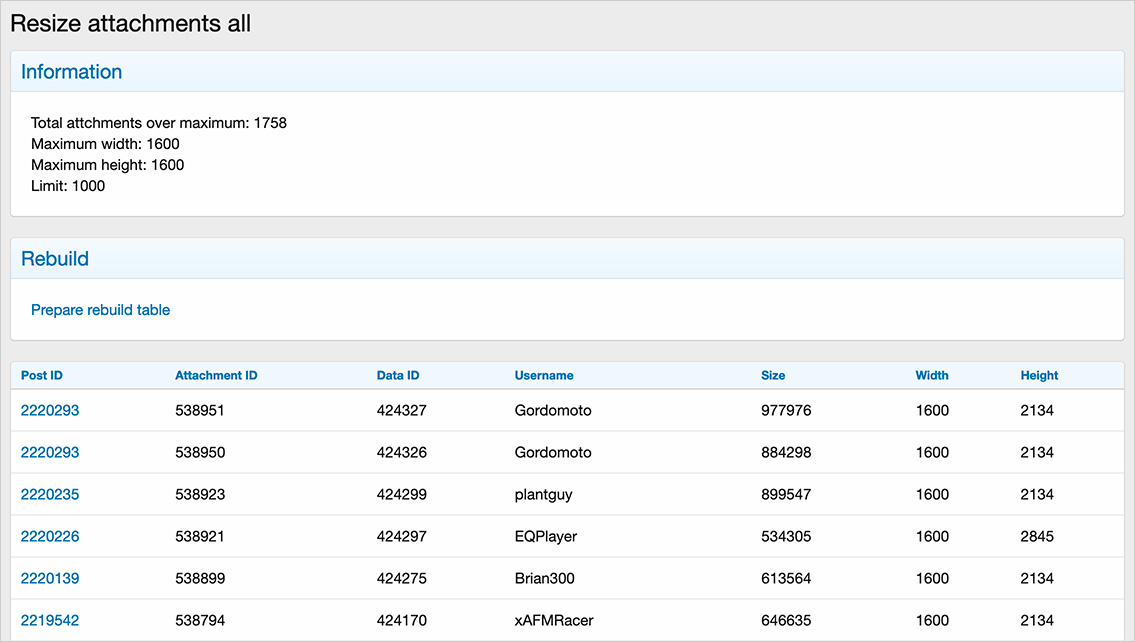
Example of Resize attachments all page :
Example of Options page :

Requirements :
This add-on requires ImageMagick PECL extension to be enabled. Make sure the following is checked:
Admin control panel -> Options -> Attachments -> Default image processor -> ImageMagick PECL extension

If you're not able to select ImageMagick PECL extension, contact your web host and ask them to install it.
How to use:
This add-on will create a table called andy_resize_attachments_all in your database.
Questions and Answers:
Q: Who can run this add-on?
A: You must be an admin to run this add-on.
Télécharger V1.3 :
Resize attachments all v1.4 changes : Added note to indicate the add-on will only resize attachments in thread posts.
Télécharger V1.4 :
Resize attachments all v1.5 changes : Changed options page defaults maximum width and height to 2500.
Resize attachments all v1.6 changes : The Limit set in the options page will limit the number of posts to process.
Télécharger V1.6 :
Resize attachments all v1.7 changes : Now excludes GIF attachments.
Télécharger V1.7 :
Resize attachments all v1.8 changes : Compatible XF 2.x versions: 2.3
Resize attachments all v1.9 changes : Deleted unused Options page.
Télécharger V1.9 :
Resize attachments all v2.0 changes : Now supports resize for all content types. Now supports abstracted file system.
Télécharger V2.0 :
Resize attachments all v2.1 changes : Now works with GD or Imagick. Now resizes JPG, PNG and WEBP image types.
Télécharger V2.1 :
Resize attachments all v2.2 changes : Added code to suppress server error if image is corrupt.
Télécharger V2.2 :
Resize attachments all v2.3 changes : Now shows exactly how many attachments need to be resized.
Télécharger V2.3 :
Resize all attached images in posts which are over maximum width and height allowed.
This add-on will run through all posts and resize any attached images which exceed the allowed maximum setting in the options page.
Example of Resize attachments all page :
Example of Options page :
Requirements :
This add-on requires ImageMagick PECL extension to be enabled. Make sure the following is checked:
Admin control panel -> Options -> Attachments -> Default image processor -> ImageMagick PECL extension
If you're not able to select ImageMagick PECL extension, contact your web host and ask them to install it.
How to use:
- Select the maximum width and height you want images to be in the Options page.
- Add "resizeattachmentsall" to your forum URL and press enter.
- Click the "Prepare rebuild table" link.
- Go to Rebuild caches page.
- Click the "Rebuild now" button in the Resize attachments all block.
This add-on will create a table called andy_resize_attachments_all in your database.
Questions and Answers:
Q: Who can run this add-on?
A: You must be an admin to run this add-on.
Télécharger V1.3 :
Pour consulter le contenu, vous devez : Se connecter ou S'inscrire.
Resize attachments all v1.4 changes : Added note to indicate the add-on will only resize attachments in thread posts.
Télécharger V1.4 :
Pour consulter le contenu, vous devez : Se connecter ou S'inscrire.
Resize attachments all v1.5 changes : Changed options page defaults maximum width and height to 2500.
Resize attachments all v1.6 changes : The Limit set in the options page will limit the number of posts to process.
Télécharger V1.6 :
Pour consulter le contenu, vous devez : Se connecter ou S'inscrire.
Resize attachments all v1.7 changes : Now excludes GIF attachments.
Télécharger V1.7 :
Pour consulter le contenu, vous devez : Se connecter ou S'inscrire.
Resize attachments all v1.8 changes : Compatible XF 2.x versions: 2.3
Resize attachments all v1.9 changes : Deleted unused Options page.
Télécharger V1.9 :
Pour consulter le contenu, vous devez : Se connecter ou S'inscrire.
Resize attachments all v2.0 changes : Now supports resize for all content types. Now supports abstracted file system.
Télécharger V2.0 :
Pour consulter le contenu, vous devez : Se connecter ou S'inscrire.
Resize attachments all v2.1 changes : Now works with GD or Imagick. Now resizes JPG, PNG and WEBP image types.
Télécharger V2.1 :
Pour consulter le contenu, vous devez : Se connecter ou S'inscrire.
Resize attachments all v2.2 changes : Added code to suppress server error if image is corrupt.
Télécharger V2.2 :
Pour consulter le contenu, vous devez : Se connecter ou S'inscrire.
Resize attachments all v2.3 changes : Now shows exactly how many attachments need to be resized.
Télécharger V2.3 :
Pour consulter le contenu, vous devez : Se connecter ou S'inscrire.


